Windows 7 Forums


Windows 7: Mac Mini running Windows 7 x64 Ultimate

04 Aug 2010   #1

Windows 7 x64
 
 
Mac Mini running Windows 7 x64 Ultimate

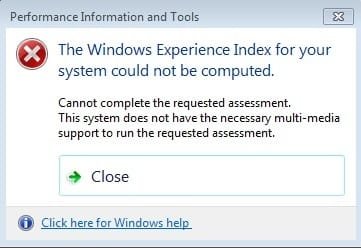
I can't run the WEI and get the following error shown in the attached file.

The contents of the winsat.log file is as follows:-


3346751 (3216) - winsat\logging.cpp:0815: --- START 2010\8\4 18:11:08 ---
3346767 (3216) - winsat\main.cpp:4301: Command Line = "C:\Windows\system32\winsat.exe" formal -cancelevent 1916a47b-99bb-4485-9563-ab8574650fbc
3346767 (3216) - winsat\processwinsaterror.cpp:0095: ERROR: tried to read resource strings, unknown exception occured
3346939 (3216) - winsat\main.cpp:4474: > IsFormal=TRUE IsMoobe=FALSE.
3346939 (3216) - winsat\main.cpp:4505: ERROR: no multi-media files, no MM support
3346939 (3216) - winsat\main.cpp:2861: > no need to restore power state (no saver object).
3346939 (3216) - winsat\main.cpp:2873: > Not necessary to reenable EMD cache.
3346939 (3216) - winsat\main.cpp:4909: > exit value = 10.

Would like acces to the Areo feature and hence the posting.

Apple won't help and I daren't tell MS that the hardware platform is MacMini.

Has anyone had a similar exprience?

Robert, Edinburgh
Attached Thumbnails
Mac Mini running Windows 7 x64 Ultimate-weierror.jpg  
My System SpecsSystem Spec

04 Aug 2010   #2

Windows 7 Professional SP1 64-bit
Virginia


I'm not sure how MS would react. They might be happy to see 7 on Macs. It sounds like the Mac is configured in some way that 7 isn't designed for. In case its a problem with the installation, open command prombt and type in "sfc /scannow" without the quotation marks. If it finds irreparable errors you can do a repair install.
My System SpecsSystem Spec
04 Aug 2010   #3

Windows 7 x64


After sfc /scannow from the Command prompt I'm told I must be an administrator running a Console Session.

Don't know enough about Windows 7 to understand.

I have checked the HDD using Disk Tools and everthing looks OK.

sfc /scannow ???
My System SpecsSystem Spec
.


04 Aug 2010   #4

Windows 7 Professional SP1 64-bit
Virginia


SFC is short for Sytem File Checker. It tells you if important windows system files are corrupted. If you are logged in as an administrator, then you may still need to right click command prompt and click Run as Administrator. I always do it by default, so you may have to to run SFC.
My System SpecsSystem Spec
04 Aug 2010   #5

Windows 7 x64
 
 
sfc /scannow checks out

I've now run sfc /scannow and everythings checks out.

Perhaps MS will help any MVP's out there who might confirm?
My System SpecsSystem Spec
04 Aug 2010   #6

Windows 7 x64
 
 
Windows 7 Advisor

I thought it would be useful to see what the Windows 7 Advisor would come up with, see attached.

Looks like the advisor is happy with the MacMini setup.
Attached Thumbnails
Mac Mini running Windows 7 x64 Ultimate-capture.jpg  
My System SpecsSystem Spec
04 Aug 2010   #7

Windows 7 Professional SP1 64-bit
Virginia


Might be time to give MS a try. go here to find the telephone number for your country.
My System SpecsSystem Spec
04 Aug 2010   #8

Windows 7 x64
 
 
Found the Answer

The answer to this issue is the N version does not have Media Player installed. This by law in Europe.

Down load this from MS, install and the WEI will run OK. After this Windows Aero becomes avaialble.

Sorted !

Thanks for everyone's interest

Robert, Edinburgh
My System SpecsSystem Spec
04 Aug 2010   #9

Windows 7 Professional SP1 64-bit
Virginia


Glad to hear you found the solution! I'll have to remember this for helping people in the future.
My System SpecsSystem Spec
Reply

 Mac Mini running Windows 7 x64 Ultimate problems?


Thread Tools


Similar help and support threads for: Mac Mini running Windows 7 x64 Ultimate
Thread Forum
Solved Running DOS on Windows 7 Ultimate x64 bit General Discussion
many games crashing or not running at all in windows 7 ultimate x64 Gaming
No Audio with Foxconn P43A running on Windows 7 Ultimate 64-bit Sound & Audio
Resolution issue with Mac Mini (9400) running 7MC Media Center


All times are GMT -5. The time now is 12:32 PM.


Seven Forums Android App Seven Forums IOS App Follow us on Facebook

Windows 7 Forums is an independent web site and has not been authorized,
sponsored, or otherwise approved by Microsoft Corporation.
"Windows 7" and related materials are trademarks of Microsoft Corp.
© Designer Media Ltd
  

1 2 3 4 5 6 7 8 9 10 11 12 13 14 15 16 17 18 19 20 21 22 23 24 25 26 27 28 29 30 31 32