Windows 7 Forums Search
Welcome to Windows 7 Forums. Our forum is dedicated to helping you find solutions with any problems, errors or issues you are experiencing with Windows 7. The Windows 7 forum also covers news and updates and has an extensive Windows 7 tutorial section that covers a wide range of tips and tricks.


Windows 7 - Two choices at boot up: how can I remove the first?

 
08-09-2010   #1


Windows 7 Ultimate


Two choices at boot up: how can I remove the first?

Hi,

I´ve bought a new Dell Inspiron N5010 with Windows 7. I switched it on with plugged External HDD, which contained Windows 7 files. So when I switch the notebook on I have to choose. How can I remove the first choice?

Thanks,

Matthew0014

My System SpecsSystem Spec
08-09-2010   #2


Windows 7 Ultimate x64


Quote   Quote: Originally Posted by Matthew0014 View Post
Hi,

I´ve bought a new Dell Inspiron N5010 with Windows 7. I switched it on with plugged External HDD, which contained Windows 7 files. So when I switch the notebook on I have to choose. How can I remove the first choice?

Thanks,

Matthew0014
You might want to have a look at EasyBCD by NeoSmart Technologies.
My System SpecsSystem Spec
08-09-2010   #3


Windows 7 Ultimate x64


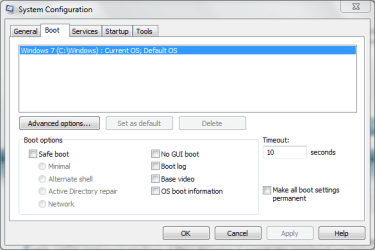
Operating System to Start - Delete OS on List at Boot


Click the Start button and in the search box, type msconfig and press Enter.
Then go to the Boot tab, select the entry which you want to remove and then click Delete.

Two choices at boot up: how can I remove the first?-capture.png

Last edited by Brink; 08-09-2010 at 10:30 AM.. Reason: added link
My System SpecsSystem Spec
.


08-09-2010   #4


Windows 7 Ultimate


Thank you

Thank you for the fast answers.
I think the second answer is simpler. so I´ve used this one with success.

Thanks,

Matthew0014
My System SpecsSystem Spec
08-09-2010   #5


Windows 7 Ultimate x64


Quote   Quote: Originally Posted by Matthew0014 View Post
Thank you for the fast answers.
I think the second answer is simpler. so I´ve used this one with success.

Thanks,

Matthew0014
Hello Matthew, glad to know it worked.
My System SpecsSystem Spec
Reply

 Two choices at boot up: how can I remove the first? problems?


Thread Tools


Similar Threads for: Two choices at boot up: how can I remove the first?
Thread Forum
Solved Need to change boot to remove 2 hd and make it boot to partition 1 Installation & Setup
SSD choices...your opinions please Hardware & Devices
2 Choices Chillout Room
DDR 3 ram choices Hardware & Devices
What Card to get? Choices choices Chillout Room


All times are GMT -5. The time now is 09:12 PM.


Windows 7 Forums is an independent web site and has not been authorized,
sponsored, or otherwise approved by Microsoft Corporation.
"Windows 7" and related materials are trademarks of Microsoft Corp.
© Designer Media Ltd
  

1 2 3 4 5 6 7 8 9 10 11 12 13 14 15 16 17 18 19 20 21 22 23 24 25 26 27 28 29 30