|
Welcome to Windows 7 Forums. Our forum is dedicated to helping you find solutions with any problems, errors or issues you are experiencing with Windows 7. The Windows 7 forum also covers news and updates and has an extensive Windows 7 tutorial section that covers a wide range of tips and tricks.
Windows 7 - Creating A new Partition help? |
08-10-2010
|
#1 | | |
Creating A new Partition help? hi
i have windows vista home premium and i want to upgrade to win 7 ultimate x64(clean upgrade) and i have a recovery partition called"hp recovery" and hp told me that it will no longer work if you did a clean installation of windows 7
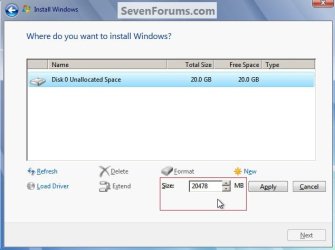
so i want to delete all partitions during installing windows 7 and creat a new NTFS one with 180gb(system will create a recovery one automaticaly right?) and after installing windows i open desk maingment and creat a new one with the rest of the HDD.
so will it work?
can i select partition format when creating it?
do i have to format it directly after creating it?
and thanks | My System Specs | | System Manufacturer/Model Number hp OS Windows 7 Ultimate x64 Memory 3.00GB Internet Speed 4mb/sec |
08-10-2010
|
#2 | | Win7 HP (x64)/Win7 Ultimate (x64) |
Hi Soosa
Welcome to Seven Forums 
Once you format your existing partitions, you will lose the current recovery partition and Windows will not automatically create another following your upgrade to Win 7 Ultimate. There are tools available however these are primarily limited to OEM-vendors and some imaging software such as Acronis etc.
Have a look at some of the following SF tutorials, don't forget to thank Shawn for the work done, to help you with what you propose to do: How to Create a New Partition or Volume in Windows 7 How to Do a Clean Install with a Upgrade Windows 7 Version How to Do a Clean Installation with Windows 7 For the initial image, similar to the recovery partition, make sure that you create an image of your newly-installed Windows 7 - refer to the following tutorial : How to Do a System Image Recovery in Windows 7
Hope this helps and regards | My System Specs | | System Manufacturer/Model Number Custom OS Win7 HP (x64)/Win7 Ultimate (x64) CPU Core i7 920 Motherboard Intel X58 Memory 6 x 2GB Corsair XMS3 Graphics Card CF HD4890 Sound Card Asus Xonar Monitor(s) Displays Dell 2408WFP Screen Resolution 1920 x 1200 Keyboard Razer Lycosa/N52te Mouse Razer Lachesis PSU Corsair HX1000W Case Antec 1200 Hard Drives 2 x 150GB WDC Velociraptors (Raid 0)
1 x 1TB Seagate
1 x 1.5TB Seagate |
08-10-2010
|
#3 | | Windows 7 Professional x64 |
You can use the method described here to clean the hard drive, minus step 3: SSD / HDD : Optimize for Windows Reinstallation
These will give you the info needed for doing the installation, ignore the second one if it does not apply: Clean Install Windows 7 Clean Install with a Upgrade Windows 7 Version
The recovery partition is not created automatically. There is a system reserve partition that is automatically created, by that is no where near the same thing. You will need to create you primary partition, your second partition (data only I'm guessing), and a third recovery partition. Recovery Partition - Create
EDIT: guess someone beat me to it. | My System Specs | | System Manufacturer/Model Number Dell Vostro 1700 OS Windows 7 Professional x64 CPU Core 2 Duo 2.00GHz T7250 Memory 4GB DDR2 667 Graphics Card Intel GM965 Sound Card SigmaTel HD Audio Monitor(s) Displays Built-in 17.2" and Insignia 22" Screen Resolution 1440x900 and 1360x768 Hard Drives 160GB Western Digital Scorpio Blue
1TB Seagate FreeAgent External Other Info Current warranty does not expire until 4/14/2012 |
08-10-2010
|
#4 | | Windows 7 Ultimate x64 SP1 |

Quote: Originally Posted by soosa so will it work? Yes, exactly as you guessed. You can wipe all partitions clean, then create your 180 GB one and install Windows 7 to it. Once completed, you can create a D drive with the rest of the hard drive's space. The recovery partition can be blown away as well, as it will only restore Vista. It is a dumb idea to store that on the same physical hard drive as the OS anyway. If the drive dies, so does your backup. You should have created the discs right away and then you could have deleted the recovery partition from the very beginning. Anyway, I disgress. Once you get Win 7 installed, you can make your own backup process. | My System Specs | | OS Windows 7 Ultimate x64 SP1 CPU Intel Core i7-2600 Motherboard Gigabyte GA-P67A-UD3P-B3 Memory 12 GB Patriot Extreme DDR3-1333 Graphics Card Nvidia GTX 470 Monitor(s) Displays Dell UltraSharp 2209WA PSU OCZ ModStream 700W Case CoolerMaster HAF 912 Advanced Cooling CoolerMaster Hyper 212 Plus Hard Drives OCZ Agility3 240 GB, WD5001AALS, WD7501AALS |
08-10-2010
|
#6 | | |
Hello soosa, welcome to Seven Forums!
If you are going to do a clean install and there's going to be nothing on the Hard Disk Drive (HDD) that you care about; have a look at the tutorial at the link below, it over-writes everything left on the HDD and gives you a clean slate to install Windows 7 to. If you want to create a specific size partition, at Step Three use this command to create a 180GB partition ...
"create partition primary=184320MB"
then after the install you can create other partitions as you choose. SSD / HDD : Optimize for Windows Reinstallation | My System Specs | | System Manufacturer/Model Number * BFK Customs * OS W 7 64-bit Ultimate CPU Intel Q9550 Yorkfield Motherboard ASUS P5Q Pro Memory 8GB Dominator 8500C5D Graphics Card ATI : XFX 5870 Sound Card Realtek HD Audio 7-1 Monitor(s) Displays 1x 47" LCD HDMI & 3x 26" LCD HDMI Screen Resolution 1920x1080P & 1920x1200 Keyboard Microsoft 500 Mouse Razer Diamondback 3G PSU Corsair 620HX Case Cooler Master RC-690 Cooling Tuniq Tower 120, 2x 140mm and 3x 120mm case fans Hard Drives 1x 80GB Intel X25-M G2 SSD : 1x 500GB & 1x 640GB WD Caviar Black(s) Internet Speed 14 Mb/s Other Info 1x Koutech 3Gb/s SATA HDD Hot Swap Rack |
08-10-2010
|
#7 | | |

Quote: Originally Posted by Bare Foot Kid Hello soosa, welcome to Seven Forums!
If you are going to do a clean install and there's going to be nothing on the Hard Disk Drive (HDD) that you care about; have a look at the tutorial at the link below, it over-writes everything left on the HDD and gives you a clean slate to install Windows 7 to. If you want to create a specific size partition, at Step Three use this command to create a 180GB partition ...
"create partition primary=184320MB"
then after the install you can create other partitions as you choose. SSD / HDD : Optimize for Windows Reinstallation but i need that 100mb partition for system recovery can i skip step three and start the win 7 installation and manke a new partition so windows will create that 100mb boot disk. | My System Specs | | System Manufacturer/Model Number hp OS Windows 7 Ultimate x64 Memory 3.00GB Internet Speed 4mb/sec |
08-10-2010
|
#8 | | Windows 7 Ultimate x64 SP1 |

Quote: Originally Posted by soosa but i need that 100mb partition for system recovery can i skip step three and start the win 7 installation and manke a new partition so windows will create that 100mb boot disk. I'm not sure what you are still worried about. You don't need a guide or a tutorial. If you boot from your Windows 7 disc, you can delete all partitions, and then create your 180 GB one. The 100 MB partition will be created for you automatically, and then setup will continue. | My System Specs | | OS Windows 7 Ultimate x64 SP1 CPU Intel Core i7-2600 Motherboard Gigabyte GA-P67A-UD3P-B3 Memory 12 GB Patriot Extreme DDR3-1333 Graphics Card Nvidia GTX 470 Monitor(s) Displays Dell UltraSharp 2209WA PSU OCZ ModStream 700W Case CoolerMaster HAF 912 Advanced Cooling CoolerMaster Hyper 212 Plus Hard Drives OCZ Agility3 240 GB, WD5001AALS, WD7501AALS |
08-10-2010
|
#9 | | |

Quote: Originally Posted by DeaconFrost 
Quote: Originally Posted by soosa but i need that 100mb partition for system recovery can i skip step three and start the win 7 installation and manke a new partition so windows will create that 100mb boot disk. I'm not sure what you are still worried about. You don't need a guide or a tutorial. If you boot from your Windows 7 disc, you can delete all partitions, and then create your 180 GB one. The 100 MB partition will be created for you automatically, and then setup will continue. exactly what I'm was worried about is that 100mb boot disk.
thanks alot man you are a lifesaver | My System Specs | | System Manufacturer/Model Number hp OS Windows 7 Ultimate x64 Memory 3.00GB Internet Speed 4mb/sec |
08-10-2010
|
#10 | | |

Quote: Originally Posted by soosa 
Quote: Originally Posted by Bare Foot Kid Hello soosa, welcome to Seven Forums!
If you are going to do a clean install and there's going to be nothing on the Hard Disk Drive (HDD) that you care about; have a look at the tutorial at the link below, it over-writes everything left on the HDD and gives you a clean slate to install Windows 7 to. If you want to create a specific size partition, at Step Three use this command to create a 180GB partition ...
"create partition primary=184320MB"
then after the install you can create other partitions as you choose. SSD / HDD : Optimize for Windows Reinstallation but i need that 100mb partition for system recovery can i skip step three and start the win 7 installation and manke a new partition so windows will create that 100mb boot disk.
If you wanted to use the tutorial, skip Step Three, when you get here create the desired partition(s) and the 100MB boot partition will still be created; that way you will still have a clean slate to install to. Just deleting the existing partitions does not "remove" the existing data, just marks it to be over-written as needed.  | My System Specs | | System Manufacturer/Model Number * BFK Customs * OS W 7 64-bit Ultimate CPU Intel Q9550 Yorkfield Motherboard ASUS P5Q Pro Memory 8GB Dominator 8500C5D Graphics Card ATI : XFX 5870 Sound Card Realtek HD Audio 7-1 Monitor(s) Displays 1x 47" LCD HDMI & 3x 26" LCD HDMI Screen Resolution 1920x1080P & 1920x1200 Keyboard Microsoft 500 Mouse Razer Diamondback 3G PSU Corsair 620HX Case Cooler Master RC-690 Cooling Tuniq Tower 120, 2x 140mm and 3x 120mm case fans Hard Drives 1x 80GB Intel X25-M G2 SSD : 1x 500GB & 1x 640GB WD Caviar Black(s) Internet Speed 14 Mb/s Other Info 1x Koutech 3Gb/s SATA HDD Hot Swap Rack Creating A new Partition help? problems? All times are GMT -5. The time now is 09:12 PM. |  |