| Windows 7: Opening .pps attachment |
13 Aug 2010
|
| | |
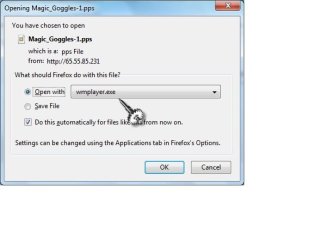
Opening .pps attachment On Windows XP a .pps attachment will open directly from the Outlook 2007 email because i have Powerpoint installed. On Windows 7 the .pps will not open directly from the attachment (with Powerpoint installed) received in the Hotmail account, so i have to open Powerpoint and then go to the attachment and it will open. Attachments show a message and how i`ve set it to open in Windows Media Player. Is there something else that should be set especially for Windows 7 to open .pps directly as it does on Windows XP. ? | My System Specs |
| |
13 Aug 2010
|
| | Windows 7 Professional SP1 64-bit 3,075 posts Virginia |
why would you set a power point file to open with Windows Media Player? Thats like trying to open a movie clip with MS Word.
What you want to do is set to open with Power Point. If it doesn't give you the option to set it to Power Point or browse for a program, you need to save the file, then open it normally. If it won't open that way, you need to right click the file, click properties, and then change the default file association. Once again, it needs to be set to Power Point. Windows Media Player is only for movies, music, and pictures. | My System Specs | | System Manufacturer/Model Number Toshiba P775-S7100 OS Windows 7 Professional SP1 64-bit CPU Intel Core i5-2450M @2.5 GHz Memory 6 GB DDR3 1333MHz Graphics Card Intel HD 3000 Monitor(s) Displays Built-in 17.3" LED; 22" Insignia NS-L22Q-10A Screen Resolution 1600x900; 1360x768 Hard Drives 750 GB Hitachi
1TB Seagate FreeAgent External Internet Speed Verizon DSL Speed(Down/Up): 3360 Kbps / 800 Kbps Antivirus MSE and MBAM Pro Browser IE10 RP |
13 Aug 2010
|
| | Windows 7 Home Premium x64 SP1 32,121 posts Bay Area Peninsula |
Welcome to Seven Forums jameson. This small registry change should do it:
For .PPS files
Start> Type regedit and press ENTER
Navigate to:
HKEY_CLASSES_ROOT \ PowerPointViewer.SlideShow.11 \ shell \ Show
Right-click Show and click Rename
Type the word Open so that Show is replaced by Open
You may have to repeat the above steps in this key, as well:
HKEY_CLASSES_ROOT \ PowerPointViewer.SlideShow.12 \ shell \ Show
After changing Show to Open, close Registry Editor window.
See if that works for you. A Guy | My System Specs | | OS Windows 7 Home Premium x64 SP1 CPU INTEL Core i5-750 Quad-Core 3.37GHz Motherboard ASUS P7P55D Memory KINGSTON 4GB (2 x 2GB) HyperX PC3-12800 DDR3 1600MHz CL8 Graphics Card MSI N240GT-MD1G/D5 GeForce GT 240 1GB 128-bit GDDR5 Monitor(s) Displays Samsung SyncMaster B2430H 24" Screen Resolution 1920 x 1080 PSU ANTEC TruePower New TP-550, 80 PLUS, 550W Case ANTEC Three Hundred Illusion Cooling COOLER MASTER Hyper 212 Plus, 4 x 120mm 1 x 140mm Noctua's Hard Drives Intel X25M Gen2 80GB, SEAGATE 500GB Barracudaź 7200.12, SATA 3 Gb/s, 7200 RPM, 16MB cache Internet Speed 20 + Mbps Antivirus Avast Browser Opera |
14 Aug 2010
|
| | |
opening .pps attachment 
Quote: Originally Posted by Petey7 why would you set a power point file to open with Windows Media Player? Thats like trying to open a movie clip with MS Word.
What you want to do is set to open with Power Point. If it doesn't give you the option to set it to Power Point or browse for a program, you need to save the file, then open it normally. If it won't open that way, you need to right click the file, click properties, and then change the default file association. Once again, it needs to be set to Power Point. Windows Media Player is only for movies, music, and pictures. Well to answer your question "why would you set a power point file to open with Windows Media Player?"-answer-clearly because i didn`t know, that`s why i asked the question.! To get to the real thing, I saved the file and right click>properties but there is no provision in there to set it to power point in Windows 7, but there is in Windows XP. | My System Specs | | |
14 Aug 2010
|
| | Windows 7 Professional SP1 64-bit 3,075 posts Virginia |
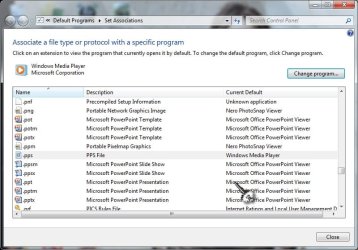
Right click the file, click properties. You will see Opens with: XXXXX. Next to that you will see a button that says "Change". Click it. | My System Specs | | System Manufacturer/Model Number Toshiba P775-S7100 OS Windows 7 Professional SP1 64-bit CPU Intel Core i5-2450M @2.5 GHz Memory 6 GB DDR3 1333MHz Graphics Card Intel HD 3000 Monitor(s) Displays Built-in 17.3" LED; 22" Insignia NS-L22Q-10A Screen Resolution 1600x900; 1360x768 Hard Drives 750 GB Hitachi
1TB Seagate FreeAgent External Internet Speed Verizon DSL Speed(Down/Up): 3360 Kbps / 800 Kbps Antivirus MSE and MBAM Pro Browser IE10 RP |
14 Aug 2010
|
| | |
opening .pps attachment 
Quote: Originally Posted by A Guy Welcome to Seven Forums jameson. This small registry change should do it:
For .PPS files
Start> Type regedit and press ENTER
Navigate to:
HKEY_CLASSES_ROOT \ PowerPointViewer.SlideShow.11 \ shell \ Show
Right-click Show and click Rename
Type the word Open so that Show is replaced by Open
You may have to repeat the above steps in this key, as well:
HKEY_CLASSES_ROOT \ PowerPointViewer.SlideShow.12 \ shell \ Show
After changing Show to Open, close Registry Editor window.
See if that works for you. A Guy Thank You. I went into "K_KEYclasses_ROOT and found.pps which takes me to PowerPointViewer.Slideshow.8, not 11, and then shellnew, not shell, but don`t know from there. Am i on the right track? | My System Specs | | |
14 Aug 2010
|
| | |
opening .pps attachment 
Quote: Originally Posted by Petey7 Right click the file, click properties. You will see Opens with: XXXXX. Next to that you will see a button that says "Change". Click it. Yes that`s right, but as i said in my post 4, there`s no provision in there to change it to powerpoint. | My System Specs | | |
14 Aug 2010
|
| | Windows 7 Professional SP1 64-bit 3,075 posts Virginia |

Quote: Originally Posted by jameson 
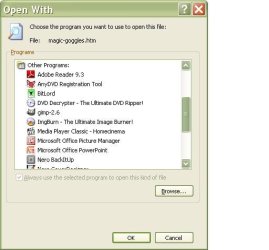
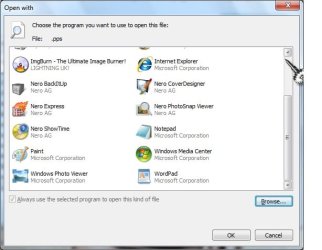
Quote: Originally Posted by Petey7 Right click the file, click properties. You will see Opens with: XXXXX. Next to that you will see a button that says "Change". Click it. Yes that`s right, but as i said in my post 4, there`s no provision in there to change it to powerpoint.  Click browse. On my computer it takes me directly to program files, but if you on a 64-bit computer you will likely need to go the C:, then Program Files (x86). Then go to Microsoft Ofiice, then Offixe1X (X being any number). Scroll down and double click Power Point (may read "POWERPNT"). | My System Specs | | System Manufacturer/Model Number Toshiba P775-S7100 OS Windows 7 Professional SP1 64-bit CPU Intel Core i5-2450M @2.5 GHz Memory 6 GB DDR3 1333MHz Graphics Card Intel HD 3000 Monitor(s) Displays Built-in 17.3" LED; 22" Insignia NS-L22Q-10A Screen Resolution 1600x900; 1360x768 Hard Drives 750 GB Hitachi
1TB Seagate FreeAgent External Internet Speed Verizon DSL Speed(Down/Up): 3360 Kbps / 800 Kbps Antivirus MSE and MBAM Pro Browser IE10 RP |
14 Aug 2010
|
| | Windows 7 Home Premium x64 SP1 32,121 posts Bay Area Peninsula |

Quote: Originally Posted by jameson 
Quote: Originally Posted by A Guy Welcome to Seven Forums jameson. This small registry change should do it:
For .PPS files
Start> Type regedit and press ENTER
Navigate to:
HKEY_CLASSES_ROOT \ PowerPointViewer.SlideShow.11 \ shell \ Show
Right-click Show and click Rename
Type the word Open so that Show is replaced by Open
You may have to repeat the above steps in this key, as well:
HKEY_CLASSES_ROOT \ PowerPointViewer.SlideShow.12 \ shell \ Show
After changing Show to Open, close Registry Editor window.
See if that works for you. A Guy Thank You. I went into "K_KEYclasses_ROOT and found.pps which takes me to PowerPointViewer.Slideshow.8, not 11, and then shellnew, not shell, but don`t know from there. Am i on the right track?  Scroll much farther down to the key I mentioned, PowerPointViewer, not the file type near the top. A Guy | My System Specs | | OS Windows 7 Home Premium x64 SP1 CPU INTEL Core i5-750 Quad-Core 3.37GHz Motherboard ASUS P7P55D Memory KINGSTON 4GB (2 x 2GB) HyperX PC3-12800 DDR3 1600MHz CL8 Graphics Card MSI N240GT-MD1G/D5 GeForce GT 240 1GB 128-bit GDDR5 Monitor(s) Displays Samsung SyncMaster B2430H 24" Screen Resolution 1920 x 1080 PSU ANTEC TruePower New TP-550, 80 PLUS, 550W Case ANTEC Three Hundred Illusion Cooling COOLER MASTER Hyper 212 Plus, 4 x 120mm 1 x 140mm Noctua's Hard Drives Intel X25M Gen2 80GB, SEAGATE 500GB Barracudaź 7200.12, SATA 3 Gb/s, 7200 RPM, 16MB cache Internet Speed 20 + Mbps Antivirus Avast Browser Opera |
14 Aug 2010
|
| | Windows 7 Professional SP1 64-bit 3,075 posts Virginia |

Quote: Originally Posted by A Guy 
Quote: Originally Posted by jameson Thank You. I went into "K_KEYclasses_ROOT and found.pps which takes me to PowerPointViewer.Slideshow.8, not 11, and then shellnew, not shell, but don`t know from there. Am i on the right track?  Scroll much farther down to the key I mentioned, PowerPointViewer, not the file type near the top. A Guy A Guy, if this person doesn't even know how to associate a file with the proper program than he doesn't need to be messing around in the registry. Even I get nervous doing it, and I know my way around it pretty well. It is very easy for someone who has no clue what they are doing to really screw something up. | My System Specs | | System Manufacturer/Model Number Toshiba P775-S7100 OS Windows 7 Professional SP1 64-bit CPU Intel Core i5-2450M @2.5 GHz Memory 6 GB DDR3 1333MHz Graphics Card Intel HD 3000 Monitor(s) Displays Built-in 17.3" LED; 22" Insignia NS-L22Q-10A Screen Resolution 1600x900; 1360x768 Hard Drives 750 GB Hitachi
1TB Seagate FreeAgent External Internet Speed Verizon DSL Speed(Down/Up): 3360 Kbps / 800 Kbps Antivirus MSE and MBAM Pro Browser IE10 RP Opening .pps attachment problems? All times are GMT -5. The time now is 07:13 AM. | |