Windows 7 Forums Search
Welcome to Windows 7 Forums. Our forum is dedicated to helping you find solutions with any problems, errors or issues you are experiencing with Windows 7. The Windows 7 forum also covers news and updates and has an extensive Windows 7 tutorial section that covers a wide range of tips and tricks.


Windows 7 - Taskbar - unwanted shadow


05-18-2009   #1


Win7 & XP


Taskbar - unwanted shadow

The taskbar has a shadow which, as I have it at the top, obscures maximised window controls. On a 32bit installation it cured itself which I put down to an auto update, but nothing will shift it on my 64 bit one.

If I change the position and move it back, sometimes the shadow goes but
it always seems to come back.

My System SpecsSystem Spec
05-18-2009   #2


Vista SP2 HP 32-bit & Ult 64-bit W7 SP1 Pro 32-bit & 64-bit


Hi Henry and welcome to Windows 7 Forums

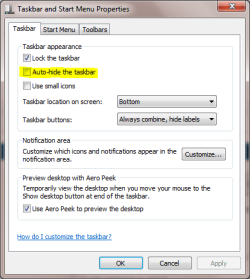
Do you have the following highlighted option enabled?
Taskbar - unwanted shadow-capture.png
My System SpecsSystem Spec
05-18-2009   #3


Windows 7 7600


I think he means the same as I tried to describe in my post here: http://www.sevenforums.com/general-d...html#post79575
My System SpecsSystem Spec
.


05-18-2009   #4


Win7 & XP


Yes, same problem. I did a search before posting, but yours didn't come up.
My System SpecsSystem Spec
05-18-2009   #5


Windows 7 7600


I think the glitch occurs when you use small icons on the taskbar. Try using the normal sized icons and see if the shadow goes away.

I am unsure if this is a bug in the operating system or the graphics driver.
My System SpecsSystem Spec
05-18-2009   #6


Windows 7 Ultimate x64 SP1


Hello Henry, and welcome to Seven Forums.

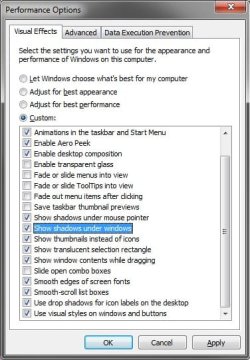
It may just be a graphic glitch with the video drivers that updating or wiggling the window a bit may sort out, but you might also see if unchecking the Visual Effects option highlighted below may help with it.

Taskbar - unwanted shadow-effects.jpg

Hope this helps,
Shawn
My System SpecsSystem Spec
05-18-2009   #7


Win7 & XP


I have tried both with small and large icons, and I don't have Window Shadows enabled.

I agree, its a driver issue, but on my laptop it resolved itself; probably with a Windows Update which installed new video drivers.

Thanks for trying to help.

Last edited by henryg; 05-18-2009 at 01:09 PM.. Reason: I'm an idiot
My System SpecsSystem Spec
05-18-2009   #8


Windows 7 Ultimate x64 SP1


Henry,

I'm happy to hear that it seems to have sorted itself out. My guess would be the updated driver as well.
My System SpecsSystem Spec
Reply

Taskbar - unwanted shadow problems?


Thread Tools


Similar Threads for: Taskbar - unwanted shadow
Thread Forum
how to remove shadow fron taskbar button Themes and Styles
Solved shadow copy? Performance & Maintenance
Solved shadow copy Backup and Restore
Unwanted Resizing of Taskbar Customization
Program shadow? General Discussion


All times are GMT -5. The time now is 01:09 AM.


Windows 7 Forums is an independent web site and has not been authorized,
sponsored, or otherwise approved by Microsoft Corporation.
"Windows 7" and related materials are trademarks of Microsoft Corp.
© Designer Media Ltd
  

1 2 3 4 5 6 7 8 9 10 11 12 13 14 15 16 17 18 19 20 21 22 23 24 25 26 27 28 29 30