| Windows 7: Waiting For Background Process(es) To Close |
22 May 2009
|
#11 | | 64-bit Windows 7 Ultimate SP1 & Windows 8 Enterprise Texas |
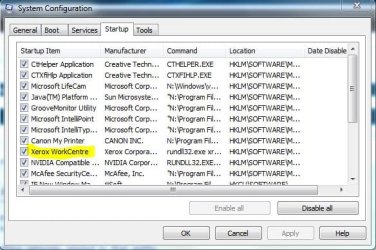
You might temporarily disable that startup item to see if it still happens. | My System Specs |
| Computer type PC/Desktop System Manufacturer/Model Number Self built custom OS 64-bit Windows 7 Ultimate SP1 & Windows 8 Enterprise CPU Intel i7-3930K 3.2 Ghz (O/C 4 Ghz) Motherboard ASRock X79 Extreme11 Memory 32 GB (8GBx4) G.SKILL DDR3 Quad PC3-19200 2400MHz Graphics Card Sapphire HD5870 Eyefinity 6 2GB Sound Card SB Recon 3Di Integrated Chip Monitor(s) Displays 3x 27" Asus VE278Q Screen Resolution 1920x1080 Keyboard Logitech Cordless Desktop MX 5500 Revolution Mouse Logitech Cordless Desktop MX 5500 Revolution PSU OCZ Series Gold OCZZ1000M 1000W Case Thermaltake Level 10 GT Snow Edition Cooling Corsair Hydro H100 Hard Drives 256GB OCZ Vector
160GB OCZ RevoDrive X2
2 x 1TB Samsung HDD HD154UI SATA Internet Speed 50 Mb/s Download and 2 Mb/s Upload Other Info Microsoft LifeCam Cinema
Lite-On iHBS212 12x BD Writer
Samsung CLX-3175FW Printer
Netgear WNDR3800 Router
Motorola SBG6580 Cable Modem
2x APC Back-UPS XS 1500 |
22 May 2009
|
#12 | | |
well, atleast i know i'm not alone and its just my lonely one world crazy pc configuration setup.... the conspiracy theory
its a bugger Brit, and tbh i havent gotten around to sussing it just yet, I just try to not reboot as much as possible, hehe... sad but... maybe try an upgrade ti 27, with a backup? I'm about to wipe 7100 off and start a new with the 27, and probably, foregoing any catastrophes and stick with it, as it seems pretty stable as compared to the 7000 imo.
just to add some worthy info... i have a lexmark and a kodak on the network, but i dont think that is it, could be, but my nugget tells me its something simpler than that even. I want to blame a gadget, but i dont think i can, yet anyways, tho it could be that or something as trivial as such. I've been down the list of startup, repairing startup, so on and so on. no good. and thats about my length of dedicated time to it, just decided to not reboot unless needed, which isnt a big deal anywho for me.
Last edited by Brink; 22 May 2009 at 09:04 PM..
| My System Specs | | System Manufacturer/Model Number CUSTOM OS XP/win7 x86 build 7127 CPU Athlon64 X2 DUAL 4200+ 2.21ghz Motherboard ASUS K8 PRO SLI Memory 2GB Dual Chan DDR2 Corsair Graphics Card Nvidia 6800GT Sound Card nvidia Monitor(s) Displays 19' LCD Screen Resolution 1280x1024 Keyboard MS wireless Mouse MS Wireless PSU coolermaster 450 Case SUPERFLOWER Cooling 1 HDD bay fan, 5x80mm Case Fans, AEROGATE II Fan/Temp Hard Drives WD 250, 2x500, 2x1TB IDE/USB
WD 250 SATA (system)
SEAGATE 120 Sata Internet Speed fassssssssst |
22 May 2009
|
#13 | | Vista Ult SP2/Win 7 Ult SP1/Win 8 Pro w/MC/x64/XP SP3 x86 in VM Toronto, Canada |
LOL. Some parts of Windows & its inner workings will always remain a mystery to me. They simply defy logic.
Anyway, it's still disabled and I've rebooted 6 times. The last boot started up with a popup Windows Image Aquisition has stopped working, send error report? So I did.
Maybe it had something to do with that.
That taskhost thingy still appears momentarily at shutdown, but there isn't anything in it, as far as I can tell, as it's literally only up for a split second. Another annoyance, to me if Windows wants to tell you something, for Gawd's sake let me read the damn thing.
Back to the drawing board, or should I say grindstone. | My System Specs | | System Manufacturer/Model Number Alienware® ALX X58 OS Vista Ult SP2/Win 7 Ult SP1/Win 8 Pro w/MC/x64/XP SP3 x86 in VM CPU Intel® Core™ i7-975 Extreme O/C to 4.02 GHz, 8MB Cache Motherboard Asus® P6T Deluxe V2 X58 LGA1366 Memory 12GB DDR3 SDRAM at 1600MHz - 6 x 2048MB Graphics Card 1792 MB NVIDIA® GeForce® GTX 295/Hauppauge HVR2250 TV Tuner Sound Card Onboard Soundmax® High-Definition 7.1 Performance Audio Monitor(s) Displays Samsung XL2370 LED backlit 23" W/S 2ms response time Screen Resolution 1920 X 1080 Keyboard Microsoft® Wireless Entertainment 8000 + Logitech® G15 Wired Mouse Microsoft® Wireless Laser 8000 + Logitech® G9 Wired PSU Alienware® 1200 Watt Multi-GPU Case Alienware® P2 ALX Chassis with AlienIce™ 3.0 Video Cooling Cooling Alienware® High-Perf. Liquid Cooling + Acoustic Dampening Hard Drives 2 x 500gb SATA II
1 x 1TB SATA II
1 external eSATA LaCie 1TB
(Non-RAID) Internet Speed 45mbps Other Info Using non-RAID on purpose as I find RAID to be too temperamental.
I've noticed no difference since switching. |
22 May 2009
|
#14 | | |

Quote: Originally Posted by Ex_Brit
That taskhost thingy still appears momentarily at shutdown, but there isn't anything in it, as far as I can tell, as it's literally only up for a split second. Another annoyance, to me if Windows wants to tell you something, for Gawd's sake let me read the damn thing.
Back to the drawing board, or should I say grindstone.  hahaha... i hear ya Brit... i had this EXACT same thought the other day.... | My System Specs | | System Manufacturer/Model Number CUSTOM OS XP/win7 x86 build 7127 CPU Athlon64 X2 DUAL 4200+ 2.21ghz Motherboard ASUS K8 PRO SLI Memory 2GB Dual Chan DDR2 Corsair Graphics Card Nvidia 6800GT Sound Card nvidia Monitor(s) Displays 19' LCD Screen Resolution 1280x1024 Keyboard MS wireless Mouse MS Wireless PSU coolermaster 450 Case SUPERFLOWER Cooling 1 HDD bay fan, 5x80mm Case Fans, AEROGATE II Fan/Temp Hard Drives WD 250, 2x500, 2x1TB IDE/USB
WD 250 SATA (system)
SEAGATE 120 Sata Internet Speed fassssssssst |
22 May 2009
|
#15 | | Vista Ult SP2/Win 7 Ult SP1/Win 8 Pro w/MC/x64/XP SP3 x86 in VM Toronto, Canada |
Well I'm going to re-enable that darned thing, just in case. Who knows, I may be causing a landslide somewhere in Asia by turning it off. | My System Specs | | System Manufacturer/Model Number Alienware® ALX X58 OS Vista Ult SP2/Win 7 Ult SP1/Win 8 Pro w/MC/x64/XP SP3 x86 in VM CPU Intel® Core™ i7-975 Extreme O/C to 4.02 GHz, 8MB Cache Motherboard Asus® P6T Deluxe V2 X58 LGA1366 Memory 12GB DDR3 SDRAM at 1600MHz - 6 x 2048MB Graphics Card 1792 MB NVIDIA® GeForce® GTX 295/Hauppauge HVR2250 TV Tuner Sound Card Onboard Soundmax® High-Definition 7.1 Performance Audio Monitor(s) Displays Samsung XL2370 LED backlit 23" W/S 2ms response time Screen Resolution 1920 X 1080 Keyboard Microsoft® Wireless Entertainment 8000 + Logitech® G15 Wired Mouse Microsoft® Wireless Laser 8000 + Logitech® G9 Wired PSU Alienware® 1200 Watt Multi-GPU Case Alienware® P2 ALX Chassis with AlienIce™ 3.0 Video Cooling Cooling Alienware® High-Perf. Liquid Cooling + Acoustic Dampening Hard Drives 2 x 500gb SATA II
1 x 1TB SATA II
1 external eSATA LaCie 1TB
(Non-RAID) Internet Speed 45mbps Other Info Using non-RAID on purpose as I find RAID to be too temperamental.
I've noticed no difference since switching. |
30 Dec 2009
|
#16 | | |
I was having a curious problem with Win 7 message stating "Waiting For Background Process(es) To Close ". I did all the normal techie things like, disabling startup processes one by one, changing shutdown settings (Wait To Kill Timeout) etc. Then when I went to fix a printing problem on a Lexmark wireless downstairs, I discovered the AC plug had been unplugged. When the printer reconnected to my network I later noticed that my "Waiting For Background Process(es) To Close " issue had not re-occured. Shazzam, since Windows 7 wasn't getting a disconnect message from the unplugged printer, it must've been re-trying to confirm log-off, thus slowing shut-down. Go figure. | My System Specs | | |
30 Dec 2009
|
#17 | | |
Thnx Ex_Brit. I stumble dupon this thread juz now, otherwise would have started a new thread with this same issue. From the usage of Win 7, I was also bugged upon this issue till now. Here is my case,
I have 2 heavy applications always open during daytime. Outlook and FF. Before shutdown or restart, I close them, but FF takes some time to close. At this moment I get the same above message but it will nt list wat process is running. Strange. What I do is, click on force restart and then click on yes.
Sometimes if my explorer is opened, I get it listed. Sometimes for Outlook too. But strangely, eventhough there are no applications open, I get this screen and message by default.
When goin thru the above post, I was thinking whether the network printer I have connected to my lappy is causing the problem. Because, back in home I havent seen this screen. Also a extra note, I am connected in a Domain. | My System Specs | | System Manufacturer/Model Number MacBook Pro OS Lion CPU i5 Memory 4GB Graphics Card Intel Screen Resolution 1200x800 Hard Drives Seagate FreeAgent GO 250GB Ext. HDD |
30 Dec 2009
|
#18 | | Vista Ult SP2/Win 7 Ult SP1/Win 8 Pro w/MC/x64/XP SP3 x86 in VM Toronto, Canada |
I have to do that same forced shut down sometimes. Not always....weird. Event Viewer may have clues, haven't really had time to check. | My System Specs | | System Manufacturer/Model Number Alienware® ALX X58 OS Vista Ult SP2/Win 7 Ult SP1/Win 8 Pro w/MC/x64/XP SP3 x86 in VM CPU Intel® Core™ i7-975 Extreme O/C to 4.02 GHz, 8MB Cache Motherboard Asus® P6T Deluxe V2 X58 LGA1366 Memory 12GB DDR3 SDRAM at 1600MHz - 6 x 2048MB Graphics Card 1792 MB NVIDIA® GeForce® GTX 295/Hauppauge HVR2250 TV Tuner Sound Card Onboard Soundmax® High-Definition 7.1 Performance Audio Monitor(s) Displays Samsung XL2370 LED backlit 23" W/S 2ms response time Screen Resolution 1920 X 1080 Keyboard Microsoft® Wireless Entertainment 8000 + Logitech® G15 Wired Mouse Microsoft® Wireless Laser 8000 + Logitech® G9 Wired PSU Alienware® 1200 Watt Multi-GPU Case Alienware® P2 ALX Chassis with AlienIce™ 3.0 Video Cooling Cooling Alienware® High-Perf. Liquid Cooling + Acoustic Dampening Hard Drives 2 x 500gb SATA II
1 x 1TB SATA II
1 external eSATA LaCie 1TB
(Non-RAID) Internet Speed 45mbps Other Info Using non-RAID on purpose as I find RAID to be too temperamental.
I've noticed no difference since switching. Waiting For Background Process(es) To Close problems? All times are GMT -5. The time now is 03:17 PM. | |