Windows 7 Forums


Windows 7: Waiting For Background Process(es) To Close

20 May 2009  
Ex_Brit

Vista Ult SP2/Win 7 Ult SP1/Win 8 Pro w/MC/x64/XP SP3 x86 in VM
1,392 posts
Toronto, Canada
 
 
Waiting For Background Process(es) To Close

..at least I think that's what I seemingly always get on my darkening screen when shutting down Windows 7 and I find it rather annoying. Isn't it stating the obvious?
If it lists the processes, which isn't always the case, it doesn't usually give me a chance to close them anyway as the shutdown process is ongoing.
Is there a way to disable that?

My System SpecsSystem Spec

20 May 2009  
Brink

64-bit Windows 7 Ultimate SP1 & Windows 8 Enterprise
47,733 posts
Texas


Hi Peter,

Did you close anything that you had running before you shutdown the computer?

You might see if this tutorial can help speed up the shutdown time for you. If not, then you can create a shutdown shortcut in this tutorial to force a faster shutdown until you find the culprit that is not shutting down gracefully.

Before you shutdown, look in the Processes and Applications tabs in Task Manager to see if anything in there may stand out to that may be the culprit. You can test and see by killing the process or application before shutting down to see if it shutsdown ok without it running.

Hope this helps,
Shawn

Last edited by Brink; 22 May 2009 at 01:42 PM..
My System SpecsSystem Spec
20 May 2009  
Ex_Brit

Vista Ult SP2/Win 7 Ult SP1/Win 8 Pro w/MC/x64/XP SP3 x86 in VM
1,392 posts
Toronto, Canada


Thanks, I'll look into it in a bit more detail. It doesn't always happen. Maybe it's something I just shut down and it hasn't actually fully finished doing it before I tell the machine to reboot.
My System SpecsSystem Spec
.


22 May 2009  
Ex_Brit

Vista Ult SP2/Win 7 Ult SP1/Win 8 Pro w/MC/x64/XP SP3 x86 in VM
1,392 posts
Toronto, Canada


I managed to catch what it said before it shut down...the trouble is it's on a black screen so difficult to read and only up for a moment, so obviously isn't a real problem.

It says xerox scanner template is trying to close....God only know what that is as I don't use any Xerox product and I, as far as I know anyway, have no Xerox templates. Tried searching and nothing.
My System SpecsSystem Spec
22 May 2009  
Brink

64-bit Windows 7 Ultimate SP1 & Windows 8 Enterprise
47,733 posts
Texas


You might also check in your startup programs to see if you may have anything listed for this.
My System SpecsSystem Spec
22 May 2009  
Digger

XP/win7 x86 build 7127
1,009 posts


taskhost.exe by chance Brit?

if so, same problem here with 7100... havent gotten my 27 configured to see if its still the case yet
My System SpecsSystem Spec
22 May 2009  
Ex_Brit

Vista Ult SP2/Win 7 Ult SP1/Win 8 Pro w/MC/x64/XP SP3 x86 in VM
1,392 posts
Toronto, Canada


Quote   Quote: Originally Posted by Brink View Post
You might also check in your startup programs to see if you may have anything listed for this.
Nothing remotely related to that entity.

Quote   Quote: Originally Posted by Digger View Post
taskhost.exe by chance Brit?

if so, same problem here with 7100... havent gotten my 27 configured to see if its still the case yet
I have taskhost but not sure what you mean by that.

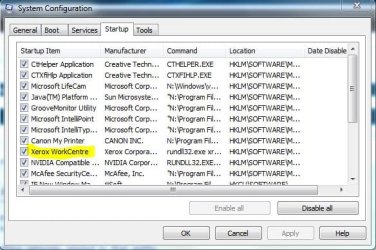
I did however find something in my msconfig startup...weird, what the heck is it?
Attached Thumbnails
Waiting For Background Process(es) To Close-xerox.jpg  
My System SpecsSystem Spec
22 May 2009  
Brink

64-bit Windows 7 Ultimate SP1 & Windows 8 Enterprise
47,733 posts
Texas


LOL, that's a startup item.

It looks like it may be a driver for a Xerox printer or scanner.
My System SpecsSystem Spec
22 May 2009  
Digger

XP/win7 x86 build 7127
1,009 posts


I'll try and be a little more descriptive Brit... when shutting down... screen darkens, naturally... then there is the "box" in the middle of processes shutting down, right? and the box most time 9/10 doesnt show any processes running, correct? well, i have seen that 1 out of 10 times, the taskhost.exe is trying to shutdown properly and.... takes forever sometimes... thats my only explanation... but sorry, i have no found fix yet for it.

edit: to also explain... the other 9 of 10 times, the hangtime is the same or abouts as when the 1 time that shows the taskhost.exe... so this is who my culprit seems to be, and taking my blame atleast
My System SpecsSystem Spec
22 May 2009  
Ex_Brit

Vista Ult SP2/Win 7 Ult SP1/Win 8 Pro w/MC/x64/XP SP3 x86 in VM
1,392 posts
Toronto, Canada


Quote   Quote: Originally Posted by Brink View Post
LOL, that's a startup item.

It looks like it may be a driver for a Xerox printer or scanner.
Yes, sorry. I was looking originally in my All Programs/Startup list.

I have a Canon printer/scanner/fax and nothing remotely resembling anything "Xerox".

The strange thing is when I search for anything "Xerox", nothing turns up.

Quote   Quote: Originally Posted by Digger View Post
I'll try and be a little more descriptive Brit... when shutting down... screen darkens, naturally... then there is the "box" in the middle of processes shutting down, right? and the box most time 9/10 doesnt show any processes running, correct? well, i have seen that 1 out of 10 times, the taskhost.exe is trying to shutdown properly and.... takes forever sometimes... thats my only explanation... but sorry, i have no found fix yet for it.

edit: to also explain... the other 9 of 10 times, the hangtime is the same or abouts as when the 1 time that shows the taskhost.exe... so this is who my culprit seems to be, and taking my blame atleast
Ah, now I understand. Yes that's exactly what I get, sometimes as you said.
My System SpecsSystem Spec
Reply

 Waiting For Background Process(es) To Close problems?


Thread Tools


Similar help and support threads for: Waiting For Background Process(es) To Close
Thread Forum
Game keeps crashing, the process hangs when I close it in task manager Gaming
Solved Make 'close window' button kill the process? General Discussion
Waiting for background program to close General Discussion
"Waiting for Background Programs to Close" Symante BSOD Help and Support
"Waiting for Background Programs to Close" Symantec Software


All times are GMT -5. The time now is 08:18 PM.


Windows 7 Forums is an independent web site and has not been authorized,
sponsored, or otherwise approved by Microsoft Corporation.
"Windows 7" and related materials are trademarks of Microsoft Corp.
© Designer Media Ltd