Windows 7 Forums


Windows 7: Is there a way to disallow changing system time/date?

30 Aug 2010   #1

Windows 7 Ultimate x64
 
 
Is there a way to disallow changing system time/date?

A bunch of guys in the office change the date/time and conveniently claim they finished their work on time. Is there a way to disallow changing of time?


Thanks guys

Last edited by wildgoat; 30 Aug 2010 at 09:35 AM.. Reason: Wrong sentence
My System SpecsSystem Spec

30 Aug 2010   #2

Windows 7 Ultimate x64, Windows 7 Starter x86
Belgium


Hi,
can you give more info? What kind of OS? Domain or not?
Kind reg,
My System SpecsSystem Spec
30 Aug 2010   #3

MS Windows 7 Ultimate SP1 64-bit
Austin, Texas


Quote   Quote: Originally Posted by wildgoat View Post
A bunch of guys in the office change the date/time and conveniently claim they finished their work on time. Is there a way to disallow changing of time?

Thanks guys
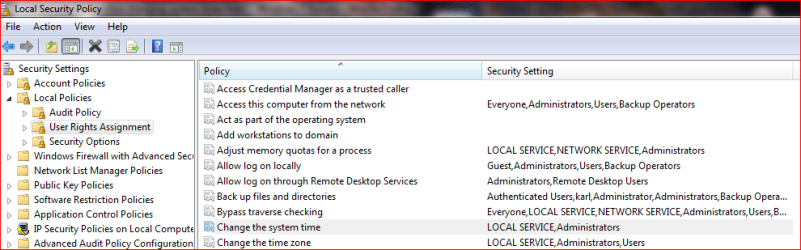
WIN | type SECPOL.MSC | ENTER

WIN is the key with wavy flag.

Now navigate as shown in following attachment.

Is there a way to disallow changing system time/date?-change-time-right.png

Date and Time - Allow or Prevent Users and Groups from Changing

Last edited by Brink; 25 Sep 2010 at 12:09 AM.. Reason: added link
My System SpecsSystem Spec
.


30 Aug 2010   #4

Windows 7 Enterprise (x64); Windows Server 2008 R2 (x64)
Earth - I wish I was on Risa


Or you can make them all standard users.
My System SpecsSystem Spec
31 Aug 2010   #5

Windows 7 Ultimate x64


Quote   Quote: Originally Posted by karlsnooks View Post
Quote   Quote: Originally Posted by wildgoat View Post
A bunch of guys in the office change the date/time and conveniently claim they finished their work on time. Is there a way to disallow changing of time?

Thanks guys
WIN | type SECPOL.MSC | ENTER

WIN is the key with wavy flag.

Now navigate as shown in following attachment.

Attachment 94373
Thanks. This did it!
My System SpecsSystem Spec
31 Aug 2010   #6

Windows 7 Ultimate x64


Quote   Quote: Originally Posted by WindowsStar View Post
Or you can make them all standard users.
Some older apps dont work with the standard user account.
My System SpecsSystem Spec
31 Aug 2010   #7

MS Windows 7 Ultimate SP1 64-bit
Austin, Texas


Wildgoat,

Glad to hear that the problem is solved and to have been of assistance.
My System SpecsSystem Spec
01 Sep 2010   #8

Windows 7 Enterprise (x64); Windows Server 2008 R2 (x64)
Earth - I wish I was on Risa


Quote   Quote: Originally Posted by wildgoat View Post
Quote   Quote: Originally Posted by WindowsStar View Post
Or you can make them all standard users.
Some older apps dont work with the standard user account.
I really just said that because you sounded like you wanted to get back at them.
My System SpecsSystem Spec
01 Sep 2010   #9

Windows 7 x64 (SP1)


Quote   Quote: Originally Posted by wildgoat View Post
Quote   Quote: Originally Posted by WindowsStar View Post
Or you can make them all standard users.
Some older apps dont work with the standard user account.
Then you have a big problem, very big. No user should ever EVER have administrator power. An administrator user can revert any change you make in Local Security Policy and regain the ability to change the time.

You already lost your ability to control these computers. Either take away administrator power and find a way to make your old broken POS applications work, or give up now.
My System SpecsSystem Spec
Reply

 Is there a way to disallow changing system time/date? problems?


Thread Tools


Similar help and support threads for: Is there a way to disallow changing system time/date?
Thread Forum
Date and Time - Allow or Prevent Users and Groups from Changing Tutorials
Time and Date issue - BIOS time and date reset after change in Win7 General Discussion
Time changing, date remains correct General Discussion
Date and Time keeps changing General Discussion
Changing System Date in VirtualBox Virtualization


All times are GMT -5. The time now is 02:08 AM.


Seven Forums Android App Seven Forums IOS App Follow us on Facebook

Windows 7 Forums is an independent web site and has not been authorized,
sponsored, or otherwise approved by Microsoft Corporation.
"Windows 7" and related materials are trademarks of Microsoft Corp.
© Designer Media Ltd
  

1 2 3 4 5 6 7 8 9 10 11 12 13 14 15 16 17 18 19 20 21 22 23 24 25 26 27 28 29 30 31 32