

- Local time
- 10:01 PM
- Messages
- 22
So I've got this Autohotkey script that I use to replace explorer.exe. I'm trying to get a command line working (instead of the standard Win+R), however I'm running into some odd problems.
I'm an admin user, and if I run cmd from Win+R, I don't have any problems. I can run every command I can think of that exists in the System32 folder. For example, I can run 'sndvol' and 'soundrecorder' without problems.
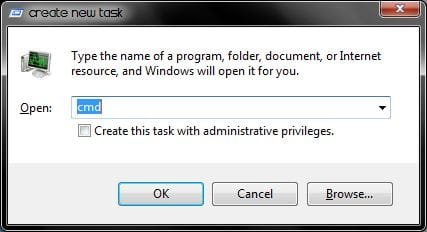

However, whenever I run a command from Autohotkey (which is running as admin), or even run a command from the command prompt that was initiated from Autohotkey, some things don't seem to be recognized. For example, I can run 'sndvol' no problem, but I can't run 'soundrecorder'.
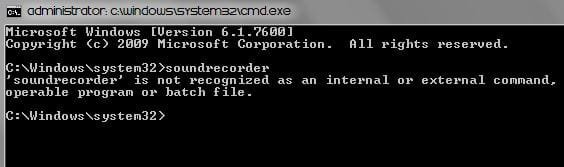
I did notice something though, when I run Autohotkey as admin, the command prompt inherits that and it gets "Administrator:" at the beginning of the window title. However, this isn't making a difference, because running Autohotkey not as admin produces the same results.
So basically, the question is, what can cause the command prompt to not recognize certain commands? Is it a privilege issue? Is it an issue with those commands? What can I try?
Very odd problem... I would greatly appreciate help.
I'm an admin user, and if I run cmd from Win+R, I don't have any problems. I can run every command I can think of that exists in the System32 folder. For example, I can run 'sndvol' and 'soundrecorder' without problems.
However, whenever I run a command from Autohotkey (which is running as admin), or even run a command from the command prompt that was initiated from Autohotkey, some things don't seem to be recognized. For example, I can run 'sndvol' no problem, but I can't run 'soundrecorder'.
I did notice something though, when I run Autohotkey as admin, the command prompt inherits that and it gets "Administrator:" at the beginning of the window title. However, this isn't making a difference, because running Autohotkey not as admin produces the same results.
So basically, the question is, what can cause the command prompt to not recognize certain commands? Is it a privilege issue? Is it an issue with those commands? What can I try?
Very odd problem... I would greatly appreciate help.
My Computer
At a glance
Win7 Ultimate x64Intel Dual 2.16 Ghz4GBNVidia GeForce 9200M GS, 256MB
- Computer Manufacturer/Model Number
- HP Pavilion dv5
- OS
- Win7 Ultimate x64
- CPU
- Intel Dual 2.16 Ghz
- Memory
- 4GB
- Graphics Card(s)
- NVidia GeForce 9200M GS, 256MB
- Hard Drives
- 320GB internal, 320GB external, 1TB external to come (big download library XD)


