| Windows 7: extending partition? |
04 Sep 2010
|
#1 | | |
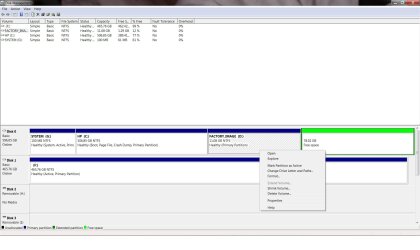
extending partition? According to the help files the adjacent partition should allow me to be extended and absorb the partition next to it which is free space. See screenshot. Why does it not allow it? | My System Specs |
| System Manufacturer/Model Number HP p6347c OS W7 CPU AMD Athlon(tm) II X4 630 Processor Motherboard AMD RS780/RS880 Memory 8 GB Graphics Card ATI Radeon HD 4200 Sound Card Realtek High Definition Audio Monitor(s) Displays HP w2338h (HP w2338h Wide LCD Monitor) Hard Drives WDC WD6400AAKS-65A7B SCSI Disk Device |
04 Sep 2010
|
#2 | | Vista, Windows7, Mint Mate, Zorin, Windows 8 Florida in winter, Black Forest/Germany |
Because it is free space within a partition and not unallocated space. Right click on it and delete the volume. | My System Specs | | System Manufacturer/Model Number HP, Dell, Gateway, Toshiba - 4 laptops and 2 desktops OS Vista, Windows7, Mint Mate, Zorin, Windows 8 CPU from 1.6GHz Duo to i7 Monitor(s) Displays 2x HP w2207 Keyboard with trackball - no mices Mouse Trackball mice Hard Drives 5x HDD, 7x SSD, 12x Externals Internet Speed DSL 6000 |
04 Sep 2010
|
#3 | | Win7 x 6 PC's California, Florida, Boston |
You wind up with Free Space when you have an Extended Logical partition which you delete sub-partitions within. As Wolfgang says, you need to delete the Free Space to get Unallocated Space you can extend a Primary partition into. | My System Specs | | |
05 Sep 2010
|
#4 | | |

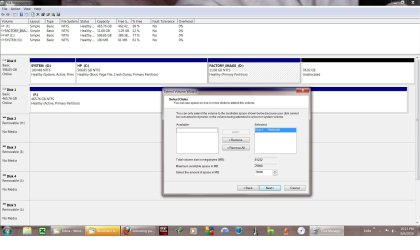
Quote: Originally Posted by whs Because it is free space within a partition and not unallocated space. Right click on it and delete the volume. This is the result: | My System Specs | | System Manufacturer/Model Number HP p6347c OS W7 CPU AMD Athlon(tm) II X4 630 Processor Motherboard AMD RS780/RS880 Memory 8 GB Graphics Card ATI Radeon HD 4200 Sound Card Realtek High Definition Audio Monitor(s) Displays HP w2338h (HP w2338h Wide LCD Monitor) Hard Drives WDC WD6400AAKS-65A7B SCSI Disk Device |
05 Sep 2010
|
#5 | | |
You have to have the "unallocated" space directly to the right of the drive that you want to expand. With your picture above, you could expand the D drive with the unallocated space to the right of it. However, if you want to expand the C drive...you would have to delete the D drive partition immediately to it's right to do it.
Oops...didn't read closely enough. As the message says, it sees this recovery partition as having boot files and won't let you change it.
You might have better luck with something like Gparted. It's a bootable .ISO that you can freely download to resize drives. It works outside of windows...so you aren't hampered with the limitations of Windows as shown above. | My System Specs | | System Manufacturer/Model Number Self-Built in July 2009 OS Windows 7 Ultimate x64 CPU Intel Q9550 2.83Ghz OC'd to 3.40Ghz Motherboard Gigabyte GA-EP45-UD3R rev. 1.1, F12 BIOS Memory 8GB G.Skill PI DDR2-800, 4-4-4-12 timings Graphics Card EVGA 1280MB Nvidia GeForce GTX570 Sound Card Realtek ALC899A 8 channel onboard audio Monitor(s) Displays 23" Acer x233H Screen Resolution 1920x1080 Keyboard ABS M1 Mechanical Mouse Logitech G9 Laser Mouse PSU Corsair 620HX modular Case Antec P182 Cooling stock Hard Drives Intel X25-M 80GB Gen 2 SSD
Western Digital 1TB Caviar Black, 32MB cache. WD1001FALS Internet Speed 15/2 cable modem Other Info Windows and Linux enthusiast. Logitech G35 Headset. |
05 Sep 2010
|
#6 | | |

Quote: Originally Posted by pparks1 You have to have the "unallocated" space directly to the right of the drive that you want to expand. With your picture above, you could expand the D drive with the unallocated space to the right of it. That is exactly what I want to do, but as my screenshot shows, it does not let me! 
Quote: Originally Posted by pparks1 However, if you want to expand the C drive...you would have to delete the D drive partition immediately to it's right to do it. I didn't intend to expand the C partition. Also, it is not adjacent!
The D is where the restore points are kept, and I want to make room for more.
There may be a reason that the system doesn't allow it to be made larger? | My System Specs | | System Manufacturer/Model Number HP p6347c OS W7 CPU AMD Athlon(tm) II X4 630 Processor Motherboard AMD RS780/RS880 Memory 8 GB Graphics Card ATI Radeon HD 4200 Sound Card Realtek High Definition Audio Monitor(s) Displays HP w2338h (HP w2338h Wide LCD Monitor) Hard Drives WDC WD6400AAKS-65A7B SCSI Disk Device |
05 Sep 2010
|
#7 | | Windows 7 Ultimate x64, XP Mode, W8 RP VM, Linux Mint Debian 2nd OS HD- 7 Pro x64 second case New England |
Your best option there is GParted live for cd where you would start off by moving the factory image(D) partition all the way to the right being the rear of the drive. The move will take some time however while nowhere as long as a few hundred GBs!
The latest 0.6.2-5 release of GParted is seen at Browse GParted Files on SourceForge.net
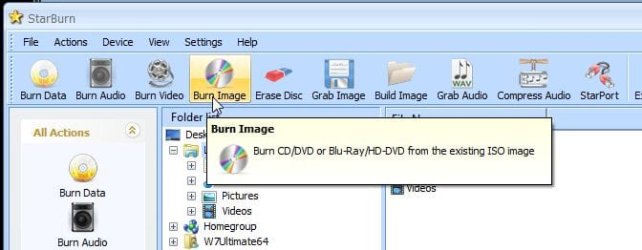
The 3rd link in the green area "Newest Files" when clicking the "View all files" button will be for the ISO disk image you burn to a cd-r. If you need a burning program that works well on the 64bit 7 go for the free version of StarBurn at :: RocketDivision :: CD/DVD/Blu-Ray/HD-DVD recording and mastering
ImgBurn is what many will point to but was written for the 32bit XP and doesn't like the 64bit Windows too well. If you have a small usb flash drvie you can also see the disk image written to that to make up a boot from flash drive key and load GParted from that. The same shareware version of UltraISO used for 7 install keys will write the image when selecting the "bootable" option along the menu bar. http://www.ezbsystems.com/ultraiso/index.html
(comes in handy for writting live distros too  ) | My System Specs | | OS Windows 7 Ultimate x64, XP Mode, W8 RP VM, Linux Mint Debian 2nd OS HD- 7 Pro x64 second case CPU AMD Phenom II X4 975 Deneb 3.6ghz - 965 on new mini tower Motherboard Gigabyte GA-790XTA-UD4 Memory Kingston Hyper X DDR3 1600 1.5v 16gb - Mushkin on 2nd build Graphics Card MSI HD Radeon 5750 1gb - MSI HD Radeon 6450 on mini tower Sound Card Creative Labs X-Fi XtremeGamer - Realtek onooard 2nd case Monitor(s) Displays 2 x Acer P191W 19" widesscreen - HP 20" widescreen mini towe Screen Resolution 1440x900 native - 1600x1024 on 7 Pro x64 build Keyboard Microsoft Recusa Razor - MS Comfort 3000 on second build Mouse MS Trackball Explorer - A4TECH dual scroll wheel trackball PSU Corsair 750TX - primary / Corsair CX600 - second Case Antec 900-2 - SSD compatible / NZXT Vulcan mini tower Cooling Zalman CNPS9900A Hard Drives Primary Ultimate x64 build-
WD Black Edition 1tb Sata 6.0 = 2
WD Black Edition 1tb Sata 3.0 = 2 (OS drives)
WD 1tb Green Power sata = 2 1 external
usb flash drives = 18
Second 7 Pro x64 mini tower-
WD Caviar SE 500gb sata II single drive presen Internet Speed 30mbps upgrade - primary hard wired - mini tower usb WiFi |
05 Sep 2010
|
#8 | | Windows 7 Ultimate RTM (Technet) Charlotte, NC |

Quote: Originally Posted by Alsenor 
Quote: Originally Posted by pparks1 You have to have the "unallocated" space directly to the right of the drive that you want to expand. With your picture above, you could expand the D drive with the unallocated space to the right of it. That is exactly what I want to do, but as my screenshot shows, it does not let me! 
Quote: Originally Posted by pparks1 However, if you want to expand the C drive...you would have to delete the D drive partition immediately to it's right to do it. I didn't intend to expand the C partition. Also, it is not adjacent!
The D is where the restore points are kept, and I want to make room for more.
There may be a reason that the system doesn't allow it to be made larger? FYI, restore points are stored on all drives and contain the information to restore that particular drive. In other words, if you have issues on the C: drive, more room on D: won't help you. | My System Specs | | System Manufacturer/Model Number Custom OS Windows 7 Ultimate RTM (Technet) CPU 3.00 gigahertz Intel Core2 Duo E8400 Motherboard ASUSTeK Computer INC. P5K/EPU Rev 1.xx Memory 4GB Graphics Card ATI Radeon X1950 Pro Sound Card Built in HD Audio Monitor(s) Displays 22" Gateway LCD Screen Resolution 1920 x 1200 Keyboard Logitech G11 Mouse Microsoft Wireless Laser Mouse 5000 Hard Drives ST3160023A [Hard drive] (160.04 GB) -- drive 0, rev 8.01, ST3500630AS [Hard drive] (500.11 GB) -- drive 2, rev 3.AAK
ST3500630AS [Hard drive] (500.11 GB) -- drive 1, rev 3.AAK Internet Speed 13.44 Mbps |
05 Sep 2010
|
#9 | | Win7 x 6 PC's California, Florida, Boston |
Make your Recovery Disks and then you don't have to worry about deleting the Recovery partition or moving it to the end of the drive. There are no boot files on it.
If you decide to move it, use free Partition Wizard bootable CD which is tool we use to help hundreds of similar operations here. Partition Wizard : Use the Bootable CD
In this case, boot PW CD, rightclick Factory Recovery then Click/hold and slide the whole partition intact to the right end of the HD, click OK. Next rightclick Windows 7 partition and drag the left grey border all the way to the right to take up the space OK, Apply. | My System Specs | | |
05 Sep 2010
|
#10 | | Windows 7 HP 64bit, Windows 8 Pro w/Media Center 64bit Covington, La |
| My System Specs | | Computer type PC/Desktop System Manufacturer/Model Number Home Built OS Windows 7 HP 64bit, Windows 8 Pro w/Media Center 64bit CPU Phenom II X6 1100T Motherboard ASUS M5A99X EVO Memory Crucial Balistic 8gb DDR3-1866 CL9 Graphics Card MSI R6850 Cyclone IGD5 PE Sound Card On Board Monitor(s) Displays ASUS VE258Q 25" LED with DVI-HDMI-DisplayPort Screen Resolution 1920 x 1080 Keyboard Logitech K120 Mouse Logitech Marble Mouse USB, Logitech Precision Game Pad PSU Seasonic X650 80 Plus GOLD Modular Case Corsair 400R Cooling Antec Kuhler H2O 620, Two 120mm and four 140mm Hard Drives Two WD Cavier Black 2TB Sata III, WD My Book Essential 2TB USB 3.0 Internet Speed 15MB Antivirus Norton IS 2012, Malwarebytes Pro Browser IE-10, FF-19 Other Info APC UPS ES 750, Netgear WNR3500L Gigabit & Wireless N Router with SamKnows Test Program, Motorola SB6120 Gigabit Cable Modem. Brother HL-2170W Laser Printer, Epson V300 Scanner extending partition? problems? All times are GMT -5. The time now is 12:33 AM. | |