Windows 7 Forums


Windows 7: Set file attributes

11 Sep 2010   #1

Windows 7
 
 
Set file attributes

How do I make sure that a file extension will open a specific application?


Thanks,
My System SpecsSystem Spec

11 Sep 2010   #2

Windows 7 x64 pro/ Windows 7 x86 Pro/ XP SP3 x86


My System SpecsSystem Spec
11 Sep 2010   #3

Windows 7


I want to use NoteTab pro as my default text editor. I does not show up in suggested programs or the secondary list that I open. How can I set this?
My System SpecsSystem Spec
.


11 Sep 2010   #4

Windows 7 Ultimate x86
Massachusetts


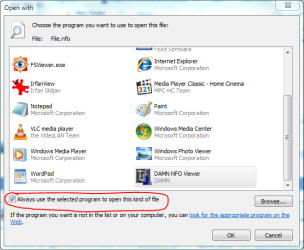
The basic way would be to right-click the data file in question(.txt), go to "open with" and "chose default program" then click on Browse to point to the application you'd like it to open with (notepad Pro). Make sure the box at the bottom left is ticked. That should do the trick.

Open With - Change Default Program

Set file attributes-capture.png
-DG

Last edited by Brink; 11 Sep 2010 at 02:27 PM.. Reason: added link
My System SpecsSystem Spec
11 Sep 2010   #5

Windows 7


Thanks a lot, that was the key. At first I was a bit puzzled, the open option was several options above open with.

Appreciate the help. I have been fussing with this for a while.
My System SpecsSystem Spec
11 Sep 2010   #6

Windows 7 Ultimate x86
Massachusetts


glad you got it sorted out
-DG
My System SpecsSystem Spec
Reply

 Set file attributes problems?


Thread Tools


Similar help and support threads for: Set file attributes
Thread Forum
File Attributes General Discussion
Question about Windows 7 advanced file attributes General Discussion
Which file backup programs can copy attributes/permissions? Backup and Restore
I need a tool for changing file/directory attributes General Discussion
Display of .msg file attributes in Explorer General Discussion


All times are GMT -5. The time now is 10:47 PM.


Seven Forums Android App Seven Forums IOS App Follow us on Facebook

Windows 7 Forums is an independent web site and has not been authorized,
sponsored, or otherwise approved by Microsoft Corporation.
"Windows 7" and related materials are trademarks of Microsoft Corp.
© Designer Media Ltd
  

1 2 3 4 5 6 7 8 9 10 11 12 13 14 15 16 17 18 19 20 21 22 23 24 25 26 27 28 29 30 31 32