Windows 7 Forums Search
Welcome to Windows 7 Forums. Our forum is dedicated to helping you find solutions with any problems, errors or issues you are experiencing with Windows 7. The Windows 7 forum also covers news and updates and has an extensive Windows 7 tutorial section that covers a wide range of tips and tricks.


Windows 7 - Converting External HD from Fat 32 to NTFS


05-24-2009   #1


Win7


Converting External HD from Fat 32 to NTFS

Can't believe this but I have just discovered my external back up HD is fat 32.

I know in XP I could run a command line from the run box to convert to NTFS.

I did try this, I'm using Win 7 with run enabled but no joy, can I convert this HD from within the Win 7 environment?

I wish to convert but not loose any data.

My System SpecsSystem Spec
05-24-2009   #2


Windows 7 Ultimate x64 SP1


Hello Tram,

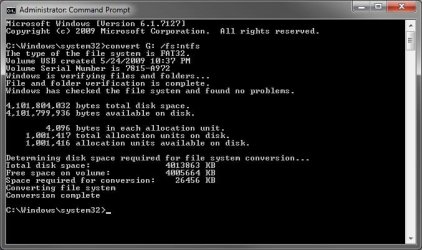
You should be able to use the same command convert C: /fs:ntfs to do this with. Substitute C: for the drive letter of the external drive. I just tested it on a USB flash key in Windows 7 (7127 build) in a elevated command prompt, and it worked without a problem.

Converting External HD from Fat 32 to NTFS-command.jpg

Hope this helps,
Shawn

Last edited by Brink; 05-25-2009 at 10:48 AM..
My System SpecsSystem Spec
05-25-2009   #3


Win7


Thanks Shawn, that went just fine.
My System SpecsSystem Spec
.


05-25-2009   #4


Windows 7 Ultimate x64 SP1


You're welcome Tram. I'm happy to hear that it work for you.
My System SpecsSystem Spec
05-25-2009   #5


Win 7 (7100 x64); OS X 10.5.6


wait, wat. You can convert FSs?
I hope for the 3 hours I spent copying and formatting yesterday that this wouldn't work with HFSJ to NTFS.
My System SpecsSystem Spec
05-25-2009   #6


Windows 7 Ultimate x64 SP1


It will only work for FAT (FAT16) or FAT32 to NTFS, but will not work for NTFS to anything else.
My System SpecsSystem Spec
08-12-2009   #7


Windows XP 32-bit, Windows 7 64-bit


I'm gonna borrow this thread. So, i have my 1TB buffalo external, but ofcourse buffalo has formatted it into FAT32, and now i have ~500 gb in it, so can copy + format + paste them. So, i did it all that the tutorial said, but after when i type convert g: /fs:ntfs and press enter, it says: enter current volume for drive G:. Where i can see what is the volumenumber for my external HD? i tried, 0, 1.. nope. didnt work. Any help?


Thanks.
My System SpecsSystem Spec
08-12-2009   #8


XP_Pro, W7_7201, W7RC.vhd, SciLinux5.3, Fedora12, Fedora9_2x, OpenSolaris_09-06


Quote   Quote: Originally Posted by gheeD View Post
I'm gonna borrow this thread. So, i have my 1TB buffalo external, but ofcourse buffalo has formatted it into FAT32, and now i have ~500 gb in it, so can copy + format + paste them. So, i did it all that the tutorial said, but after when i type convert g: /fs:ntfs and press enter, it says: enter current volume for drive G:. Where i can see what is the volumenumber for my external HD? i tried, 0, 1.. nope. didnt work. Any help?


Thanks.
Are you sure he didn't say "Enter volume name for drive G:", thus letting you change the volume label ?
My System SpecsSystem Spec
08-13-2009   #9


Windows XP 32-bit, Windows 7 64-bit


Thanks. Now i got it to work, it said volume label.. of course...
My System SpecsSystem Spec
02-03-2010   #10


Windows 7 Ultimate x64 SP1


Hello Ex3r, and welcome to Seven Forums.

Yes, it's safe to use the method below to convert a FAT32 HDD to NTFS without losing anything on it. However, you should always backup anything that you do not want to lose to be extra safe. You never know if you could lose power or something in the middle of it converting.

Convert FAT or FAT32 Volume to NTFS

Hope this helps,
Shawn
My System SpecsSystem Spec
Reply

Converting External HD from Fat 32 to NTFS problems?


Thread Tools


Similar Threads for: Converting External HD from Fat 32 to NTFS
Thread Forum
Hundreds of NTFS 55 errors on external hd Performance & Maintenance
Converting dvd installation to external hdd USB Installation & Setup
NTFS Security for external drive Sync Network & Sharing
converting from FAT32 to NTFS Hardware & Devices
How can I format my external drive to NTFS? Hardware & Devices


All times are GMT -5. The time now is 05:54 AM.


Windows 7 Forums is an independent web site and has not been authorized,
sponsored, or otherwise approved by Microsoft Corporation.
"Windows 7" and related materials are trademarks of Microsoft Corp.
© Designer Media Ltd
  

1 2 3 4 5 6 7 8 9 10 11 12 13 14 15 16 17 18 19 20 21 22 23 24 25 26 27 28 29 30