| Windows 7: How to stop Windows 7 from writing desktop.ini files everywhere? |
13 Sep 2010
|
#1 | | |
How to stop Windows 7 from writing desktop.ini files everywhere? Hello,
so I have issues about hidden files (I always want to see them), and I'm particularly annoyed by this desktop.ini file. As if it wasn't enough that there is one in almost every folder, in Windows 7 there are TWO of them on my desktop!
Also, Windows 7 is always trying to burn/write that file on every removable media I have, including USB memory sticks, external hard drives, CD's, DVD's (and the fact that they aren't rewritable and have been burned and closed by the factory doesn't seem to stop it from getting that file ready to be written to disc), etc. Am I the only one thinking this is insane?
My question is simple - how do I stop Windows 7 from ever creating another one of these files again (that is, until next reinstall or some such thing, I'm just trying to be dramatic)?
Yes, I know I will lose some customization functions, but the fact is - I don't need them (which is why I want to see hidden files - to delete them if I don't need them). I know what's in what folder, thank you very much. And yes, I know I can go to Control Panel and set it to not show hidden files, but that's exactly what I don't want.
So, just show me which option to un-check and I'll be happy and I'll buy you some e-beer.
Thanks,
Nikola | My System Specs |
| |
13 Sep 2010
|
#2 | | Windows 7 Home Premium x64 Norwich, UK |
I've seen before that if you have thumbnail view set for your folders, each folder will have a desktop.ini file. Is this the view you have? | My System Specs | | System Manufacturer/Model Number Sony Vaio VPCEB1Z0E/B Laptop OS Windows 7 Home Premium x64 CPU Intel Core i5-430M Processor Motherboard Intel HM55 Express Chipset Memory 4GB DDR3 SDRAM Graphics Card ATI Mobility Radeon HD 5470 Sound Card Realtek ATI HDMI Audio (Dolby Home Theatre v3) Monitor(s) Displays 15.5" VAIO Display Plus Screen Resolution 1920x1080 Mouse Microsoft Bluetooth Notebook Mouse 5000 Hard Drives Internal - SATA 500GB (5400rpm)
External - Western Digital Passport 320GB Internet Speed Up to 20 Mbps, averages about 5Mbps Other Info Lexmark S605 All in One Wireless Printer |
13 Sep 2010
|
#3 | | |

Quote: Originally Posted by Sourcerer So, just show me which option to un-check and I'll be happy and I'll buy you some e-beer.
Thanks,
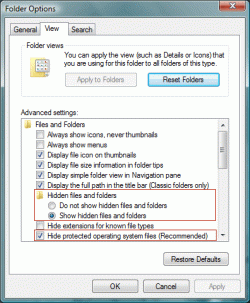
Nikola Folder Options > View > enable Hide protected operating system files.
Furthermore, desktop.ini is not written to CD/DVDs when you burn. | My System Specs | | System Manufacturer/Model Number Alienware Aurora ALX R4 OS Windows 7 x64 (SP1) CPU Intel Core i7-3930K (3.2GHz, Turbo 4GHz) Motherboard Alienware Aurora-R4 x79 Memory 4x Samsung 4GB PC3-12800 DDR3 (16GB 1600MHz) Graphics Card Nvidia Geforce GTX 690 (Stock) Sound Card RealTek Integrated Audio Monitor(s) Displays Dell UltraSharp U3011 Screen Resolution 2560x1600 Other Info Dell Inspiron Mini 10v (Intel Atom N270 1.6 GHz; 1GB; Windows 7 Ultimate) |
13 Sep 2010
|
#4 | | Windows 7 HP 64bit, Windows 8 Pro w/Media Center 64bit Covington, La |
[/QUOTE]
Furthermore, desktop.ini is not written to CD/DVDs when you burn.[/QUOTE]
You are right that it does not write it to the CD/DVD but if you go to write another CD/DVD it shows desktop.ini in que to be written. It just stays in que until you delete it or reboot. Don't understand that.
Jim | My System Specs | | Computer type PC/Desktop System Manufacturer/Model Number Home Built OS Windows 7 HP 64bit, Windows 8 Pro w/Media Center 64bit CPU Phenom II X6 1100T Motherboard ASUS M5A99X EVO Memory Crucial Balistic 8gb DDR3-1866 CL9 Graphics Card MSI R6850 Cyclone IGD5 PE Sound Card On Board Monitor(s) Displays ASUS VE258Q 25" LED with DVI-HDMI-DisplayPort Screen Resolution 1920 x 1080 Keyboard Logitech K120 Mouse Logitech Marble Mouse USB, Logitech Precision Game Pad PSU Seasonic X650 80 Plus GOLD Modular Case Corsair 400R Cooling Antec Kuhler H2O 620, Two 120mm and four 140mm Hard Drives Two WD Cavier Black 2TB Sata III, WD My Book Essential 2TB USB 3.0 Internet Speed 15MB Antivirus Norton IS 2012, Malwarebytes Pro Browser IE-10, FF-19 Other Info APC UPS ES 750, Netgear WNR3500L Gigabit & Wireless N Router with SamKnows Test Program, Motorola SB6120 Gigabit Cable Modem. Brother HL-2170W Laser Printer, Epson V300 Scanner |
13 Sep 2010
|
#5 | | |
I am new to windows 7, and ever since I started using windows 95 up to the present Windows 7 (with win98 and winxp; yes I skipped vista), I have always viewed hidden files - I am a computer professional, and not an end user type.
Why is ms/windows creating these desktop.ini files on my desktop? What is the purpose anyway?
Deb | My System Specs | | System Manufacturer/Model Number Sager OS windows 7 64 bit CPU dual core Memory 8 gigs Graphics Card ati radeon 5800 Hard Drives ssd 80 gigs
320 gig |
13 Sep 2010
|
#6 | | |

Quote: Originally Posted by tiger2 I am new to windows 7, and ever since I started using windows 95 up to the present Windows 7 (with win98 and winxp; yes I skipped vista), I have always viewed hidden files - I am a computer professional, and not an end user type.
Why is ms/windows creating these desktop.ini files on my desktop? What is the purpose anyway?
Deb desktop.ini holds folder configurations/customizations as it always have. | My System Specs | | System Manufacturer/Model Number Alienware Aurora ALX R4 OS Windows 7 x64 (SP1) CPU Intel Core i7-3930K (3.2GHz, Turbo 4GHz) Motherboard Alienware Aurora-R4 x79 Memory 4x Samsung 4GB PC3-12800 DDR3 (16GB 1600MHz) Graphics Card Nvidia Geforce GTX 690 (Stock) Sound Card RealTek Integrated Audio Monitor(s) Displays Dell UltraSharp U3011 Screen Resolution 2560x1600 Other Info Dell Inspiron Mini 10v (Intel Atom N270 1.6 GHz; 1GB; Windows 7 Ultimate) |
13 Sep 2010
|
#7 | | Vista and now 7 in 32 and 64 bit. Denmark |
Professional or amateur, I don't feel there is and real value or purpose in being able to see the system files, except, possibly, if you are troubleshooting. But, fwiw, I have enabled mine and have had no problems deleting .ini files. Some are recreated, but I have not had the desktop ones do that. | My System Specs | | System Manufacturer/Model Number Three desktops and one laptop with good specs.. OS Vista and now 7 in 32 and 64 bit. |
13 Sep 2010
|
#8 | | Windows 7 HP 64bit, Windows 8 Pro w/Media Center 64bit Covington, La |
Learned something today. It seams that anytime you make a custom change to a folder it writes a desktop.ini file to that folder so it remembers the changes. If you delete the desktop.ini file the folder will return to default settings. To me the name is a little misleading and would not folder.ini be a better name??
Please correct me if I am wrong on this.
Thanks,
Jim | My System Specs | | Computer type PC/Desktop System Manufacturer/Model Number Home Built OS Windows 7 HP 64bit, Windows 8 Pro w/Media Center 64bit CPU Phenom II X6 1100T Motherboard ASUS M5A99X EVO Memory Crucial Balistic 8gb DDR3-1866 CL9 Graphics Card MSI R6850 Cyclone IGD5 PE Sound Card On Board Monitor(s) Displays ASUS VE258Q 25" LED with DVI-HDMI-DisplayPort Screen Resolution 1920 x 1080 Keyboard Logitech K120 Mouse Logitech Marble Mouse USB, Logitech Precision Game Pad PSU Seasonic X650 80 Plus GOLD Modular Case Corsair 400R Cooling Antec Kuhler H2O 620, Two 120mm and four 140mm Hard Drives Two WD Cavier Black 2TB Sata III, WD My Book Essential 2TB USB 3.0 Internet Speed 15MB Antivirus Norton IS 2012, Malwarebytes Pro Browser IE-10, FF-19 Other Info APC UPS ES 750, Netgear WNR3500L Gigabit & Wireless N Router with SamKnows Test Program, Motorola SB6120 Gigabit Cable Modem. Brother HL-2170W Laser Printer, Epson V300 Scanner |
14 Sep 2010
|
#9 | | |

Quote: Originally Posted by logicearth Folder Options > View > enable Hide protected operating system files.
Furthermore, desktop.ini is not written to CD/DVDs when you burn. Thou hast not properly understood my question, thus thou shalt not get any e-beer.
Edit: Maybe desktop.ini isn't written to a CD/DVD (I wouldn't know, I always delete it manually off the list), but it's always *ready* to be written.
Cheers! | My System Specs | | |
14 Sep 2010
|
#10 | | |

Quote: Originally Posted by gurustevie I've seen before that if you have thumbnail view set for your folders, each folder will have a desktop.ini file. Is this the view you have? That, I think, was true on Windows XP, but 7 creates desktop.ini file regardless. I deleted the two off my desktop once, only to have them reappear on reboot.
For some reason I'm quite certain that Microsoft could've come up with a more elegant solution to folder customization than having a hidden system file in every folder. I wouldn't even be making such a fuss about it if the files (and yes, I'm saying files, as in more than one of them, both having the same name in the same folder, how insane is that!) weren't showing on my desktop (and no, I'm not likely to un-check viewing of hidden files). | My System Specs | | How to stop Windows 7 from writing desktop.ini files everywhere? problems? All times are GMT -5. The time now is 01:49 PM. | |