Windows 7 Forums Search
Welcome to Windows 7 Forums. Our forum is dedicated to helping you find solutions with any problems, errors or issues you are experiencing with Windows 7. The Windows 7 forum also covers news and updates and has an extensive Windows 7 tutorial section that covers a wide range of tips and tricks.


Windows 7 - Search box in start menu does not work


05-26-2009   #1


Windows 7


Search box in start menu does not work

The search box in start menu stopped working. The search from windows explorer works fine, just the start menu does not work. All it returns is:

Search box in start menu does not work-search-result.png

When I click an item in result a security warning will appear:

Search box in start menu does not work-search-result2.png

The "See more results" link in the results list works fine. It opens an explorer window with list of results.

Please help. It's driving me mad.

My System SpecsSystem Spec
05-26-2009   #2


W7 RTM Ultimate x64


Does the search indexer have anything actually indexed?

Enzo.
My System SpecsSystem Spec
05-26-2009   #3


Hi iinlane, welcome to the forums.

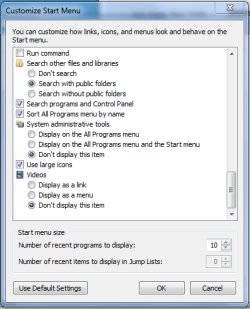
Check your start menu settings (right-click taskbar-Properties-Start Menu-Customize)
Search box in start menu does not work-capture.png

You might also want to reset your advanced internet settings (Control Panel-Network and Internet-Internet Settings-Advanced-Restore advanced setting).

Hope this helps


Jeff
My System SpecsSystem Spec
.


05-26-2009   #4


Quote   Quote: Originally Posted by enzo View Post
does the search indexer have anything actually indexed?

Enzo.
+ 1 enzo
My System SpecsSystem Spec
05-26-2009   #5


Windows 7


Quote   Quote: Originally Posted by ENZO View Post
Does the search indexer have anything actually indexed?

Enzo.
Sure. There's 20000+ files in index.
My System SpecsSystem Spec
05-26-2009   #6


Windows 7


Quote   Quote: Originally Posted by Orbital Shark View Post
Hi iinlane, welcome to the forums.

Check your start menu settings (right-click taskbar-Properties-Start Menu-Customize)

You might also want to reset your advanced internet settings (Control Panel-Network and Internet-Internet Settings-Advanced-Restore advanced setting).

Hope this helps

Jeff
Thanks for great reply but it didn't help.
My System SpecsSystem Spec
05-26-2009   #7
OEM


OS3.5


Just an idea, try rebuilding the index. Control panel\index options, click advanced then on rebuild.
My System SpecsSystem Spec
05-26-2009   #8


Windows 7


Quote   Quote: Originally Posted by OEM View Post
Just an idea, try rebuilding the index. Control panel\index options, click advanced then on rebuild.
Already tried. Did not help.

An interesting note. Under another user account the search box works normally. So the problem must be somewhere in user profile.
My System SpecsSystem Spec
05-26-2009   #9
OEM


OS3.5


On another thread, it was brought to my attention that you can uninstall /reinstall the search service.

Try going to:

Control Panel\Programs\Programs and Features

and in the left plane, click on "Turn Windows features on or off". In the new window scroll down to "windows search", un-check it, click OK and restart.
After restart, go back and re-check "windows search", restart and see if that does the trick. Good Luck
Attachment 12096

Last edited by OEM; 01-01-2011 at 06:44 PM..
My System SpecsSystem Spec
05-26-2009   #10


Windows 7


Quote   Quote: Originally Posted by OEM View Post
On another thread, it was brought to my attention that you can uninstall /reinstall the search service.

Try going to:

Control Panel\Programs\Programs and Features

and in the left plane, click on "Turn Windows features on or off". In the new window scroll down to "windows search", un-check it, click OK and restart.
After restart, go back and re-check "windows search", restart and see if that does the trick. Good Luck
Already tried that but it didn't help.

Just got it working, the problem was somewhere in registry. Butchered big part of current_user/software/microsoft/windows before I got it working. I localized the problem by renaming NTUSER.dat by using a temporary account; it helped.

It's the dirtiest fix I have ever done to my computer.

Br, Robert.
My System SpecsSystem Spec
Reply

Search box in start menu does not work problems?


Thread Tools


Similar Threads for: Search box in start menu does not work
Thread Forum
Start Menu - Add Libraries to Search in Start Menu Tutorials
Start menu run/search box won't work General Discussion
Start Menu Search Doesnt work General Discussion
Start Menu - Add Search Connectors to Start Menu Search Tutorials
Google Desktop Search Results from Start menu search Software


All times are GMT -5. The time now is 06:18 AM.


Windows 7 Forums is an independent web site and has not been authorized,
sponsored, or otherwise approved by Microsoft Corporation.
"Windows 7" and related materials are trademarks of Microsoft Corp.
© Designer Media Ltd
  

1 2 3 4 5 6 7 8 9 10 11 12 13 14 15 16 17 18 19 20 21 22 23 24 25 26 27 28 29 30