Search Indexing problem

s7ven

New member
Hi everyone,

Can you please help me figure out how to fix my "search bar" Sorry, I do not know the name of it but I included a picture. I just reformatted my laptop and now it does not work the way it did before. I used to type msconfig, device manager, and cmd.exe then "enter" and these applications open up. Now, as you can see on the picture, it does not show device manager anymore. My search indexing is on, see picture. I would really appreciate a hand. Thanks.

s7ven,
 

Attachments

  • Untitled.png
    Untitled.png
    23.1 KB · Views: 6
  • Untitled2.png
    Untitled2.png
    50.1 KB · Views: 8

My Computer

OS
Windows s7ven

My Computer

Computer type
PC/Desktop
Computer Manufacturer/Model Number
Self built custom
OS
64-bit Windows 11 Pro for Workstations
CPU
Intel i7-8700K OC'd to 5 GHz
Motherboard
ASUS ROG Maximus XI Formula Z390
Memory
64 GB (4x16GB) G.SKILL TridentZ RGB DDR4 3600 MHz
Graphics Card(s)
ASUS ROG-STRIX-GTX1080TI-O11G-GAMING
Sound Card
Integrated
Monitor(s) Displays
2 x Samsung Odyssey G7 27"
Screen Resolution
2560x1440
Hard Drives
1TB Samsung 990 PRO M.2,
4TB Samsung 990 PRO PRO M.2,
TerraMaster F8 SSD Plus NAS
PSU
Seasonic Prime Titanium 850W
Case
Thermaltake Core P3
Cooling
Corsair Hydro H115i
Keyboard
Logitech wireless K800
Mouse
Logitech MX Master 4
Internet Speed
2 Gb/s Download and 100 Mb/s Upload
Antivirus
Malwarebyte Anti-Malware Premium
Browser
Google Chrome
Other Info
Logitech Z625 speaker system,
Logitech BRIO 4K Pro webcam,
HP Color LaserJet Pro MFP M477fdn,
APC SMART-UPS RT 1000 XL - SURT1000XLI,
Galaxy S23 Plus phone
Hello s7ven,

This may be able to help. Check through the items in the NOTE boxes to see if setting those settings may be able to help.

http://www.sevenforums.com/tutorials/36599-search-windows-7-a.html

Hope this helps,
Shawn

Hi Shawn,

It did not solve my problem. It is really weird because I reformat my laptop almost every 3 mos. and never had this problem. I have not changed any of my indexing settings. Though I put the "Run Command" in my Start Menu and have removed it later on. Do you think it has to the with it?

s7ven,
 

My Computer

OS
Windows s7ven
...Though I put the "Run Command" in my Start Menu and have removed it later on. Do you think it has to the with it?

s7ven,

I doubt thats the reason because I also added the run command to my start menu, then removed it when i realised the search bar can do the same thing, and did not have the problem you are having. Sorry its not the solution, but i thought it might help to rule this out.
 

My Computer

Computer Manufacturer/Model Number
HP dv6519tx
OS
Windows 7 Ultimate x64
CPU
1.80 GHz Intel Core 2 Duo processor T7100
Memory
3 gig ddr2
Graphics Card(s)
NVIDIA GeForce 8400M GS
Sound Card
Realtek High Definition Audio
Monitor(s) Displays
15.4” WXGA High Definition BrightView Widescreen
Screen Resolution
1280 x 800
Hard Drives
Hitachi 320 GB (5400 rpm)
PSU
90 W AC Power Adapter
Cooling
Kitchen plate under the lappy
Keyboard
101 key compatible
Mouse
Touch Pad with On/Off button and dedicated vertical Scroll
Internet Speed
Three Wireless internet prepaid using E160G USB dongle
s7ven,

As a test, disable the Search index completely to have Windows 7 use nonindexed searched by default to see if your searches are accurate afterwards.
 

My Computer

Computer type
PC/Desktop
Computer Manufacturer/Model Number
Self built custom
OS
64-bit Windows 11 Pro for Workstations
CPU
Intel i7-8700K OC'd to 5 GHz
Motherboard
ASUS ROG Maximus XI Formula Z390
Memory
64 GB (4x16GB) G.SKILL TridentZ RGB DDR4 3600 MHz
Graphics Card(s)
ASUS ROG-STRIX-GTX1080TI-O11G-GAMING
Sound Card
Integrated
Monitor(s) Displays
2 x Samsung Odyssey G7 27"
Screen Resolution
2560x1440
Hard Drives
1TB Samsung 990 PRO M.2,
4TB Samsung 990 PRO PRO M.2,
TerraMaster F8 SSD Plus NAS
PSU
Seasonic Prime Titanium 850W
Case
Thermaltake Core P3
Cooling
Corsair Hydro H115i
Keyboard
Logitech wireless K800
Mouse
Logitech MX Master 4
Internet Speed
2 Gb/s Download and 100 Mb/s Upload
Antivirus
Malwarebyte Anti-Malware Premium
Browser
Google Chrome
Other Info
Logitech Z625 speaker system,
Logitech BRIO 4K Pro webcam,
HP Color LaserJet Pro MFP M477fdn,
APC SMART-UPS RT 1000 XL - SURT1000XLI,
Galaxy S23 Plus phone
s7ven,

As a test, disable the Search index completely to have Windows 7 use nonindexed searched by default to see if your searches are accurate afterwards.


HI Shawn,

I did that and I can't search anymore. Nothing shows up so I guess that is not the answer. Could this be a glitch? I'm pretty sure it is not caused by any other programs in my laptop because right after I reformatted it, I tried to access cmd.exe and it does not show up.

s7ven,
 

My Computer

OS
Windows s7ven
HI,, I have included the whole drive c now. I can see the cmd.exe but with a whole lot of .mui files. I still can't do cmd.exe then enter because if I do it gives me a result in a new explorer. I also can't search for "device manager"
 

My Computer

OS
Windows s7ven
s7ven,

Is the cmd.exe file there if you go to it's source C:\Windows\System32\cmd.exe location?

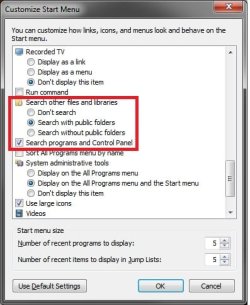
If yes, then see if having you search options in Folder Options (left) and Customize Start Menu settings (right) set like below may help with the search results.

Folder_Options.jpgStart_Menu.jpg
 

My Computer

Computer type
PC/Desktop
Computer Manufacturer/Model Number
Self built custom
OS
64-bit Windows 11 Pro for Workstations
CPU
Intel i7-8700K OC'd to 5 GHz
Motherboard
ASUS ROG Maximus XI Formula Z390
Memory
64 GB (4x16GB) G.SKILL TridentZ RGB DDR4 3600 MHz
Graphics Card(s)
ASUS ROG-STRIX-GTX1080TI-O11G-GAMING
Sound Card
Integrated
Monitor(s) Displays
2 x Samsung Odyssey G7 27"
Screen Resolution
2560x1440
Hard Drives
1TB Samsung 990 PRO M.2,
4TB Samsung 990 PRO PRO M.2,
TerraMaster F8 SSD Plus NAS
PSU
Seasonic Prime Titanium 850W
Case
Thermaltake Core P3
Cooling
Corsair Hydro H115i
Keyboard
Logitech wireless K800
Mouse
Logitech MX Master 4
Internet Speed
2 Gb/s Download and 100 Mb/s Upload
Antivirus
Malwarebyte Anti-Malware Premium
Browser
Google Chrome
Other Info
Logitech Z625 speaker system,
Logitech BRIO 4K Pro webcam,
HP Color LaserJet Pro MFP M477fdn,
APC SMART-UPS RT 1000 XL - SURT1000XLI,
Galaxy S23 Plus phone
s7ven,

Is the cmd.exe file there if you go to it's source C:\Windows\System32\cmd.exe location?

If yes, then see if having you search options in Folder Options (left) and Customize Start Menu settings (right) set like below may help with the search results.

View attachment 101197View attachment 101199


Hi Shawn,

It is working now. Thanks so much. I have a feeling it has to do with the "Search the Control Panel" in the Start Menu Customize. I appreciate your time helping me out. I have probably ticked that off when I customize my Start Menu, how silly of me. :)

s7ven,
 

My Computer

OS
Windows s7ven
You're most welcome s7ven. I'm happy to hear that it's working now. :)
 

My Computer

Computer type
PC/Desktop
Computer Manufacturer/Model Number
Self built custom
OS
64-bit Windows 11 Pro for Workstations
CPU
Intel i7-8700K OC'd to 5 GHz
Motherboard
ASUS ROG Maximus XI Formula Z390
Memory
64 GB (4x16GB) G.SKILL TridentZ RGB DDR4 3600 MHz
Graphics Card(s)
ASUS ROG-STRIX-GTX1080TI-O11G-GAMING
Sound Card
Integrated
Monitor(s) Displays
2 x Samsung Odyssey G7 27"
Screen Resolution
2560x1440
Hard Drives
1TB Samsung 990 PRO M.2,
4TB Samsung 990 PRO PRO M.2,
TerraMaster F8 SSD Plus NAS
PSU
Seasonic Prime Titanium 850W
Case
Thermaltake Core P3
Cooling
Corsair Hydro H115i
Keyboard
Logitech wireless K800
Mouse
Logitech MX Master 4
Internet Speed
2 Gb/s Download and 100 Mb/s Upload
Antivirus
Malwarebyte Anti-Malware Premium
Browser
Google Chrome
Other Info
Logitech Z625 speaker system,
Logitech BRIO 4K Pro webcam,
HP Color LaserJet Pro MFP M477fdn,
APC SMART-UPS RT 1000 XL - SURT1000XLI,
Galaxy S23 Plus phone
Back
Top