Jumplists And System32

dd8p

New member
Local time
10:48 PM
Messages
11
I am using Windows 7 Home Premium.

When I click on a jumplist in the start menu, then anything to do with Tasks or Frequent it seems to go to System32 file, even any stuff to do with iTunes.

How do I get it so that the jumplists are working correctly? I have an Acer Aspire X3950, 4GB of RAM.

Many thanks

dd8p
 

My Computer My Computer

At a glance

Windows 7 Home Premium 64bit
OS
Windows 7 Home Premium 64bit
Welcome to Seven Forums dd8p. Download ShellExView HERE.

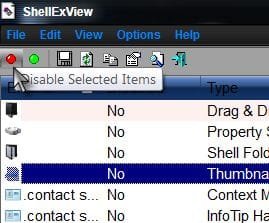
Extract to a folder anywhere, the desktop is easy. Click on shexview.exe to open the program. After it scans it will create a list. The non microsoft items will be highlighted in pink. Select all non microsoft items, and choose "Disable selected items" in toolbar.

The red dot in upper left:

Disable.jpg

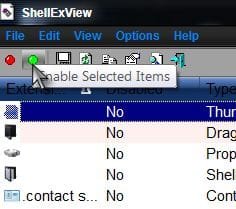
Restart to see if problem is corrected. If not, just select all non microsoft items again, and choose "Enable selected items" in toolbar to restore everything.

The green dot next to the red:

Enable.jpg

But if disabling DOES fix the problem. Enable the pink items either one by one and reboot and test after each, or you can enable 1/2, or 10 at a time, for instance, then reboot. And if the problem doesn't return, you can then choose the other half, or ten more, etc. You must reboot each time to know if the problem has returned. But if disabling all fixed the problem, you can be sure a 3rd party shell extension is the cause.

Do this until you figure out which extension caused the problem, then either just leave it disabled, or remove it.

Good luck. A Guy
 

My Computer My Computer

At a glance

Windows 10 Home x64INTEL Core i5-750 Quad-Core 3.37GHzHyperX Fury Black Series 8GB (2 x 4GB) 1866MhzEVGA GeForce GTX 750 Superclocked 1GB 128-Bit...
Computer type
PC/Desktop
OS
Windows 10 Home x64
CPU
INTEL Core i5-750 Quad-Core 3.37GHz
Motherboard
ASUS P7P55D
Memory
HyperX Fury Black Series 8GB (2 x 4GB) 1866Mhz
Graphics Card(s)
EVGA GeForce GTX 750 Superclocked 1GB 128-Bit GDDR5
Monitor(s) Displays
LG 32MA68HY 32" IPS
Screen Resolution
1920 x 1080
Hard Drives
Samsung 840 Evo 120GB, SEAGATE 500GB Barracuda® 7200.12, SATA 3 Gb/s, 7200 RPM, 16MB cache
PSU
ANTEC TruePower New TP-550, 80 PLUS, 550W
Case
ANTEC Three Hundred Illusion
Cooling
COOLER MASTER Hyper 212 Plus, 4 x 120mm 1 x 140mm Noctua's
Internet Speed
85 + Mbps
Antivirus
Avast
Browser
Vivaldi
Back
Top