Windows 7 Forums Search
Welcome to Windows 7 Forums. Our forum is dedicated to helping you find solutions with any problems, errors or issues you are experiencing with Windows 7. The Windows 7 forum also covers news and updates and has an extensive Windows 7 tutorial section that covers a wide range of tips and tricks.


Windows 7 - Close Many windows at once

 
05-30-2009   #1


Windows 7 x64 / Same


Close Many windows at once

Not sure where to put this but:

In XP and Vista, you could hold down Ctrl, left click more than one window in the taskbar, and right click and close all the selected windows at once.

This doesn't seem to work in 7. Is this functionality still there but using different keys?

My System SpecsSystem Spec
05-30-2009   #2
bhuulo


Quote   Quote: Originally Posted by Win7User512 View Post
Not sure where to put this but:

In XP and Vista, you could hold down Ctrl, left click more than one window in the taskbar, and right click and close all the selected windows at once.

This doesn't seem to work in 7. Is this functionality still there but using different keys?

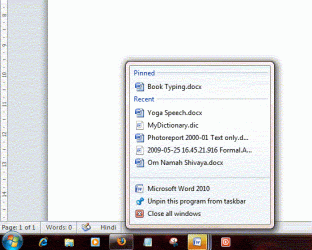
Shift+ left click opens more than 1 window and when u have grouped icons then simply right click on the icon shows the option to close all the selected windows... screenshot below of the close window...
Attached Thumbnails
Close Many windows at once-close-all.gif  
My System SpecsSystem Spec
05-30-2009   #3


Win7 7600 x64


You can show desktop by hovering mouse to the right of the clock in the taskbar. Or click the same area and everything shrinks down so you can see the desktop.

[Alt+F4] - Close the active window.

But I am unable to find a short cut to close all active windows.
My System SpecsSystem Spec
.


05-30-2009   #4


Windows 7 Ultimate x64 SP1


Clicking once on the Show Desktop in the right corner like ilesal says is I think a much faster way than any other shortcuts.
My System SpecsSystem Spec
05-30-2009   #5
bhuulo


I beg ur pardon but the original post is closing many windows at once not minimizing windows....
My System SpecsSystem Spec
05-30-2009   #6


Windows 7 Ultimate x64 SP1


Oh yeah, you right. My bad.
My System SpecsSystem Spec
05-30-2009   #7


Windows 7 x64 / Same


Quote   Quote: Originally Posted by bhuulo View Post
Shift+ left click opens more than 1 window and when u have grouped icons then simply right click on the icon shows the option to close all the selected windows... screenshot below of the close window...
Thanks, the close all will be handy. But to clarify, I may not want to close all windows of a particular type (many Notepads for example). I may want to close just 3 or 5 windows for example. Can this still be done? Or are we restricted to the extremes of all or none?
My System SpecsSystem Spec
05-30-2009   #8


Windows 7 Ultimate Vista Ultimate x64


Another way to close a program is to use the middle button on your mouse and just click on the preview window.
My System SpecsSystem Spec
05-30-2009   #9
bhuulo


Quote   Quote: Originally Posted by Win7User512 View Post
Thanks, the close all will be handy. But to clarify, I may not want to close all windows of a particular type (many Notepads for example). I may want to close just 3 or 5 windows for example. Can this still be done? Or are we restricted to the extremes of all or none?
What is know is extreme of all or none...
My System SpecsSystem Spec
06-09-2009   #10


Win7 7600 x64


Whilst searching for an answer I found out that you can hold Ctrl and press W to close all open windows.

I am determine to find the answer to your question and will post back when I do.
My System SpecsSystem Spec
Reply

 Close Many windows at once problems?


Thread Tools


Similar Threads for: Close Many windows at once
Thread Forum
problem when close windows General Discussion
Close all Photoshop windows at once Music, Pictures & Video
Windows Close Down Problem General Discussion
Can't close windows?! General Discussion
A Close Look At The New Windows 7 Taskbar News


All times are GMT -5. The time now is 09:51 PM.


Windows 7 Forums is an independent web site and has not been authorized,
sponsored, or otherwise approved by Microsoft Corporation.
"Windows 7" and related materials are trademarks of Microsoft Corp.
© Designer Media Ltd
  

1 2 3 4 5 6 7 8 9 10 11 12 13 14 15 16 17 18 19 20 21 22 23 24 25 26 27 28 29 30