Windows 7 Forums Search
Welcome to Windows 7 Forums. Our forum is dedicated to helping you find solutions with any problems, errors or issues you are experiencing with Windows 7. The Windows 7 forum also covers news and updates and has an extensive Windows 7 tutorial section that covers a wide range of tips and tricks.


Windows 7 - Everything looks erased

 
10-09-2010   #1


Windows 7 Enterprise x64


Everything looks erased

Hi,I have a problem with my PC.
everything on the monitor look like a fluding just crossed on my descktop.
What should I do?

My System SpecsSystem Spec
10-09-2010   #2


ultimate 64 sp1


give us a screenshot perhaps?

you can either use the snipping-tool (type snip into your start-menu searchbox) or use the PrtScrn key, and paste it into the paint program.

then attach the image file to your post.

ask for more help if you need it.
My System SpecsSystem Spec
10-09-2010   #3


Windows 7 Enterprise x64


Quote   Quote: Originally Posted by mickey megabyte View Post
give us a screenshot perhaps?

you can either use the snipping-tool (type snip into your start-menu searchbox) or use the PrtScrn key, and paste it into the paint program.

then attach the image file to your post.

ask for more help if you need it.
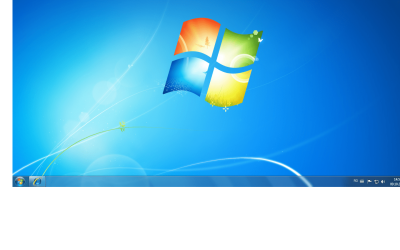
Look like this
Attached Thumbnails
Everything looks erased-screen.png  
My System SpecsSystem Spec
.


10-09-2010   #4


ultimate 64 sp1


maybe it is your monitor settings.

do you have a flat lcd screen or a bigger old monitor?
My System SpecsSystem Spec
10-09-2010   #5


Win 7 Home Premium (64-bit), Win 7 Pro (32-bit)


Your screenshot looks normal to me so perhaps you have a problem with your monitor. Can you try the monitor on another computer?
My System SpecsSystem Spec
10-09-2010   #6


Windows 7 Ultimate 32-bit & 64-bit both SP1


Can you capture an image of what you're seeing on your monitor with a digital camera and upload that picture for us? The problem with the Snipping Tool and PrtScn is that whilst they capture the screen image, they only capture it at source, which is the raw data fed to the monitor. They do not capture the image as it appears on screen.
My System SpecsSystem Spec
10-09-2010   #7


Hi,

I've seen similar effects when using different multi-monitor settings. If you press Win+P it will bring up the monitor display arrangement box, just make sure that 'Computer Only' is selected and not 'Extended' as this can cause the Icons to move to the extended desktop if that one is somehow set as the 'Main' display.

Hope it helps


OS
My System SpecsSystem Spec
10-09-2010   #8


Windows 7 Enterprise x64


Quote   Quote: Originally Posted by Orbital Shark View Post
Hi,

I've seen similar effects when using different multi-monitor settings. If you press Win+P it will bring up the monitor display arrangement box, just make sure that 'Computer Only' is selected and not 'Extended' as this can cause the Icons to move to the extended desktop if that one is somehow set as the 'Main' display.

Hope it helps


OS
Doesn't help.
I pressed auto-adjusting on the monitor,but nothing happened.
Does Benq monitors need software?
Till now,I didn't need them.
Attached Thumbnails
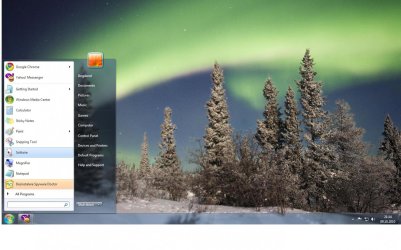
Everything looks erased-bug.jpg  
My System SpecsSystem Spec
10-09-2010   #9


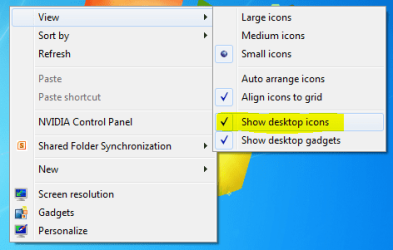
1 thing to try is right-click the desktop, hover over 'View' and see if 'Show desktop icons' has somehow been de-selected.

Everything looks erased-capture.png


OS
My System SpecsSystem Spec
10-09-2010   #10


Windows 7 Ultimate RTM (Technet)


I don't see a problem with any of the images you've posted.
My System SpecsSystem Spec
Reply

 Everything looks erased problems?


Thread Tools


Similar Threads for: Everything looks erased
Thread Forum
Erased password: Can't log in! Virtualization
Registry Erased General Discussion
One of my partitions erased please help. Hardware & Devices
Odd info on erased disc.. General Discussion
ENTIRE HDD Erased! General Discussion


All times are GMT -5. The time now is 09:56 PM.


Windows 7 Forums is an independent web site and has not been authorized,
sponsored, or otherwise approved by Microsoft Corporation.
"Windows 7" and related materials are trademarks of Microsoft Corp.
© Designer Media Ltd
  

1 2 3 4 5 6 7 8 9 10 11 12 13 14 15 16 17 18 19 20 21 22 23 24 25 26 27 28 29 30