
You are using an out of date browser. It may not display this or other websites correctly.
You should upgrade or use an alternative browser.
You should upgrade or use an alternative browser.
extracting files SOS
- Thread starter Piffdaddy
- Start date

What type of file is it that you are downloading? IZArc will extract almost any type of archive file. IZArc - Download
My Computer
At a glance
Windows 7 Professional SP1 64-bitIntel Core i5-2450M @2.5 GHz6 GB DDR3 1333MHzIntel HD 3000
- Computer type
- Laptop
- Computer Manufacturer/Model Number
- Toshiba P775-S7100
- OS
- Windows 7 Professional SP1 64-bit
- CPU
- Intel Core i5-2450M @2.5 GHz
- Memory
- 6 GB DDR3 1333MHz
- Graphics Card(s)
- Intel HD 3000
- Monitor(s) Displays
- Built-in 17.3" LED; 22" Insignia NS-L22Q-10A
- Screen Resolution
- 1600x900; 1360x768
- Hard Drives
- 750 GB Hitachi
1TB Seagate FreeAgent External
- Internet Speed
- Verizon DSL Speed(Down/Up): 3360 Kbps / 800 Kbps
- Antivirus
- MSE and MBAM Pro
- Browser
- IE10
You can extract most zip files in windows 7 without the use of third party software. All you need to do is find the zip folder in Windows Explorer and it should be simple enough from there. If you are still having trouble extracting it, use IZArc.
My Computer
At a glance
Windows 7 Professional SP1 64-bitIntel Core i5-2450M @2.5 GHz6 GB DDR3 1333MHzIntel HD 3000
- Computer type
- Laptop
- Computer Manufacturer/Model Number
- Toshiba P775-S7100
- OS
- Windows 7 Professional SP1 64-bit
- CPU
- Intel Core i5-2450M @2.5 GHz
- Memory
- 6 GB DDR3 1333MHz
- Graphics Card(s)
- Intel HD 3000
- Monitor(s) Displays
- Built-in 17.3" LED; 22" Insignia NS-L22Q-10A
- Screen Resolution
- 1600x900; 1360x768
- Hard Drives
- 750 GB Hitachi
1TB Seagate FreeAgent External
- Internet Speed
- Verizon DSL Speed(Down/Up): 3360 Kbps / 800 Kbps
- Antivirus
- MSE and MBAM Pro
- Browser
- IE10
You shouldn't need one. Can you post a screen shot of what you see. To do a screen shot, in case you don't already know, press the print screen key on your key board, open paint, hit paste, and save the image, the tutorial I linked to below will explain how to upload it.
http://www.sevenforums.com/tutorials/9733-screenshots-files-upload-post-seven-forums.html?ltr=S
http://www.sevenforums.com/tutorials/9733-screenshots-files-upload-post-seven-forums.html?ltr=S
My Computer
At a glance
Windows 7 Professional SP1 64-bitIntel Core i5-2450M @2.5 GHz6 GB DDR3 1333MHzIntel HD 3000
- Computer type
- Laptop
- Computer Manufacturer/Model Number
- Toshiba P775-S7100
- OS
- Windows 7 Professional SP1 64-bit
- CPU
- Intel Core i5-2450M @2.5 GHz
- Memory
- 6 GB DDR3 1333MHz
- Graphics Card(s)
- Intel HD 3000
- Monitor(s) Displays
- Built-in 17.3" LED; 22" Insignia NS-L22Q-10A
- Screen Resolution
- 1600x900; 1360x768
- Hard Drives
- 750 GB Hitachi
1TB Seagate FreeAgent External
- Internet Speed
- Verizon DSL Speed(Down/Up): 3360 Kbps / 800 Kbps
- Antivirus
- MSE and MBAM Pro
- Browser
- IE10

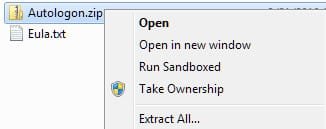
Don't you just right click on the zip file and choose "Extract All"?
Can't remember.....
Can't remember.....
My Computer
At a glance
Windows 7 64 Bit Home Premium SP1i7-3820GSkill F3-14900CL9Q - 16GBEVGA GeForce GTX660 - Driver 352.86
- Computer type
- PC/Desktop
- Computer Manufacturer/Model Number
- Home Built - Jan 2013
- OS
- Windows 7 64 Bit Home Premium SP1
- CPU
- i7-3820
- Motherboard
- Asus P9X79-PRO - Bios 4608
- Memory
- GSkill F3-14900CL9Q - 16GB
- Graphics Card(s)
- EVGA GeForce GTX660 - Driver 352.86
- Sound Card
- On board Realtek ALC898
- Monitor(s) Displays
- Acer S271HL
- Screen Resolution
- 1920 x 1080
- Hard Drives
- #1- Samsung 840 Pro Series
#2- Western Digital WD1002FAEX Sata3 Black
#3- Western Digital WD1002FAEX Sata3 Black
- PSU
- Corsair CMPSU-850TX-V2 - 850 watt (by Seasonic)
- Case
- Corsair Obsidian 550D
- Cooling
- Standard 3 120mm case fans, Cooler Master Hyper 212 EVO
- Keyboard
- MS KC-0405
- Mouse
- Intellimouse 5-button
- Internet Speed
- 56 Mbits/Sec (on a good day)
- Antivirus
- Avast & Malwarebytes
- Browser
- Firefox
- Other Info
- Asus DVD - DRW-24B1ST 24X

mikedl
New member
- Local time
- 10:00 PM
- Messages
- 1,342
Yep, you are correct.Don't you just right click on the zip file and choose "Extract All"?
Can't remember.....

My Computer
At a glance
Windows 7 Ultimate x64 SP1Core2 Duo4 GBGM965 on-board
- Computer Manufacturer/Model Number
- Toshiba L355D
- OS
- Windows 7 Ultimate x64 SP1
- CPU
- Core2 Duo
- Motherboard
- Intel
- Memory
- 4 GB
- Graphics Card(s)
- GM965 on-board
- Sound Card
- RealTek on-board
- Monitor(s) Displays
- 19"+17"(laptop)
- Screen Resolution
- 1440x900 (x 2)
- Hard Drives
- 500GB Ext. 200GB Internal
- PSU
- N/A
- Case
- N/A
- Cooling
- N/A

Piffdaddy , do you have full admin rights to the PC  http://www.sevenforums.com/tutorials/11841-run-administrator.html
http://www.sevenforums.com/tutorials/11841-run-administrator.html
Last edited:
My Computer
At a glance
win 7 ultimate32bit, Win8.1pro wmc 32bitamd phenom x4 9600corsair twinxs 2x2gb2x nvidia 1gb 8500gt
- Computer type
- PC/Desktop
- Computer Manufacturer/Model Number
- self build
- OS
- win 7 ultimate32bit, Win8.1pro wmc 32bit
- CPU
- amd phenom x4 9600
- Motherboard
- asus m2n32-sli deluxe
- Memory
- corsair twinxs 2x2gb
- Graphics Card(s)
- 2x nvidia 1gb 8500gt
- Sound Card
- onboard
- Monitor(s) Displays
- 23" PB Viseo 233d
- Screen Resolution
- 1920x1080
- Hard Drives
- maxtor sata 500gb
maxtor sata 320gb
fujitsu sata200gb
- PSU
- oryxx tornado 750w
- Case
- thermaltake xaser lll
- Cooling
- artic freezer64 pro + 7 case fans
Similar threads
- Replies
- 1
- Views
- 2K

- Replies
- 15
- Views
- 14K
- Replies
- 6
- Views
- 17K
- Replies
- 4
- Views
- 2K
