Hi all,
I've recently installed a new, 2nd, hard drive on my computer which I'll be using to store data on. All went well, fairly easy installation, but this meant that I ended up playing about with partitions on my 1st HDD (the one where windows is installed).
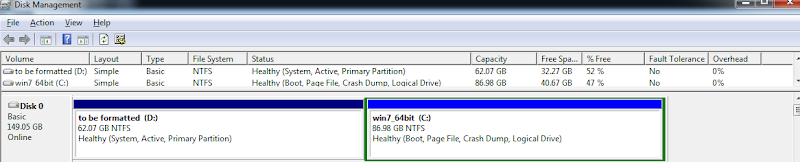
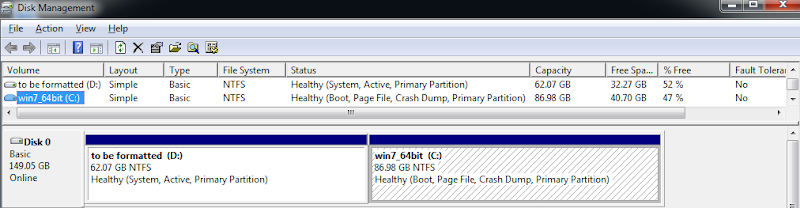
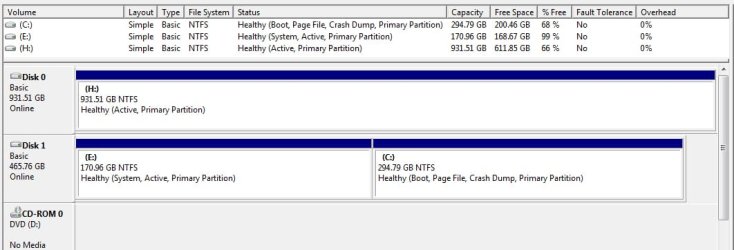
I managed to allocate my 1st HDD into two final partitions, one being the system partition and the other being the boot partition (the files were allocated in 2 different partitions, I'm assuming when I installed windows, but never really noticed/bothered me). This is where the problem lies. What do I need to do to merge these 2 partitions together?
Seeing as one has the system files and the other has the boot files, I realise that using disk manager is not possible (I do have Acronis Disk Director if it helps), but am comfortable with using command prompt.
I tried doing this myself, by searching for info over the web and mainly this forum, but my best result was to have an unbootable windows (Managed to get it back to normal so no worries there).
I would appreciate it if I could get some help on how to do this. I'm attaching a pic of disk management for further clarification of my system.
P.S. should I be able to get the partitions merged, if I want to repartition them again, this time with the system and boot files on the same partition, is the process easily done via disk manager?
P.P.S. on a slightly different note, should Disk 1 where windows is installed, be actually Disk 0, or it doesn't make a difference? and if so how would I go about doing this?
Thanks for all the help in advance
I've recently installed a new, 2nd, hard drive on my computer which I'll be using to store data on. All went well, fairly easy installation, but this meant that I ended up playing about with partitions on my 1st HDD (the one where windows is installed).
I managed to allocate my 1st HDD into two final partitions, one being the system partition and the other being the boot partition (the files were allocated in 2 different partitions, I'm assuming when I installed windows, but never really noticed/bothered me). This is where the problem lies. What do I need to do to merge these 2 partitions together?
Seeing as one has the system files and the other has the boot files, I realise that using disk manager is not possible (I do have Acronis Disk Director if it helps), but am comfortable with using command prompt.
I tried doing this myself, by searching for info over the web and mainly this forum, but my best result was to have an unbootable windows
(Managed to get it back to normal so no worries there).I would appreciate it if I could get some help on how to do this. I'm attaching a pic of disk management for further clarification of my system.
P.S. should I be able to get the partitions merged, if I want to repartition them again, this time with the system and boot files on the same partition, is the process easily done via disk manager?
P.P.S. on a slightly different note, should Disk 1 where windows is installed, be actually Disk 0, or it doesn't make a difference? and if so how would I go about doing this?
Thanks for all the help in advance
Attachments
My Computer
At a glance
Windows 7 Professional x64
- OS
- Windows 7 Professional x64