| Windows 7: New increased background CPU activity |
23 Oct 2010
|
#1 | | Windows 7 Home Premium x64 Exeter, UK |
New increased background CPU activity I'm puzzled. About 3 days ago the background CPU activity on my system rose to a quite significant level that, based on all my experience over many years, I'd say is way too high, and has stayed at that level - but I've been unable to link this to any new or updated program.
What makes this particularly difficult to get to grips with is that the main alleged culprit for this high level of background activity is a basic Windows process. I use Anvir Task Manager for my monitoring, and its tray icon for CPU activity shows svchost.exe as being the main player - but ATM's detailed process list shows something cryptically called 'System Idle Process' as being the primary culprit. However, I'm aware that the problem may well not lie in Windows, because the last time I suddenly got an ongoing too-high background CPU activity (i.e. ascribed to such basic Windows processes), I resolved the problem by uninstalling Drive Sentry (which I didn't care for anyway, despite some great features).
Unfortunately I've so far not identified any new or updated program that is responsible for this change as from about 3 days ago; those that I thought might have been responsible have all now been tested by exiting or disabling them, with no clear change in the background CPU activity.
Prior to about 3 days ago, background CPU activity simply was low enough not to be showing on the ATM tray icon, but it is now typically as in the attached image - usually but not always with a bit more activity in the core that is represented on the right side of the icon.
Any ideas of anything further simple things I could do to sort this thing out? -- Many thanks. | My System Specs |
| System Manufacturer/Model Number Nofan A40-Z68 Silent PC OS Windows 7 Home Premium x64 CPU Intel Core i3 2125 3.3GHz Sandy Bridge Dual Core Motherboard Gigabyte GA-Z68X-UD3H-B3 LGA1155 ATX Memory 8 GB Graphics Card On-board Sound Card On-board Monitor(s) Displays Xerox 700P LCD Screen Resolution 1280x1024 Keyboard Microsoft Natural Media Mouse Microsoft optical PSU Nofan 400W (fanless) Case Nofan CS-30 Cooling Nofan IcePipe Hard Drives 2 internal nominally 128 GB SSDs
plus intermittent use of USB-connected HDDs Internet Speed Nominal c. 17 mbps Other Info I have NO plans to return to the stressful noise of fan cooled computers, such time as I need to get a new system! |
23 Oct 2010
|
#2 | | Windows 7 Ultimate X64 SP1 Cromer Norfolk UK |
Well firstly, System Idle Process is the CPU doing nothing. So that isn't the culprit.
Can you please Open Task Manager (CTRL-SHIFT-ESC) and click the Processes Tab. Then click "Show Processes for All Users" and click the "CPU" tag at the top, so that the highest using CPU processes are at the top. and upload a screenshot using Snipping Tool (use Start Menu Search to find it) | My System Specs | | Computer type PC/Desktop System Manufacturer/Model Number Self Built OS Windows 7 Ultimate X64 SP1 CPU Intel(R) Core(TM) i5-2500K CPU @ 3.30GHz Motherboard Intel(R) Core(TM) i5-2500K CPU @ 3.30GHz Memory 8GB 1333Mhz DDR3 Graphics Card NVIDIA GeForce GTX 460 Sound Card Realtek Monitor(s) Displays Acer Al1980, Screen Resolution 1360*768 Keyboard Alba USB Mouse IT Works Wireless USB PSU 750W Cooler Master Case Cooler Master Haf X Cooling Cooler Master Hyper TX3 Hard Drives 500GB SATA WBC
1TB WD Caviar Green
80GB IDE Samsung Internet Speed 12Mb/s Down 1.2 Mb/s Up |
23 Oct 2010
|
#3 | | Operating System : Windows 7 Home Premium Edition 6.01.7600 SP1 (x64) MILTON KEYNES |
hello and welcome to the forums  if you would like to see more details of the processors and any good detail of the operating system my suggestion is download Sysinternals Suite By Mark Russinovich Sysinternals Suite
you will find a program called Process Monitor v2.93 Process Monitor
this will show you very detailed information | My System Specs | | System Manufacturer/Model Number packard bell IXTREME M5722 OS Operating System : Windows 7 Home Premium Edition 6.01.7600 SP1 (x64) CPU Processor : Intel Core 2 Quad Q8300 @ 2500 MHz Motherboard Mainboard : Packard Bell (Acer EG43M ) Memory Physical Memory :8GB Corsair4x 2GB 800MHz C5 DDR2 Graphics Card Video Card : XFX 6700 AMD Monitor(s) Displays Maestro 234DL - BenQ V2220 - BenQ VW2420H Screen Resolution Current Display :1920x1080p pixels at 60 Hz in HD LED Keyboard Gigabyte Aivia K8100 Mouse TRUST-Wireless Laser Mouse - Carbon edition MI-7770C PSU XFX ProSeries 550W PSU Case PACKARD BELL IXTREME Cooling System Blower Current: 150mA Air Flow16CFM ;Akasa 90mm rear Hard Drives Hard Disks : WDC (1000 GB)
Drive C: (Hard Disk) : 428 GB available on 491 GB
Drive D: (Hard Disk) : 426 GB available on 492 GB
SAMSUNG spinpoint HD103SJ 1000.2 GB
(X 2) KINGSTON SSD NOW V 30GB Internet Speed TP-LINK > TL-WN951N / AV500 Gigabit Powerline Adapters Other Info EXTRA COOLING>(FAN CONTROLLER) PC Bay Cooler 3 x 40mm fans; Akasa AK-HD-BL Blue hard drive cooler 2 x 40 mm fan 4500 rpm 29.7 dBA
Bios> American Megatrends Inc.
Version : P01-A1
Date : 08/31/2009 |
23 Oct 2010
|
#4 | | Windows7 Pro 64bit SP-1; Windows XP Pro 32bit Grafton,IL |
Type resource monitor in start menu search. Click it to open. Click CPU tab.
Gives you a full list of processes and other info.
A good extra resource for CPU, memory, hardrive and network info.
Mike
Last edited by Hopalong X; 26 Jan 2011 at 10:33 AM..
| My System Specs | | System Manufacturer/Model Number Hopalong/ Godzilla OS Windows7 Pro 64bit SP-1; Windows XP Pro 32bit CPU Intel Core i7-870 Lynnfield 2.93GHz LGA 1156 95W Quad-Core Motherboard ASUS P7P55D-E PRO Memory 8GB@1400MHz Crucial Ballistix DDR3-1600 4x2GB Graphics Card ASUS ENGTX460 DirectCU/2DI/1GD5 1GB 256-bit GDDR5 Sound Card VIA Onboard Monitor(s) Displays Asus VS248H-P 24"; Samsung SyncMaster 941BW 19"ws Screen Resolution 1920x1080; 1440x900 Keyboard Logitech K-320 Mouse Kensington PSU COOLER MASTER Silent Pro RS850-AMBAJ3-US 850W Modular Case COOLER MASTER HAF 932 RC-932-KKN5-GP Black Cooling Scythe "Mugen-2 Rev.B" (2 ScytheKaze-Jyuni PWM fans) Hard Drives Samsung 830 120GB SSD
Intel 320 120GB SSD
Western Digital Caviar Black WD7501AALS 750GB 7200 RPM SATA 3.0Gb/s
Western Digital Caviar Black WD6401AALS 640GB 7200 RPM SATA 3.0Gb/s Antivirus Avast Inernet Suite Browser IE 9 ; Chrome |
23 Oct 2010
|
#5 | | Windows 7 Home Premium x64 Exeter, UK |
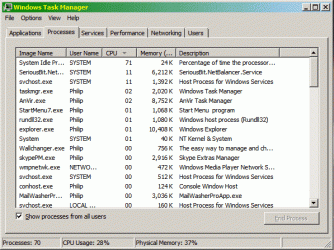
Here's my Task Manager screen clip.
Brianzion and Hopalong X, thank you for your suggestions. I am indeed aware of Process Monitor, which I do have on my system, but generally I use Anvir Task Manager, which is a great and versatile piece of work. If you don't know it, it's really worth exploring. | My System Specs | | System Manufacturer/Model Number Nofan A40-Z68 Silent PC OS Windows 7 Home Premium x64 CPU Intel Core i3 2125 3.3GHz Sandy Bridge Dual Core Motherboard Gigabyte GA-Z68X-UD3H-B3 LGA1155 ATX Memory 8 GB Graphics Card On-board Sound Card On-board Monitor(s) Displays Xerox 700P LCD Screen Resolution 1280x1024 Keyboard Microsoft Natural Media Mouse Microsoft optical PSU Nofan 400W (fanless) Case Nofan CS-30 Cooling Nofan IcePipe Hard Drives 2 internal nominally 128 GB SSDs
plus intermittent use of USB-connected HDDs Internet Speed Nominal c. 17 mbps Other Info I have NO plans to return to the stressful noise of fan cooled computers, such time as I need to get a new system! |
23 Oct 2010
|
#6 | | Operating System : Windows 7 Home Premium Edition 6.01.7600 SP1 (x64) MILTON KEYNES |
that looks good to me  System Idle Process means thats how much cpu you have doing nothing waiting to be used, nothing to worry about | My System Specs | | System Manufacturer/Model Number packard bell IXTREME M5722 OS Operating System : Windows 7 Home Premium Edition 6.01.7600 SP1 (x64) CPU Processor : Intel Core 2 Quad Q8300 @ 2500 MHz Motherboard Mainboard : Packard Bell (Acer EG43M ) Memory Physical Memory :8GB Corsair4x 2GB 800MHz C5 DDR2 Graphics Card Video Card : XFX 6700 AMD Monitor(s) Displays Maestro 234DL - BenQ V2220 - BenQ VW2420H Screen Resolution Current Display :1920x1080p pixels at 60 Hz in HD LED Keyboard Gigabyte Aivia K8100 Mouse TRUST-Wireless Laser Mouse - Carbon edition MI-7770C PSU XFX ProSeries 550W PSU Case PACKARD BELL IXTREME Cooling System Blower Current: 150mA Air Flow16CFM ;Akasa 90mm rear Hard Drives Hard Disks : WDC (1000 GB)
Drive C: (Hard Disk) : 428 GB available on 491 GB
Drive D: (Hard Disk) : 426 GB available on 492 GB
SAMSUNG spinpoint HD103SJ 1000.2 GB
(X 2) KINGSTON SSD NOW V 30GB Internet Speed TP-LINK > TL-WN951N / AV500 Gigabit Powerline Adapters Other Info EXTRA COOLING>(FAN CONTROLLER) PC Bay Cooler 3 x 40mm fans; Akasa AK-HD-BL Blue hard drive cooler 2 x 40 mm fan 4500 rpm 29.7 dBA
Bios> American Megatrends Inc.
Version : P01-A1
Date : 08/31/2009 |
23 Oct 2010
|
#7 | | Windows 7 Home Premium x64 Exeter, UK |
No, I don't see it that way. Even if nothing supposedly untoward is running, that superfluous CPU activity is, apart from anything else, wasted power, and it's totally unnecessary, because I didn't have that until some 3 days ago, as I've already noted.
There will be a specific cause for that hike in background CPU activity, and I want to find that cause, and, if possible (which I'm pretty sure it would be), to squash it. | My System Specs | | System Manufacturer/Model Number Nofan A40-Z68 Silent PC OS Windows 7 Home Premium x64 CPU Intel Core i3 2125 3.3GHz Sandy Bridge Dual Core Motherboard Gigabyte GA-Z68X-UD3H-B3 LGA1155 ATX Memory 8 GB Graphics Card On-board Sound Card On-board Monitor(s) Displays Xerox 700P LCD Screen Resolution 1280x1024 Keyboard Microsoft Natural Media Mouse Microsoft optical PSU Nofan 400W (fanless) Case Nofan CS-30 Cooling Nofan IcePipe Hard Drives 2 internal nominally 128 GB SSDs
plus intermittent use of USB-connected HDDs Internet Speed Nominal c. 17 mbps Other Info I have NO plans to return to the stressful noise of fan cooled computers, such time as I need to get a new system! |
23 Oct 2010
|
#8 | | Operating System : Windows 7 Home Premium Edition 6.01.7600 SP1 (x64) MILTON KEYNES |
thats why i suggested looking with the process monitor because it will show every process what you are using, in your screen shot is a summary, the system idle process does not use power it is telling you how much is available what is free not being used. here are some of my processors | My System Specs | | System Manufacturer/Model Number packard bell IXTREME M5722 OS Operating System : Windows 7 Home Premium Edition 6.01.7600 SP1 (x64) CPU Processor : Intel Core 2 Quad Q8300 @ 2500 MHz Motherboard Mainboard : Packard Bell (Acer EG43M ) Memory Physical Memory :8GB Corsair4x 2GB 800MHz C5 DDR2 Graphics Card Video Card : XFX 6700 AMD Monitor(s) Displays Maestro 234DL - BenQ V2220 - BenQ VW2420H Screen Resolution Current Display :1920x1080p pixels at 60 Hz in HD LED Keyboard Gigabyte Aivia K8100 Mouse TRUST-Wireless Laser Mouse - Carbon edition MI-7770C PSU XFX ProSeries 550W PSU Case PACKARD BELL IXTREME Cooling System Blower Current: 150mA Air Flow16CFM ;Akasa 90mm rear Hard Drives Hard Disks : WDC (1000 GB)
Drive C: (Hard Disk) : 428 GB available on 491 GB
Drive D: (Hard Disk) : 426 GB available on 492 GB
SAMSUNG spinpoint HD103SJ 1000.2 GB
(X 2) KINGSTON SSD NOW V 30GB Internet Speed TP-LINK > TL-WN951N / AV500 Gigabit Powerline Adapters Other Info EXTRA COOLING>(FAN CONTROLLER) PC Bay Cooler 3 x 40mm fans; Akasa AK-HD-BL Blue hard drive cooler 2 x 40 mm fan 4500 rpm 29.7 dBA
Bios> American Megatrends Inc.
Version : P01-A1
Date : 08/31/2009 |
23 Oct 2010
|
#9 | | Operating System : Windows 7 Home Premium Edition 6.01.7600 SP1 (x64) MILTON KEYNES |
Last edited by brianzion; 23 Oct 2010 at 10:12 AM..
Reason: update info
| My System Specs | | System Manufacturer/Model Number packard bell IXTREME M5722 OS Operating System : Windows 7 Home Premium Edition 6.01.7600 SP1 (x64) CPU Processor : Intel Core 2 Quad Q8300 @ 2500 MHz Motherboard Mainboard : Packard Bell (Acer EG43M ) Memory Physical Memory :8GB Corsair4x 2GB 800MHz C5 DDR2 Graphics Card Video Card : XFX 6700 AMD Monitor(s) Displays Maestro 234DL - BenQ V2220 - BenQ VW2420H Screen Resolution Current Display :1920x1080p pixels at 60 Hz in HD LED Keyboard Gigabyte Aivia K8100 Mouse TRUST-Wireless Laser Mouse - Carbon edition MI-7770C PSU XFX ProSeries 550W PSU Case PACKARD BELL IXTREME Cooling System Blower Current: 150mA Air Flow16CFM ;Akasa 90mm rear Hard Drives Hard Disks : WDC (1000 GB)
Drive C: (Hard Disk) : 428 GB available on 491 GB
Drive D: (Hard Disk) : 426 GB available on 492 GB
SAMSUNG spinpoint HD103SJ 1000.2 GB
(X 2) KINGSTON SSD NOW V 30GB Internet Speed TP-LINK > TL-WN951N / AV500 Gigabit Powerline Adapters Other Info EXTRA COOLING>(FAN CONTROLLER) PC Bay Cooler 3 x 40mm fans; Akasa AK-HD-BL Blue hard drive cooler 2 x 40 mm fan 4500 rpm 29.7 dBA
Bios> American Megatrends Inc.
Version : P01-A1
Date : 08/31/2009 |
23 Oct 2010
|
#10 | | Windows 7 Home Premium x64 Exeter, UK |
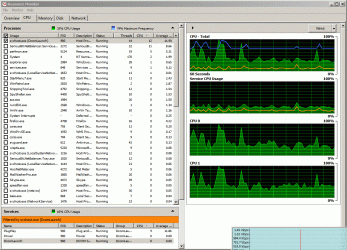
Here is a clip from Resource Monitor. Process Monitor I cannot make head or tail of for the present purpose (and I'm pretty computer-savvy!), and couldn't get a listing like the one you show, BrianZian. Indeed, Process Monitor actually ran my system out of memory, which I've never ever had happen before (necessitating a hardware reboot), so I shall not be very inclined to use it again!
The supernumerary window overlapping with the Resource Monitor display is actually my Net Meter display, which Snipper didn't manage to exclude despite my selecting the Resource Monitor window to 'snip'. | My System Specs | | System Manufacturer/Model Number Nofan A40-Z68 Silent PC OS Windows 7 Home Premium x64 CPU Intel Core i3 2125 3.3GHz Sandy Bridge Dual Core Motherboard Gigabyte GA-Z68X-UD3H-B3 LGA1155 ATX Memory 8 GB Graphics Card On-board Sound Card On-board Monitor(s) Displays Xerox 700P LCD Screen Resolution 1280x1024 Keyboard Microsoft Natural Media Mouse Microsoft optical PSU Nofan 400W (fanless) Case Nofan CS-30 Cooling Nofan IcePipe Hard Drives 2 internal nominally 128 GB SSDs
plus intermittent use of USB-connected HDDs Internet Speed Nominal c. 17 mbps Other Info I have NO plans to return to the stressful noise of fan cooled computers, such time as I need to get a new system! New increased background CPU activity problems? All times are GMT -5. The time now is 07:44 PM. | |