Windows 7 Forums


Windows 7: I found a New Local Disk Drive?

02 Nov 2010   #1

Windows 7 Home Premium 32-bit
 
 
I found a New Local Disk Drive?

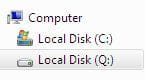
Ok so I was looking through my computer and found this
Name:  Capture6.JPG
Views: 341
Size:  10.4 KB

I'm pretty much sure I didn't intall a new HD so what going on here?

My System SpecsSystem Spec

02 Nov 2010   #2

Windows 7 Ultimate x64
Milton Keynes, United Kingdom


Can you access it? Is there anything on it?

Try clicking Start and right-click 'Computer' and select Manage. What shows up under 'Drive Management'?
My System SpecsSystem Spec
02 Nov 2010   #3

ultimate 64 sp1


microsoft have recently been giving away free hard drvies - maybe you were a lucky winner?

seriously though, how big is it? if it's 100MB, then it's probably your reserved boot partition.
My System SpecsSystem Spec
.


02 Nov 2010   #4

Windows 7 Home Premium 32-bit


Quote   Quote: Originally Posted by Orbital Shark View Post
Can you access it? Is there anything on it?

Try clicking Start and right-click 'Computer' and select Manage. What shows up under 'Drive Management'?
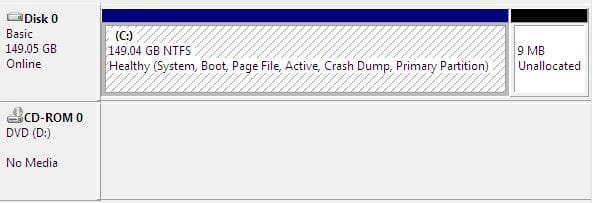
Nope all i got was this

I found a New Local Disk Drive?-capture7.jpg
My System SpecsSystem Spec
02 Nov 2010   #5

Windows 7 Ultimate x64
Milton Keynes, United Kingdom


That's really bizarr...

You should be able to right-click the 9mb unalocated space and delete it. Then right-click the main drive and 'Extend' it by those 9mb.

I've not known Windows do that without user input
My System SpecsSystem Spec
02 Nov 2010   #6

Windows 7 Home Premium 32-bit


Quote   Quote: Originally Posted by mickey megabyte View Post
microsoft have recently been giving away free hard drvies - maybe you were a lucky winner?

seriously though, how big is it? if it's 100MB, then it's probably your reserved boot partition.
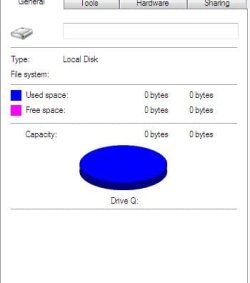
This is how big it is...

I found a New Local Disk Drive?-capture8.jpg

This is getting a lil weird now...
My System SpecsSystem Spec
02 Nov 2010   #7

Windows 7 Enterprise
Auckland


I bet you a cheeseburger you have Office 2010 installed.
My System SpecsSystem Spec
02 Nov 2010   #8

Windows 7 Home Premium 32-bit


Quote   Quote: Originally Posted by Orbital Shark View Post
That's really bizarr...

You should be able to right-click the 9mb unalocated space and delete it. Then right-click the main drive and 'Extend' it by those 9mb.

I've not known Windows do that without user input
It doesn't give me an option to delete it or do anything with it...
My System SpecsSystem Spec
02 Nov 2010   #9

Windows 7 Home Premium 32-bit


Quote   Quote: Originally Posted by xarden View Post
I bet you a cheeseburger you have Office 2010 installed.
Yes I have it installed on my machine why is it bad to do it?
My System SpecsSystem Spec
02 Nov 2010   #10

Windows 7 Enterprise
Auckland


I had the same problem here

Quote   Quote: Originally Posted by dnorris View Post
Sounds like you have Office 2010 beta installed....
it uses the click-to-run technology which creates the Q: drive.
My System SpecsSystem Spec
Reply

 I found a New Local Disk Drive? problems?


Thread Tools


Similar help and support threads for: I found a New Local Disk Drive?
Thread Forum
Samsung s2 external hard drive not loading showing local disk F drive Hardware & Devices
Hard Drive Disk is not detected in laptop - No bootable Device Found Hardware & Devices
Computer recognize DVD/RW drive as Local disk on win 7 32bit Hardware & Devices
Solved Found Free Tiny Software to Auto-Close Disk Drive using a Hotkey Software
local disk drive setting properly Hardware & Devices


All times are GMT -5. The time now is 06:42 AM.


Seven Forums Android App Seven Forums IOS App Follow us on Facebook

Windows 7 Forums is an independent web site and has not been authorized,
sponsored, or otherwise approved by Microsoft Corporation.
"Windows 7" and related materials are trademarks of Microsoft Corp.
© Designer Media Ltd
  

1 2 3 4 5 6 7 8 9 10 11 12 13 14 15 16 17 18 19 20 21 22 23 24 25 26 27 28 29 30 31 32