Windows 7 Forums


Windows 7: Missing "Favorites" menu in WinExplorer?

03 Nov 2010  
pstein

winxp
108 posts
 
 
Missing "Favorites" menu in WinExplorer?

From WinXP WinExplorer I know that he had a menu "Favorites" where I can add the currently marked/opened folder as favorite.

My WinExplorer in Windows 7 has no such menu entry.
Is this feature removed in Windows 7?

How can I re-enable it?

Peter

My System SpecsSystem Spec

03 Nov 2010  
Orbital Shark

Windows 7 Ultimate x64
6,484 posts
Milton Keynes, United Kingdom


Hi,

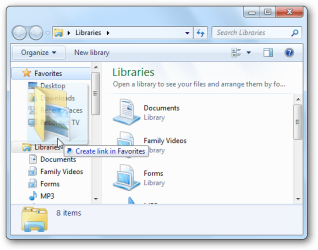
If you open explorer you should notice 'Favorites' in the left hand panel. You can click & drag files/folders to that location for quick access.

Missing "Favorites" menu in WinExplorer?-sshot20100204200626.png
My System SpecsSystem Spec
03 Nov 2010  
Brink

64-bit Windows 7 Ultimate SP1 & Windows 8 Enterprise
47,732 posts
Texas


Hello Peter,

In Vista and Windows 7, you would just drag a file, folder, or drive into the Favorites section in the Navigation Pane now to add a link of it there.

You could also create a shortcut of a file, folder, or drive and move it to your C:\Users\(user-name)\Links folder to have it added to the Favorites section in the Navigation Pane.

Hope this helps,
Shawn
My System SpecsSystem Spec
.


03 Nov 2010  
Orbital Shark

Windows 7 Ultimate x64
6,484 posts
Milton Keynes, United Kingdom


You might also want to look at User Folders - Restore Default Location if the Links folder is missing
My System SpecsSystem Spec
Reply

 Missing "Favorites" menu in WinExplorer? problems?


Thread Tools


Similar help and support threads for: Missing "Favorites" menu in WinExplorer?
Thread Forum
Solved "Explore" option missing in Right-Click Context Menu General Discussion
Context menu item "Format" missing on my DVD RW drive Hardware & Devices
Where is the WinExplorer folder context menu "search"? General Discussion
Solved missing "search programs and files" on start menu. General Discussion
Customizing "Favorites" navigation pane menu Customization


All times are GMT -5. The time now is 07:23 PM.


Windows 7 Forums is an independent web site and has not been authorized,
sponsored, or otherwise approved by Microsoft Corporation.
"Windows 7" and related materials are trademarks of Microsoft Corp.
© Designer Media Ltd