| Windows 7: Path is too Deep : Error Message |
05 Jun 2009
|
#1 | | Windows 7 Professional x64 Ponta Porã, MS |
Path is too Deep : Error Message I have a big problem in my hands, Please, Help me solve it.
So, here it is:
I installed Windows 7068 in my Asus G2s Notebook, and everything worked just fine for like 2 months. But, the 7100 version was released, and i wanted it, so i backed some important files up, and formatted my computer. The installation was fine, but, when i was restoring my files from the backup, there was a particular file that wouldn't copy.
It is Fallout 3.iso file. I tried copying it like, 10 times, and everytime i tried to copy, it would stop at 2.4gb +-. After it stopped, explorer wouldnt respond, and its process couldn't be finalized. So, the only solution was to shut down the computer. I tried many things, to see if i could solve the problem (without any sucess)
-Gave full permission to the Folder and Hard Drive
-Tried to copy the file inside the HD and copy it again to my hard drive, but even copying inside the HD, it would stop at 2.4gb.
-Tried many other things, with no sucess.
Until i tried it on my mom's XP Notebook. I copied it, and on 2.4 GB it would say : Cannot copy Fallout3.iso Path is too Deep
Tried everything, but none of it worked.
Please help me, i'm desperate.
Note: Fallout 3 is on a External 2.5 Hard Drive
Note2: The file weigh's 5.52 GB
Helpful note: I'm trying to copy the file from:
E:\Fallout 3.iso
To:
C:\Users\Alex\Desktop
Thank you very much, i really want your help.
Alex. | My System Specs |
| System Manufacturer/Model Number Custom Built OS Windows 7 Professional x64 CPU Intel Core i7 2600k - 3.4 GHz Motherboard Asus Maximus IV Z68 - Extreme Memory 4x4 Ripjaws X79 Series 2133 MHz (9-11-10-28) Graphics Card 1x eVGA GTX 580 - 3GB Classified Sound Card Realtek ALC 889 HD Audio Monitor(s) Displays Full HD Philips TV 32" Screen Resolution 1920x1080 Keyboard Logitech K800 Wireless Mouse Logitech Performance MX Laser PSU 800W Coolermaster Silentpro Gold Case Sentey - Renegade GS-6200 Cooling Stock Hard Drives 1x Crucial m4 SSD 512 GB Internet Speed 10MB Internet Connection |
05 Jun 2009
|
#2 | | Windows 7 x64 Ultimate San Diego |
That last error message is odd, it's almost like the copy is actually looking INSIDE the iso for some reason as it is copying, as if it were copying a folder.
It is (and always has been) easy to programatically create a path longer than the windows UI can handle. It's entirely possible that a long path was put into the ISO purposely to prevent copying (though I still don't know why the windows UI would be looking into the iso)
I guess you have tried copying it from the command line?
Might also try renaming the file to a.b and then try copying that to c:\ and renaming it back...
Or use another file copy tool and not windows itself to copy it. | My System Specs | | System Manufacturer/Model Number Scratch built OS Windows 7 x64 Ultimate CPU i7 960 Motherboard Asus P6X58D Memory 12 Gig Corsair Dominator Graphics Card Nvidia 480 Sound Card Maudio Delta 44 + breakout box Monitor(s) Displays Dell UltraSharp U2410 24in and Samsung 21 dual monitors Screen Resolution 1920x1200 and 1280x1024 Keyboard Logitech G15 + N52 game pad Mouse Logitech MX518 PSU Corasair TX850 Case Cooler Master HAF Cooling Corsair H50 Hard Drives Primary: Intel X-25M G2 160G SSD
Secondary: Segate baracuda 1.0 TB
HDs in AHCI mode. Internet Speed 15kbs down 4.5kbps up Other Info WEI 7.6
CPU & RAM 7.6
Graphics 7.9
Hard disk 7.7 |
05 Jun 2009
|
#3 | | Win 8 Release candidate 8400 |
Path is limited in length so probably there are folder inside folders inside folders.... What you can do is to use powerISO to open the *.iso a piece at a time if you have to. expand the files to a single folder (as close to the top layer as you can) then xcopy them to where ever they need to be.
Hope this helps
Ken | My System Specs | | System Manufacturer/Model Number HP Pavillion dv-7 1005 Tx OS Win 8 Release candidate 8400 CPU 2@2.4 Memory 4 gigs Graphics Card Nvidia 9600M Sound Card HD built-in Monitor(s) Displays 17" Wxga Screen Resolution 1440x900 Cooling none Internet Speed 45Mb down 5Mb up |
05 Jun 2009
|
#4 | | Windows 7 Ultimate x64 Service Pack 1 Doncaster, UK |
Hi Alex,
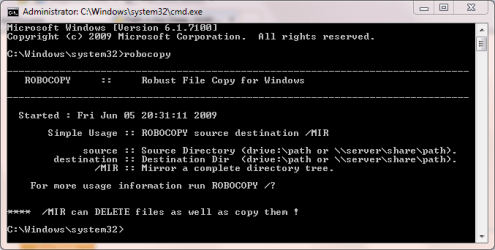
Have a look at Robocopy. Note that for best results, you will need to run this from an Elevated Command Prompt Code: Microsoft Windows [Version 6.1.7100]
Copyright (c) 2009 Microsoft Corporation. All rights reserved.
C:\Windows\system32>robocopy /?
-------------------------------------------------------------------------------
ROBOCOPY :: Robust File Copy for Windows
-------------------------------------------------------------------------------
Started : Fri Jun 05 20:32:30 2009
Usage :: ROBOCOPY source destination [file [file]...] [options]
source :: Source Directory (drive:\path or \\server\share\path).
destination :: Destination Dir (drive:\path or \\server\share\path).
file :: File(s) to copy (names/wildcards: default is "*.*").
::
:: Copy options :
::
/S :: copy Subdirectories, but not empty ones.
/E :: copy subdirectories, including Empty ones.
/LEV:n :: only copy the top n LEVels of the source directory tree.
/Z :: copy files in restartable mode.
/B :: copy files in Backup mode.
/ZB :: use restartable mode; if access denied use Backup mode.
/EFSRAW :: copy all encrypted files in EFS RAW mode.
/COPY:copyflag[s] :: what to COPY for files (default is /COPY:DAT).
(copyflags : D=Data, A=Attributes, T=Timestamps).
(S=Security=NTFS ACLs, O=Owner info, U=aUditing info).
/DCOPY:T :: COPY Directory Timestamps.
/SEC :: copy files with SECurity (equivalent to /COPY:DATS).
/COPYALL :: COPY ALL file info (equivalent to /COPY:DATSOU).
/NOCOPY :: COPY NO file info (useful with /PURGE).
/SECFIX :: FIX file SECurity on all files, even skipped files.
/TIMFIX :: FIX file TIMes on all files, even skipped files.
/PURGE :: delete dest files/dirs that no longer exist in source.
/MIR :: MIRror a directory tree (equivalent to /E plus /PURGE).
/MOV :: MOVe files (delete from source after copying).
/MOVE :: MOVE files AND dirs (delete from source after copying).
/A+:[RASHCNET] :: add the given Attributes to copied files.
/A-:[RASHCNET] :: remove the given Attributes from copied files.
/CREATE :: CREATE directory tree and zero-length files only.
/FAT :: create destination files using 8.3 FAT file names only.
/256 :: turn off very long path (> 256 characters) support.
/MON:n :: MONitor source; run again when more than n changes seen.
/MOT:m :: MOnitor source; run again in m minutes Time, if changed.
/RH:hhmm-hhmm :: Run Hours - times when new copies may be started.
/PF :: check run hours on a Per File (not per pass) basis.
/IPG:n :: Inter-Packet Gap (ms), to free bandwidth on slow lines.
/SL :: copy symbolic links versus the target.
/MT[:n] :: Do multi-threaded copies with n threads (default 8).
n must be at least 1 and not greater than 128.
This option is incompatible with the /IPG and /EFSRAW opt
ions.
Redirect output using /LOG option for better performance.
::
:: File Selection Options :
::
/A :: copy only files with the Archive attribute set.
/M :: copy only files with the Archive attribute and reset it.
/IA:[RASHCNETO] :: Include only files with any of the given Attributes set.
/XA:[RASHCNETO] :: eXclude files with any of the given Attributes set.
/XF file [file]... :: eXclude Files matching given names/paths/wildcards.
/XD dirs [dirs]... :: eXclude Directories matching given names/paths.
/XC :: eXclude Changed files.
/XN :: eXclude Newer files.
/XO :: eXclude Older files.
/XX :: eXclude eXtra files and directories.
/XL :: eXclude Lonely files and directories.
/IS :: Include Same files.
/IT :: Include Tweaked files.
/MAX:n :: MAXimum file size - exclude files bigger than n bytes.
/MIN:n :: MINimum file size - exclude files smaller than n bytes.
/MAXAGE:n :: MAXimum file AGE - exclude files older than n days/date.
/MINAGE:n :: MINimum file AGE - exclude files newer than n days/date.
/MAXLAD:n :: MAXimum Last Access Date - exclude files unused since n.
/MINLAD:n :: MINimum Last Access Date - exclude files used since n.
(If n < 1900 then n = n days, else n = YYYYMMDD date).
/XJ :: eXclude Junction points. (normally included by default).
/FFT :: assume FAT File Times (2-second granularity).
/DST :: compensate for one-hour DST time differences.
/XJD :: eXclude Junction points for Directories.
/XJF :: eXclude Junction points for Files.
::
:: Retry Options :
::
/R:n :: number of Retries on failed copies: default 1 million.
/W:n :: Wait time between retries: default is 30 seconds.
/REG :: Save /R:n and /W:n in the Registry as default settings.
/TBD :: wait for sharenames To Be Defined (retry error 67).
::
:: Logging Options :
::
/L :: List only - don't copy, timestamp or delete any files.
/X :: report all eXtra files, not just those selected.
/V :: produce Verbose output, showing skipped files.
/TS :: include source file Time Stamps in the output.
/FP :: include Full Pathname of files in the output.
/BYTES :: Print sizes as bytes.
/NS :: No Size - don't log file sizes.
/NC :: No Class - don't log file classes.
/NFL :: No File List - don't log file names.
/NDL :: No Directory List - don't log directory names.
/NP :: No Progress - don't display percentage copied.
/ETA :: show Estimated Time of Arrival of copied files.
/LOG:file :: output status to LOG file (overwrite existing log).
/LOG+:file :: output status to LOG file (append to existing log).
/UNILOG:file :: output status to LOG file as UNICODE (overwrite existing
log).
/UNILOG+:file :: output status to LOG file as UNICODE (append to existing
log).
/TEE :: output to console window, as well as the log file.
/NJH :: No Job Header.
/NJS :: No Job Summary.
/UNICODE :: output status as UNICODE.
::
:: Job Options :
::
/JOB:jobname :: take parameters from the named JOB file.
/SAVE:jobname :: SAVE parameters to the named job file
/QUIT :: QUIT after processing command line (to view parameters).
/NOSD :: NO Source Directory is specified.
/NODD :: NO Destination Directory is specified.
/IF :: Include the following Files.
C:\Windows\system32> The syntax you require is Code: ROBOCOPY "E:\" "C:\Users\Alex\Desktop" "Fallout 3.iso"
Last edited by Dwarf; 05 Jun 2009 at 04:15 PM..
| My System Specs | | System Manufacturer/Model Number Dwarf Dwf/11/2012 OS Windows 7 Ultimate x64 Service Pack 1 CPU Intel Core-i5-3570K 4-core @ 3.4GHz (Ivy Bridge) (OC 4.2GHz) Motherboard ASRock Z77 Extreme4-M Memory 4 x 4GB DDR3-1600 Corsair Vengeance CMZ8GX3M2A1600C9B (16GB) Graphics Card 2 x AMD Radeon HD7770 1GB CrossFired (OC 1100MHz/1250MHz) Sound Card Realtek High Definition on board solution (ALC 898) Monitor(s) Displays ViewSonic VA1912w Widescreen (VGA) Screen Resolution 1440x900 Keyboard Microsoft Comfort Curve Keyboard 3000 (USB) Mouse Microsoft Comfort Mouse 3000 for Business (USB) PSU XFX Pro Series 850W Semi-Modular Case Gigabyte IF233 Cooling 1 x 120mm Front Inlet 1 x 120mm Rear Exhaust Hard Drives OCZ Agility 3 SSD 120GB SATA III x2 (RAID 0)
Samsung HD501LJ 500GB SATA II x2
Hitachi HDS721010CLA332 1TB SATA II
Iomega 1.5TB Ext USB 2.0
WD 2.0TB Ext USB 3.0 Internet Speed NetGear DG834Gv3 ADSL Modem/Router (Ethernet) ~4.0 Mb/s (O2) Antivirus Avast! 7.0.1474 Browser IE 9 Other Info Optical Drive: HL-DT-ST BD-RE BH10LS30 SATA Bluray
Lexmark S305 Printer/Scanner/Copier (USB)
CTF-430 Tablet & Pen
WEI Score: 7.7/7.9/7.4/7.4/7.9
Asus Eee PC 1011PX Netbook (Windows 7 x86 Starter) |
05 Jun 2009
|
#5 | | |
Might also be your anti-virus trying to scan the long file name. Try disabling anti-virus on sending and receiving system. | My System Specs | | System Manufacturer/Model Number Home Built OS Windows 7 SP1 x64 CPU AMD 9850 X4 Motherboard ASUS Memory Corsair Graphics Card ATI Radeon Sound Card Sigmatel Monitor(s) Displays Dell Screen Resolution 1600X900 Cooling Corsair H60 Hard Drives (1) WD 1TB Internet Speed UVerse 12MB |
05 Jun 2009
|
#6 | | Windows 7 Professional x64 Ponta Porã, MS |

Quote: Originally Posted by oneextraid Might also be your anti-virus trying to scan the long file name. Try disabling anti-virus on sending and receiving system. Hello, I didn't even install an Anti-Virus.
But thanks!
Alex. 
Quote: Originally Posted by Dwarf Hi Alex,
Have a look at Robocopy. Note that for best results, you will need to run this from an Elevated Command Prompt Attachment 13346 Code: Microsoft Windows [Version 6.1.7100]
Copyright (c) 2009 Microsoft Corporation. All rights reserved.
C:\Windows\system32>robocopy /?
-------------------------------------------------------------------------------
ROBOCOPY :: Robust File Copy for Windows
-------------------------------------------------------------------------------
Started : Fri Jun 05 20:32:30 2009
Usage :: ROBOCOPY source destination [file [file]...] [options]
source :: Source Directory (drive:\path or \\server\share\path).
destination :: Destination Dir (drive:\path or \\server\share\path).
file :: File(s) to copy (names/wildcards: default is "*.*").
::
:: Copy options :
::
/S :: copy Subdirectories, but not empty ones.
/E :: copy subdirectories, including Empty ones.
/LEV:n :: only copy the top n LEVels of the source directory tree.
/Z :: copy files in restartable mode.
/B :: copy files in Backup mode.
/ZB :: use restartable mode; if access denied use Backup mode.
/EFSRAW :: copy all encrypted files in EFS RAW mode.
/COPY:copyflag[s] :: what to COPY for files (default is /COPY:DAT).
(copyflags : D=Data, A=Attributes, T=Timestamps).
(S=Security=NTFS ACLs, O=Owner info, U=aUditing info).
/DCOPY:T :: COPY Directory Timestamps.
/SEC :: copy files with SECurity (equivalent to /COPY:DATS).
/COPYALL :: COPY ALL file info (equivalent to /COPY:DATSOU).
/NOCOPY :: COPY NO file info (useful with /PURGE).
/SECFIX :: FIX file SECurity on all files, even skipped files.
/TIMFIX :: FIX file TIMes on all files, even skipped files.
/PURGE :: delete dest files/dirs that no longer exist in source.
/MIR :: MIRror a directory tree (equivalent to /E plus /PURGE).
/MOV :: MOVe files (delete from source after copying).
/MOVE :: MOVE files AND dirs (delete from source after copying).
/A+:[RASHCNET] :: add the given Attributes to copied files.
/A-:[RASHCNET] :: remove the given Attributes from copied files.
/CREATE :: CREATE directory tree and zero-length files only.
/FAT :: create destination files using 8.3 FAT file names only.
/256 :: turn off very long path (> 256 characters) support.
/MON:n :: MONitor source; run again when more than n changes seen.
/MOT:m :: MOnitor source; run again in m minutes Time, if changed.
/RH:hhmm-hhmm :: Run Hours - times when new copies may be started.
/PF :: check run hours on a Per File (not per pass) basis.
/IPG:n :: Inter-Packet Gap (ms), to free bandwidth on slow lines.
/SL :: copy symbolic links versus the target.
/MT[:n] :: Do multi-threaded copies with n threads (default 8).
n must be at least 1 and not greater than 128.
This option is incompatible with the /IPG and /EFSRAW opt
ions.
Redirect output using /LOG option for better performance.
::
:: File Selection Options :
::
/A :: copy only files with the Archive attribute set.
/M :: copy only files with the Archive attribute and reset it.
/IA:[RASHCNETO] :: Include only files with any of the given Attributes set.
/XA:[RASHCNETO] :: eXclude files with any of the given Attributes set.
/XF file [file]... :: eXclude Files matching given names/paths/wildcards.
/XD dirs [dirs]... :: eXclude Directories matching given names/paths.
/XC :: eXclude Changed files.
/XN :: eXclude Newer files.
/XO :: eXclude Older files.
/XX :: eXclude eXtra files and directories.
/XL :: eXclude Lonely files and directories.
/IS :: Include Same files.
/IT :: Include Tweaked files.
/MAX:n :: MAXimum file size - exclude files bigger than n bytes.
/MIN:n :: MINimum file size - exclude files smaller than n bytes.
/MAXAGE:n :: MAXimum file AGE - exclude files older than n days/date.
/MINAGE:n :: MINimum file AGE - exclude files newer than n days/date.
/MAXLAD:n :: MAXimum Last Access Date - exclude files unused since n.
/MINLAD:n :: MINimum Last Access Date - exclude files used since n.
(If n < 1900 then n = n days, else n = YYYYMMDD date).
/XJ :: eXclude Junction points. (normally included by default).
/FFT :: assume FAT File Times (2-second granularity).
/DST :: compensate for one-hour DST time differences.
/XJD :: eXclude Junction points for Directories.
/XJF :: eXclude Junction points for Files.
::
:: Retry Options :
::
/R:n :: number of Retries on failed copies: default 1 million.
/W:n :: Wait time between retries: default is 30 seconds.
/REG :: Save /R:n and /W:n in the Registry as default settings.
/TBD :: wait for sharenames To Be Defined (retry error 67).
::
:: Logging Options :
::
/L :: List only - don't copy, timestamp or delete any files.
/X :: report all eXtra files, not just those selected.
/V :: produce Verbose output, showing skipped files.
/TS :: include source file Time Stamps in the output.
/FP :: include Full Pathname of files in the output.
/BYTES :: Print sizes as bytes.
/NS :: No Size - don't log file sizes.
/NC :: No Class - don't log file classes.
/NFL :: No File List - don't log file names.
/NDL :: No Directory List - don't log directory names.
/NP :: No Progress - don't display percentage copied.
/ETA :: show Estimated Time of Arrival of copied files.
/LOG:file :: output status to LOG file (overwrite existing log).
/LOG+:file :: output status to LOG file (append to existing log).
/UNILOG:file :: output status to LOG file as UNICODE (overwrite existing
log).
/UNILOG+:file :: output status to LOG file as UNICODE (append to existing
log).
/TEE :: output to console window, as well as the log file.
/NJH :: No Job Header.
/NJS :: No Job Summary.
/UNICODE :: output status as UNICODE.
::
:: Job Options :
::
/JOB:jobname :: take parameters from the named JOB file.
/SAVE:jobname :: SAVE parameters to the named job file
/QUIT :: QUIT after processing command line (to view parameters).
/NOSD :: NO Source Directory is specified.
/NODD :: NO Destination Directory is specified.
/IF :: Include the following Files.
C:\Windows\system32> The syntax you require is Code: ROBOCOPY "E:\" "C:\Users\Alex\Desktop" "Fallout 3.iso" Thank you very much for your help, but it stopped copying at 41.5%.
Same symptoms, it wouldn't close and it wouldn't respond.
I had to reboot the computer. But that doesn't matters.
What can i do to help diagnosing the problem?
Thanks,
Alex. 
Quote: Originally Posted by zigzag3143 Path is limited in length so probably there are folder inside folders inside folders.... What you can do is to use powerISO to open the *.iso a piece at a time if you have to. expand the files to a single folder (as close to the top layer as you can) then xcopy them to where ever they need to be.
Hope this helps
Ken I'm sorry, but i didn't understand very well.
What did you mean by opening a iso piece at a time and expanding it to a single folder?
Thanks,
Alex. 
Quote: Originally Posted by fseal That last error message is odd, it's almost like the copy is actually looking INSIDE the iso for some reason as it is copying, as if it were copying a folder.
It is (and always has been) easy to programatically create a path longer than the windows UI can handle. It's entirely possible that a long path was put into the ISO purposely to prevent copying (though I still don't know why the windows UI would be looking into the iso)
I guess you have tried copying it from the command line?
Might also try renaming the file to a.b and then try copying that to c:\ and renaming it back...
Or use another file copy tool and not windows itself to copy it. Hello.
How can i program to create a path longer than Windows UI can handle?
Ah, and i already tried TeraCopy or something like that, it didn't work.
And im going to try the a.b thing. Be Right back with ur answers.
Please don't give up, i really need this game :P
Thanks, Alex. | My System Specs | | System Manufacturer/Model Number Custom Built OS Windows 7 Professional x64 CPU Intel Core i7 2600k - 3.4 GHz Motherboard Asus Maximus IV Z68 - Extreme Memory 4x4 Ripjaws X79 Series 2133 MHz (9-11-10-28) Graphics Card 1x eVGA GTX 580 - 3GB Classified Sound Card Realtek ALC 889 HD Audio Monitor(s) Displays Full HD Philips TV 32" Screen Resolution 1920x1080 Keyboard Logitech K800 Wireless Mouse Logitech Performance MX Laser PSU 800W Coolermaster Silentpro Gold Case Sentey - Renegade GS-6200 Cooling Stock Hard Drives 1x Crucial m4 SSD 512 GB Internet Speed 10MB Internet Connection |
05 Jun 2009
|
#7 | | Windows 7 x64 Ultimate San Diego |

Quote: Originally Posted by AlexRD Hello.
How can i program to create a path longer than Windows UI can handle?
Ah, and i already tried TeraCopy or something like that, it didn't work.
And im going to try the a.b thing. Be Right back with ur answers. The Windows UI and shell can only handly path names of 260 characters or less, but the NT file system and kernel can actually handle file names as long as 2 or 4k or something.
I once accidentally worte code that created a recursive folder that was > 260 characters deep and getting rid of it was a chore. Had to write more code to traverse it and delete itself recursivly the same way it was created.
But it just ocurred to me that its also entirely possiuble that the file (the file system actually) is corrupted on your source media. meaning that nothing short of a deep disk repair untility will get it off and then there may be missing data. The path name too long error may be a red herring caused by a broken file system :/
Maybe some kind of ISO inspection program can try to open it and browse the contents? See if it is really all there? | My System Specs | | System Manufacturer/Model Number Scratch built OS Windows 7 x64 Ultimate CPU i7 960 Motherboard Asus P6X58D Memory 12 Gig Corsair Dominator Graphics Card Nvidia 480 Sound Card Maudio Delta 44 + breakout box Monitor(s) Displays Dell UltraSharp U2410 24in and Samsung 21 dual monitors Screen Resolution 1920x1200 and 1280x1024 Keyboard Logitech G15 + N52 game pad Mouse Logitech MX518 PSU Corasair TX850 Case Cooler Master HAF Cooling Corsair H50 Hard Drives Primary: Intel X-25M G2 160G SSD
Secondary: Segate baracuda 1.0 TB
HDs in AHCI mode. Internet Speed 15kbs down 4.5kbps up Other Info WEI 7.6
CPU & RAM 7.6
Graphics 7.9
Hard disk 7.7 |
05 Jun 2009
|
#8 | | Windows 7 Professional x64 Ponta Porã, MS |

Quote: Originally Posted by fseal The Windows UI and shell can only handly path names of 260 characters or less, but the NT file system and kernel can actually handle file names as long as 2 or 4k or something.
I once accidentally worte code that created a recursive folder that was > 260 characters deep and getting rid of it was a chore. Had to write more code to traverse it and delete itself recursivly the same way it was created.
But it just ocurred to me that its also entirely possiuble that the file (the file system actually) is corrupted on your source media. meaning that nothing short of a deep disk repair untility will get it off and then there may be missing data. The path name too long error may be a red herring caused by a broken file system :/
Maybe some kind of ISO inspection program can try to open it and browse the contents? See if it is really all there?
Well, you see, i did one time accidentally shut the Hard Drive by an accident down ( It had Optimize for Performance on Device Manager.
So, should i run a Check Disk?
Which ISO inspection program would you recommend?
Thank you,
Alex. | My System Specs | | System Manufacturer/Model Number Custom Built OS Windows 7 Professional x64 CPU Intel Core i7 2600k - 3.4 GHz Motherboard Asus Maximus IV Z68 - Extreme Memory 4x4 Ripjaws X79 Series 2133 MHz (9-11-10-28) Graphics Card 1x eVGA GTX 580 - 3GB Classified Sound Card Realtek ALC 889 HD Audio Monitor(s) Displays Full HD Philips TV 32" Screen Resolution 1920x1080 Keyboard Logitech K800 Wireless Mouse Logitech Performance MX Laser PSU 800W Coolermaster Silentpro Gold Case Sentey - Renegade GS-6200 Cooling Stock Hard Drives 1x Crucial m4 SSD 512 GB Internet Speed 10MB Internet Connection |
05 Jun 2009
|
#9 | | |
Try PowerIso, or Isobuster.
They should be able to let you see what's inside - the free versions will do.
You may find you can move it with a bootable disc that has a File Manager.
If you have a Paragon product , they have the File transfer wizard on the boot disc, otherwise they do a freebie that also has it - try booting the cd and copy it new location. http://www.paragon-software.com/home/rk-express/
Once you know it has copied properly, delete the old one. | My System Specs | | OS Vista x64 / 7 X64 CPU E8400 Motherboard ASRock 1333 GLAN R2.0 Memory 2x1 gb 800mhz Graphics Card 9500gt 1gb Case Coolermaster Cooling Winpower 500w Hard Drives Maxtor 160gb-2mb cache |
06 Jun 2009
|
#10 | | Windows 7 Professional x64 Ponta Porã, MS |

Quote: Originally Posted by SIW2 Try PowerIso, or Isobuster.
They should be able to let you see what's inside - the free versions will do.
You may find you can move it with a bootable disc that has a File Manager.
If you have a Paragon product , they have the File transfer wizard on the boot disc, otherwise they do a freebie that also has it - try booting the cd and copy it new location. FREE Rescue Kit 9.0 Express - Don't wait for disaster, get instant data recovery software!
Once you know it has copied properly, delete the old one.
There is no need of any assistance furtherly 
Thank you all, but the file was actually corrupted.
Somehow, the most important file of my backup was targetted to be corrupted (by bill gates lolz) :P
Well, i'm just downloading it. It is legal isn't it?
If i bought it legally, and lost it, i can download it, right?
Thank you all,
Alex. | My System Specs | | System Manufacturer/Model Number Custom Built OS Windows 7 Professional x64 CPU Intel Core i7 2600k - 3.4 GHz Motherboard Asus Maximus IV Z68 - Extreme Memory 4x4 Ripjaws X79 Series 2133 MHz (9-11-10-28) Graphics Card 1x eVGA GTX 580 - 3GB Classified Sound Card Realtek ALC 889 HD Audio Monitor(s) Displays Full HD Philips TV 32" Screen Resolution 1920x1080 Keyboard Logitech K800 Wireless Mouse Logitech Performance MX Laser PSU 800W Coolermaster Silentpro Gold Case Sentey - Renegade GS-6200 Cooling Stock Hard Drives 1x Crucial m4 SSD 512 GB Internet Speed 10MB Internet Connection Path is too Deep : Error Message problems? All times are GMT -5. The time now is 03:29 AM. | |