|
Welcome to Windows 7 Forums. Our forum is dedicated to helping you find solutions with any problems, errors or issues you are experiencing with Windows 7. The Windows 7 forum also covers news and updates and has an extensive Windows 7 tutorial section that covers a wide range of tips and tricks.
Windows 7 - Mouse double clicks when i single click |
11-08-2010
|
#1 | | |
Mouse double clicks when i single click Hey all, I got this rather annoying problem lately. As title says, my mouse seems to double click when I just clicked once. You can notice that in browsers, when I click on an address in the suggestions, but the click "goes through" and clicks on a bookmark behind the drop down menu which vanished after first click.
Same goes for youtube, when I just want to pause a video, and single click, the video goes to fullscreen which happens only when you double click. Starts to be really annoying.
Same issue can be noticed in few other circumstances as well.. thou now that I think about it, I think it only occurs browser related.
I am using Mionix saiph 1800 mouse.
| My System Specs | | OS Windows 7 64bit CPU i5 750 @2.67 Ghz Motherboard Asus P7P55D Memory 2x2gb dual channel crossair Graphics Card Nvidia GTX 260 PSU 630W |
11-08-2010
|
#2 | | Windows 7, 64 bit Professional. SP1 |
Could be the switch in the mouse is causing that. I just got rid of a Microsoft mouse for that exact problem.
Go into the Mouse configuration panel in the Control Panel and change the LEFT mouse click to the RIGHT click. Then try it with the right mouse button and see if you still get double clicks. If you don't that would confirm that the mouse is the problem. | My System Specs | | System Manufacturer/Model Number Home Built OS Windows 7, 64 bit Professional. SP1 CPU Intel Q6600 Motherboard Intel DP35DP Memory 8GB, A Data DDR2, PC 2-6400 Graphics Card NVIDIA GTS 450 OC Sound Card Ht Omega Striker 7.1 Monitor(s) Displays Viewsonic VA2448 Series 24" LED Screen Resolution 1920X1080 Keyboard Microsoft Mouse Logitech Wireless PSU XFX 750 Watt Black Edition, Modular Case Antec Nine Hundred Cooling Zerotherm CF900 Hard Drives 1 TB Hitachi Win 7 system drive
750 GB Western Digital With Vista 32 bit.
1 TB Seagate drive with Windows 8
1.5TB for Acronis Tru Image backups Internet Speed 40 MB/sec (Cable) Other Info ProTools MP9 and Sonar X1D Extended PE DAW with Roland Octa-Capture and MAudio Fast Track Ultra 8R recording interfaces, Frontier Tranzport wireless control unit, Behringer BCF2000 Cointrol Surface.
Five USB connected optical drives for CD Audio production using Nero 11
Other systems: LenovoZ560 Laptop with Win 7 64 bit HP, SP1, Dell Dimension E510 with Vista 32 bit HP, new iPad |
11-08-2010
|
#3 | | Windows 7 Ultimate x64 SP1 |
Hello Cronnix,
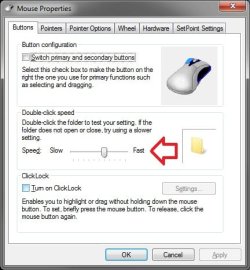
You might see if adjusting the "Double-click speed" settings, in the Mouse icon in the Control Panel (icons view), up and down to see if one the settings may help. It may be set to be just to sensitive.
Hope this helps,
Shawn | My System Specs | | System Manufacturer/Model Number Self built custom OS Windows 7 Ultimate x64 SP1 CPU Intel i7-980X 3.3 Ghz (3.48 Ghz OC'd) Motherboard ASUS P6X58D Premium Memory 12 GB (2GBx6) DDR3 PC3-16000 2000 MHz Kingston HyperX Graphics Card Sapphire HD5870 Eyefinity 6 2GB Sound Card Realtek HD Audio ALC889 Integrated Chip Monitor(s) Displays 3x 27" Asus VE278Q Screen Resolution 1920x1080 Keyboard Logitech Cordless Desktop MX 5500 Revolution Mouse Logitech Cordless Desktop MX 5500 Revolution PSU OCZ Series Gold OCZZ1000M 1000W Case Corsair Obsidian 800D Cooling Thermalright Ultra 120 Extreme Copper CPU heat sink w/120 MM Hard Drives 160GB OCZ RevoDrive X2
** 2 x 1TB Samsung HDD HD154UI SATA Internet Speed 50 Mb/s Download and 2 Mb/s Upload Other Info Microsoft LifeCam Cinema
** Lite-On iHBS212 12x BD Writer
** Samsung CLX-3175FW Printer
** Netgear WNDR3800 Router
** Motorola SBG6580 Cable Modem
** 2x APC Back-UPS XS 1500 |
11-08-2010
|
#4 | | |
While I noticed minor improvement after changing double click speed, it still occurs. I guess I will have to try Fireberds suggestion, and replace the mouse if it is a case of hardware going bad. | My System Specs | | OS Windows 7 64bit CPU i5 750 @2.67 Ghz Motherboard Asus P7P55D Memory 2x2gb dual channel crossair Graphics Card Nvidia GTX 260 PSU 630W |
11-08-2010
|
#5 | | |
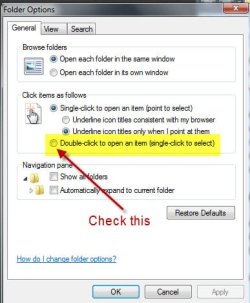
i seem to remember a setting where hovering over an icon selected it, and one click opened it, but i cant remember what the setting was called. maybe reset everything to defaults before tossing the mouse? | My System Specs | | System Manufacturer/Model Number Alienware AREA-51 M17x OS windows 7 ultimate 64bit CPU Intel Core2 Extreme x9000 2.8GHZ Motherboard Asus P965 Intel chipset Memory 4Gig Graphics Card 2 NVidia GeForce 8800M GTX (SLi) Sound Card onboard Monitor(s) Displays 17in. built-in, 47in JVC LCD Screen Resolution 1080p Mouse touchpad, Logitech Anywhere Mouse cordless laser Case 17in. laptop Hard Drives 2 250Gig Hitachi (RAID 0) @ 7200RPM Internet Speed cable |
11-08-2010
|
#6 | | |
Last edited by Brink; 11-08-2010 at 11:51 PM..
Reason: added link
| My System Specs | | System Manufacturer/Model Number Sony VGN- FZ140E OS Win7 Ultimate - 32bit CPU Intel(R) Core(TM)2 Duo CPU T7100 @ 1.80GHz - 64-bit ready Memory 3.00 GB Graphics Card Mobile Intel(R) 965 Express Chipset Family Hard Drives 320GB.7200Rpm - Hitachi HTS725032A9A364 ATA Device |
11-08-2010
|
#7 | | |

Quote: Originally Posted by wds7 Have you checked folder option ....? Yes, as I mentioned above the issue mainly occurs in my Firefox browser. I guess I will try resetting all to default in it, since probably the problem lies with the browser and not mouse, unless anyone got any other ideas.
Last edited by Brink; 11-08-2010 at 11:51 PM..
| My System Specs | | OS Windows 7 64bit CPU i5 750 @2.67 Ghz Motherboard Asus P7P55D Memory 2x2gb dual channel crossair Graphics Card Nvidia GTX 260 PSU 630W |
11-08-2010
|
#8 | | Windows 7 Ultimate RTM (Technet) |
I've seen this on a wireless mouse with weak batteries. Not sure if yours is wireless or not. | My System Specs | | System Manufacturer/Model Number Custom OS Windows 7 Ultimate RTM (Technet) CPU 3.00 gigahertz Intel Core2 Duo E8400 Motherboard ASUSTeK Computer INC. P5K/EPU Rev 1.xx Memory 4GB Graphics Card ATI Radeon X1950 Pro Sound Card Built in HD Audio Monitor(s) Displays 22" Gateway LCD Screen Resolution 1920 x 1200 Keyboard Logitech G11 Mouse Microsoft Wireless Laser Mouse 5000 Hard Drives ST3160023A [Hard drive] (160.04 GB) -- drive 0, rev 8.01, ST3500630AS [Hard drive] (500.11 GB) -- drive 2, rev 3.AAK
ST3500630AS [Hard drive] (500.11 GB) -- drive 1, rev 3.AAK Internet Speed 13.44 Mbps |
11-08-2010
|
#9 | | |

Quote: Originally Posted by MacGyvr I've seen this on a wireless mouse with weak batteries. Not sure if yours is wireless or not. Mine is wired. | My System Specs | | OS Windows 7 64bit CPU i5 750 @2.67 Ghz Motherboard Asus P7P55D Memory 2x2gb dual channel crossair Graphics Card Nvidia GTX 260 PSU 630W |
11-08-2010
|
#10 | | Windows 7 Ultimate x64, Mint 9 |
If you have an extra mouse, try that (before having to buy one).
~Lordbob | My System Specs | | System Manufacturer/Model Number Hera OS Windows 7 Ultimate x64, Mint 9 CPU Intel i5-2500k Motherboard ASUS P8P67 Pro Memory 2x 4Gb Corsair VENGEANCE DDR3-1600 Graphics Card NVidia GeForce N260GTX Twin Frozr Sound Card Realtek HD OnBoard Audio Monitor(s) Displays ASUS 24" Monitor Screen Resolution 1920x1080 Keyboard Razer Tarantula Mouse Razer Lachesis PSU Cooler Master Real Power Pro 750W Case Cooler Master Haf 932 Cooling Fans Hard Drives G.SKILL Phoenix Series 60GB SATA II MLC Internal Solid State Drive (SSD)
SAMSUNG Spinpoint F3R 1TB 7200 RPM 32MB Cache SATA II Internet Speed not fast enough Mouse double clicks when i single click problems? All times are GMT -5. The time now is 10:11 PM. |  |