Windows 7 Forums


Windows 7: Recently Opened List

08 Nov 2010   #1

7 Home Premium 64bit
 
 
Recently Opened List

One item that I don't like with Windows 7 is the "Recently Opened" List. I like the "Recently Used" list within the start menu, but I don't like the "Recently Opened" sub menu. Is there a way to disable that? This list also appears within the items on the task bar.

I know how to disable the recently used, but not the recently opened. If someone could help me out, I would appreciate it.

Thanks.

Daryl

My System SpecsSystem Spec

08 Nov 2010   #2

Windows 7 Ultimate x64
Milton Keynes, United Kingdom


Hi,

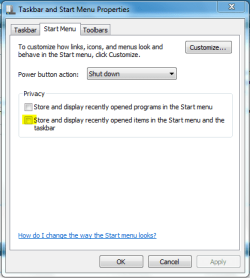
If you right-click the taskbar and select 'Properties', under 'Start Menu' just un-check 'Store and display recently opened items...'

This should stop the sub-menu (jump-list) from appearing.


OS
Attached Thumbnails
Recently Opened List-capture.png  
My System SpecsSystem Spec
08 Nov 2010   #3

7 Home Premium 64bit


OS,

I tired that, however, it also disables the "Recently Used". If you read that label, it say's "Stored and displayed". As I said, I like seeing the recently used that appears in the Start Menu, because I often use the same apps over and over, and I can quickly open the one that I need, but I don't often reopen the same doc, or other file that I had used previously. That option disables both the "Recently Used" and the "Recently Opened".

I want to be able to use the Start Menu the way that I was able to under XP & Vista. Both of those had a separate "Recently Opened Doc" on the right side of the Start Menu. If I needed to reopen a recently opened doc, I could quickly find it in there. Windows 7 doesn't seem to have that option. I find the current option very annoying.

Thanks.

Daryl
My System SpecsSystem Spec
.


08 Nov 2010   #4

Windows 7 Ultimate x64
Milton Keynes, United Kingdom


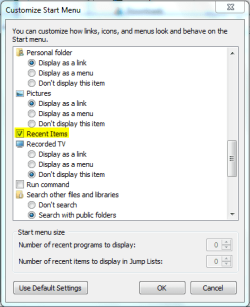
You can use the option above (checked) with the 'Recent Items' option in the start menu preferences.

Recently Opened List-capture2.png

Note   Note
Right-click Taskbar -> 'Properties' -> 'Start Menu' -> 'Customise'


Recently Opened List-capture1.png
My System SpecsSystem Spec
08 Nov 2010   #5

7 Home Premium 64bit


Now We're getting somewhere.

I looked through that list, but didn't see that "recent items" check box. I'll have to take another look.

Thank you.

Daryl
My System SpecsSystem Spec
08 Nov 2010   #6

Windows 7 Ultimate x64
Milton Keynes, United Kingdom


It's definately there
My System SpecsSystem Spec
Reply

 Recently Opened List problems?


Thread Tools


Similar help and support threads for: Recently Opened List
Thread Forum
Solved How to clear recently opened file details from vlc and wmp Music, Pictures & Video
Solved Cannot Enable Store & Display Recently Opened ... General Discussion
display recently opened programs is disable Customization
Recently opened programs General Discussion
Recently opened or more opened? taskbar menu don't work General Discussion


All times are GMT -5. The time now is 10:42 AM.


Seven Forums Android App Seven Forums IOS App Follow us on Facebook

Windows 7 Forums is an independent web site and has not been authorized,
sponsored, or otherwise approved by Microsoft Corporation.
"Windows 7" and related materials are trademarks of Microsoft Corp.
© Designer Media Ltd
  

1 2 3 4 5 6 7 8 9 10 11 12 13 14 15 16 17 18 19 20 21 22 23 24 25 26 27 28 29 30 31 32