Windows 7 Forums


Windows 7: Icons not functioning "align to grid"

09 Nov 2010   #1

Windows 7 Ultimate x64
Nagpur
 
 
Icons not functioning "align to grid"

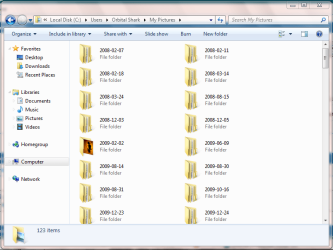
Hello!my folder icons in windows 7 are not functioning"align to grid"

Attached Thumbnails
Icons not functioning "align to grid"-capture1233.png  
My System SpecsSystem Spec

09 Nov 2010   #2

Windows 7 Home Premium SP1, clean install, upgrade disc
CT


Karan K
Align to grid refers to the desktop icons.
My System SpecsSystem Spec
09 Nov 2010   #3

Vista 64 bit and 32 bit (SP2)
Los Angeles, California + Milwaukee, Wis


Quote   Quote: Originally Posted by karank6195 View Post
Hello!my folder icons in windows 7 are not functioning"align to grid"
You're obviously in Windows Explorer, so what is it that you're trying to do? And hopefully we'll be able to help you do it.
My System SpecsSystem Spec
.


09 Nov 2010   #4

Windows 7 Ultimate x64
Milton Keynes, United Kingdom


I think the OP is wondering why the icons aren't displaying from left to right, top to bottom.

Icons not functioning "align to grid"-capture.png

My setting are set to 'Sort by' Name and Ascending
My System SpecsSystem Spec
09 Nov 2010   #5

Windows 7 Ultimate x64
Nagpur


Yeah I want to display the icons left to right i windows explorer.
My System SpecsSystem Spec
10 Nov 2010   #6

Vista 64 bit and 32 bit (SP2)
Los Angeles, California + Milwaukee, Wis


Why don't you first go into the Windows Explorer toolbar, and open Views, because it gives you many choices of icon layouts. See if one (for example, Tiles) is what you want.
My System SpecsSystem Spec
10 Nov 2010   #7

Windows 7 Ultimate x64
Nagpur


I want to display the icons as 'extended tiles'.but i don't want them to display 'top to bottom'.
My System SpecsSystem Spec
11 Nov 2010   #8

Vista 64 bit and 32 bit (SP2)
Los Angeles, California + Milwaukee, Wis


Mmmmmm, don't think that currently you can have that option. Maybe some kind person will write a script for you. . .
My System SpecsSystem Spec
11 Nov 2010   #9

Windows 7 Pro


Quote   Quote: Originally Posted by karank6195 View Post
Hello!my folder icons in windows 7 are not functioning"align to grid"
You're asking for a Windows XP function.
There is no such thing in Windows 7 for non-desktop folders.

However having said that, using Medium Icons in Windows 7 will give the same desired effect.
My System SpecsSystem Spec
11 Nov 2010   #10

Windows 7 Ultimate x64
Nagpur


ok!thanks
My System SpecsSystem Spec
Reply

 Icons not functioning "align to grid" problems?


Thread Tools


Similar help and support threads for: Icons not functioning "align to grid"
Thread Forum
Solved Where is "VIEW", "ARRANGE ICONS BY", "TYPE" General Discussion
Align To Grid Customization
"Align icons to grid" does not align to grid Customization
View: Align Icons to Grid General Discussion
Align icons to grid for desktop icons: Grid is offset Customization


All times are GMT -5. The time now is 11:36 PM.


Seven Forums Android App Seven Forums IOS App Follow us on Facebook

Windows 7 Forums is an independent web site and has not been authorized,
sponsored, or otherwise approved by Microsoft Corporation.
"Windows 7" and related materials are trademarks of Microsoft Corp.
© Designer Media Ltd
  

1 2 3 4 5 6 7 8 9 10 11 12 13 14 15 16 17 18 19 20 21 22 23 24 25 26 27 28 29 30 31 32