Windows 7 Forums


Windows 7: RAM type

25 Nov 2010  
kf10

Win 7 home premium 32 bit
174 posts
 
 
RAM type

i have dell vostro A860, i want to know what type of RAM it uses DDR1 or DD2..............
i bought the laptop in may 2009

My System SpecsSystem Spec

25 Nov 2010  
kf10

Win 7 home premium 32 bit
174 posts


according to crucial.com, its ddr2 pc2 6400, can somebody else can verify this
My System SpecsSystem Spec
25 Nov 2010  
Ciara

Windows 7 Professional 64-bit SP1
5,138 posts


Hi kf10

Spec - Dell Vostro A860 Also see > Here
My System SpecsSystem Spec
.


25 Nov 2010  
kf10

Win 7 home premium 32 bit
174 posts


but my CPU is 1.6GhZ Core 2 duo, as opposed to following CPU listed on dell website and it came with ubuntu OS installed

Intel® Core™2 Duo Processor T5670 (1.8GHz, 2MB L2 Cache, 800MHz FSB)
Intel® Pentium® Dual Core Processor T2390 (1.86GHz, 1MB L2 Cache, 533MHz FSB)
Intel® Celeron® Dual Core T1400 (1.73GHz, 512KB L2 Cache, 533MHz FSB)
Intel® Celeron® 560 (2.13GHz, 1M L2 Cache, 533MHz FSB)
My System SpecsSystem Spec
25 Nov 2010  
Ciara

Windows 7 Professional 64-bit SP1
5,138 posts


Do you have the user manual ?, looking at the Dell site there are a few vostro, you need the serial No.
My System SpecsSystem Spec
25 Nov 2010  
unifex

Windows 7 Ultimate (x64)
754 posts


The simplest thing is to go to Crucial.com and download their memory analyzer app. It will tell you exactly what kind of memory you have and how it can be upgraded according to Dell.

An alternative is to use CPU-Z app, it tells you everything about your system in more detail that you probably care for
My System SpecsSystem Spec
25 Nov 2010  
Darryl Licht

Windows 7 Ultimate 64 bit Steve Ballmer Signature Edition
1,971 posts
So Cal (I.E.)


Actually with a Dell the easiest thing to do is visit www.support.dell.com enter in your Dell service tag and you will have access to the orignal configuration as well as upgrade parts and compatibility.

Just dont buy your upgrades from Dell, their prices are as inflated as their ego! LOL!
My System SpecsSystem Spec
25 Nov 2010  
wilywombat

win7
677 posts


Right on Darryl...just wish I had 10% of the annual Dell turnover!
My System SpecsSystem Spec
25 Nov 2010  
kf10

Win 7 home premium 32 bit
174 posts


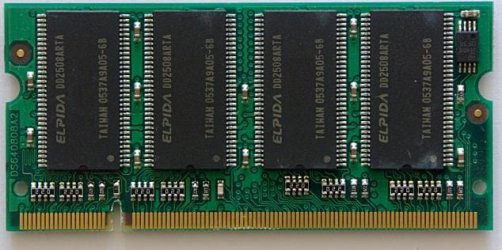
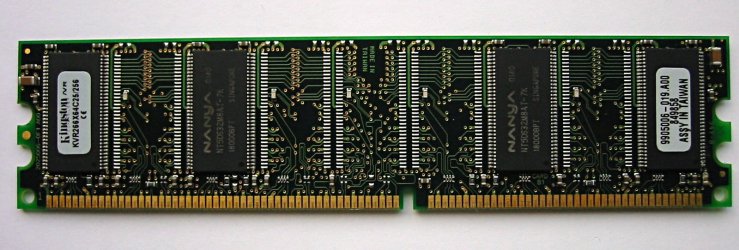
thanks it helped unifex, one more question is RAM for laptop and desktop of different sizes ie their slots differ in length or all the RAMs have same length
My System SpecsSystem Spec
25 Nov 2010  
wilywombat

win7
677 posts


Laptop memory is shorter in length and if you are trying to buy some look for "SODIMM" which stands for small outline dual in-line memory module. In a desktop you use "DIMM" modules (dual in-line memory module) which are phtsically longer. (Remember to take anti-static precautions before handling the modules as you can easily kill them with a static discharge)
My System SpecsSystem Spec
Reply

 RAM type problems?


Thread Tools


Similar help and support threads for: RAM type
Thread Forum
What type of Keyboard should I buy? Hardware & Devices
how to deal with photo files Type 1 and Type 2 Music, Pictures & Video
Is it ok if i use 2 type of Ram? Hardware & Devices
Need this type of software... Software


All times are GMT -5. The time now is 09:15 PM.


Windows 7 Forums is an independent web site and has not been authorized,
sponsored, or otherwise approved by Microsoft Corporation.
"Windows 7" and related materials are trademarks of Microsoft Corp.
© Designer Media Ltd