Windows 7 Forums


Windows 7: 2 Huge Folders

27 Nov 2010  
rap33042

Windows 7 Home Premium x64
598 posts
Osceola, WI
 
 
2 Huge Folders

Hi All!

OS: Windows 7 Home Premium with SP1 RC


I have 2 folders on my System drive (over 10000 entries and nearly 1GB) and I don't know what they are.

  1. 45097da387c9cd80642135397174
  2. 548702c0e55370e20af2680d84
Are these part of SP1?
Can I delete them?
What are they?

TIA!
My System SpecsSystem Spec

27 Nov 2010  
Bill2

Windows 7 x64 pro/ Windows 7 x86 Pro/ XP SP3 x86
5,148 posts


These may be temp files left over after the sp1 install. Best thing to do is back them up to an external location, then delete from the hdd. If everything runs fine long enough, you can get rid of the backup too.
My System SpecsSystem Spec
27 Nov 2010  
TVeblen

Windows 7 64 Bit Home Premium SP1
4,145 posts
In The Woods


Provided they are not blue, those are usually folders downloaded programs use to expand the installer files into. Windows Malicious Software Removal Tool does this. If so, you can delete them without issue.

You should check to see what they are first.
Right click on the folder and scan with your AV.
Right click on the folder and choose Properties. Go to the Details Tab. Lots of times you will get a clue about what program the folder is associated with there.

As always, do a System Restore point before making changes and don't empty the recycle bin until you are sure there are no issues caused by deleting the folders.
Edit: I like Bill2's idea better. Move them. Then delete them!
My System SpecsSystem Spec
.


27 Nov 2010  
rap33042

Windows 7 Home Premium x64
598 posts
Osceola, WI


Well, I tried to copy them to an external drive and here is what I got. Now what?
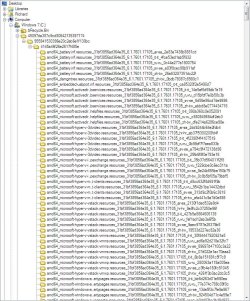
Also, here's a snapshot of what's in one of those directories, in case that's a clue.
I tried checking properties, but there was no clue there.
Edit: Ya know? I found one of these long hex-named folders on my external drive, too! But it was empty...
Could it be part of a backup program thing?
I did have both Macrium and Paragon B&R on this system for a short try-out.
i discovered there were actually 3 of these things on my System Drive totaling ~3GB!!! ~20000 files!!!
Attached Thumbnails
2 Huge Folders-screenshot00075.jpg   2 Huge Folders-screenshot00076.jpg  

Last edited by rap33042; 27 Nov 2010 at 09:48 AM.. Reason: More info
My System SpecsSystem Spec
27 Nov 2010  
Bill2

Windows 7 x64 pro/ Windows 7 x86 Pro/ XP SP3 x86
5,148 posts


Rename them to a short name, whatever you please, then retry copying. Although that would be a kinda tedious task with so many of them. But even if you try to delete, the same long filename issue will crop up.
My System SpecsSystem Spec
27 Nov 2010  
MacGyvr

Windows 7 Ultimate RTM (Technet)
137 posts
Charlotte, NC


Trust me, just delete them. I do it all the time on many machines and have never had an issue.
My System SpecsSystem Spec
27 Nov 2010  
rap33042

Windows 7 Home Premium x64
598 posts
Osceola, WI


OK- I rolled up my sleeves and tightened my suspenders; I deleted the files.
Thanks for the Tips, people!
My System SpecsSystem Spec
Reply

 2 Huge Folders problems?


Thread Tools


Similar help and support threads for: 2 Huge Folders
Thread Forum
A huge problem and need help. Graphic Cards
I have a huge rocket. :) Chillout Room
Help me, I did a huge mistake. BSOD Help and Support
HUGE cursor... Graphic Cards


All times are GMT -5. The time now is 10:12 PM.


Windows 7 Forums is an independent web site and has not been authorized,
sponsored, or otherwise approved by Microsoft Corporation.
"Windows 7" and related materials are trademarks of Microsoft Corp.
© Designer Media Ltd