| Windows 7: Everything turns to French, I am fed up! |
27 Nov 2010
|
#1 | | |
Everything turns to French, how to keep English ? Hi,
I would like to keep all settings on my PC in English (browsers, research engine...etc). This is easier and faster to find solutions to any hardware or software related problems, and helps me to improve English!
The problem is that the programs often turn automatically back to French after I set them in English!
For example, I can't keep Google home page in English! When I set it to English it quickly turns to French and research results appear mostly in French! I tried to change the language settings into English in all language settings but no change!
Worse, sometimes when I download an English version of a program I have it in French after installation!
I think this is due to automatic detection of country and OS installed. Is there any way fix this automatic detection or turn it off to avoid being targeted by local ads and languages?
I want to keep English as my default language for every thing on my PC but this seems impossible!
Does the changing of OS to English would be the right and good solution?
Last edited by win7en; 27 Nov 2010 at 09:37 PM..
| My System Specs |
| |
27 Nov 2010
|
#2 | | Windows 7 Home Premium x64 SP1 Bay Area Peninsula |
To change the system locale:
Start> Control Panel> Clock, Language, and Region> Region and Language> Administrative tab> Language for non Unicode programs> Change System Locale> Select English and click OK> Click Restart Now
For Google, bookmark this address: http://www.google.com/webhp?hl=en
A Guy | My System Specs | | OS Windows 7 Home Premium x64 SP1 CPU INTEL Core i5-750 Quad-Core 3.37GHz Motherboard ASUS P7P55D Memory KINGSTON 4GB (2 x 2GB) HyperX PC3-12800 DDR3 1600MHz CL8 Graphics Card MSI N240GT-MD1G/D5 GeForce GT 240 1GB 128-bit GDDR5 Monitor(s) Displays Samsung SyncMaster B2430H 24" Screen Resolution 1920 x 1080 PSU ANTEC TruePower New TP-550, 80 PLUS, 550W Case ANTEC Three Hundred Illusion Cooling COOLER MASTER Hyper 212 Plus, 4 x 120mm 1 x 140mm Noctua's Hard Drives Intel X25M Gen2 80GB, SEAGATE 500GB Barracuda® 7200.12, SATA 3 Gb/s, 7200 RPM, 16MB cache Internet Speed 20 + Mbps Antivirus Avast Browser Opera |
28 Nov 2010
|
#3 | | |
Thanks Guy.
But, why I should use another google URL if changing the language parameter should resolve the problem?
I have already changed the language to English, as you said, but no change! I still have google ni french!
When I write google.com in the address bar, it turns immediately to google.fr !
He is really stupid who gave this idea to change automatically and forcedly to local language!
No other idea?
I know there is another idea but it is little bit difficult to follow for now: moving to English country!
But I am looking for a technical solution now before moving ! | My System Specs | | |
28 Nov 2010
|
#4 | | |
The problem with Google has nothing to do with your system. Google, as well as many other websites use geo-positioning software to determine where you're located. They assume that their service will be more popular/profitable if it will appear in the native language. Apparently they do not care much for the minority of users who either live outside of the region where their favorite language is spoken or simply travel to other countries.
That said, most of the sites have some sort of a control over their appearance. Google for example leaves a cookie with your personal settings - you may set the preferred language of the interface, of the search results and also how many results appear on one page. However, if you "clean" your computer, erase "personal" data after you close your browser or erase the cookie in any other way, Google will revert to its default state, which corresponds to your current location.
If you want to set a bookmark to Google and not worry about this stuff, use what A Guy said, or try Google.
Of course, that would not affect your searches from the search box. There you really need to keep that cookie. What you can do, is to set an exception in your browsers treatment of cookies allowing cookies from google.com and google.fr.
Now, about program installation - this is strange. Any program that you are installing should normally ask you for an installation language and stick to your choice. There are some programs which simply do not have a language choice, they "speak" the language of their makers. If that's the case, then there is nothing you can do about it. Otherwise, what's the language of your OS? Did you install the English Windows or did you install a French version and later used the English language pack?
Edit: that link has appeared automatically. I wanted to type google.com/ncr. | My System Specs | | System Manufacturer/Model Number Dell Inspiron 530 OS Windows 7 Ultimate (x64) CPU Q6600 Memory 8 GB Graphics Card ATI Radeon HD 2600 XT Monitor(s) Displays Samsung Syncmaster P2450 Screen Resolution 1920x1080 Hard Drives Samsung HD103UJ
Samsung HD501LJ Internet Speed 25 Mb/s |
28 Nov 2010
|
#5 | | |

Quote: Originally Posted by unifex The problem with Google has nothing to do with your system. Google, as well as many other websites use geo-positioning software to determine where you're located. They assume that their service will be more popular/profitable if it will appear in the native language. Apparently they do not care much for the minority of users who either live outside of the region where their favorite language is spoken or simply travel to other countries.
That said, most of the sites have some sort of a control over their appearance. Google for example leaves a cookie with your personal settings - you may set the preferred language of the interface, of the search results and also how many results appear on one page. However, if you "clean" your computer, erase "personal" data after you close your browser or erase the cookie in any other way, Google will revert to its default state, which corresponds to your current location.
If you want to set a bookmark to Google and not worry about this stuff, use what A Guy said, or try Google.
Of course, that would not affect your searches from the search box. There you really need to keep that cookie. What you can do, is to set an exception in your browsers treatment of cookies allowing cookies from google.com and google.fr.
Now, about program installation - this is strange. Any program that you are installing should normally ask you for an installation language and stick to your choice. There are some programs which simply do not have a language choice, they "speak" the language of their makers. If that's the case, then there is nothing you can do about it. Otherwise, what's the language of your OS? Did you install the English Windows or did you install a French version and later used the English language pack?
Edit: that link has appeared automatically. I wanted to type google.com/ncr. Thank you for your nice answer, Unifex.
Your are right, choosing or targeting local languages is more profitable for ads or event ads. But there are people who don't care about that, they should understand it!
At least, we should be able to customize his own pages or desirable research results. But this is not the case with Google, nor Yahoo!
I have French operation system (Windows 7) but I am thinking about installing the English pack. I am wondering if this may solve this problem!
Do you think that changing the OS to English will solve the problem or is it a geo-positioning issue?
I tried to to chose English as my default language in google in all browsers and in the local settings, as Guy pointed, but still have google turns to (.fr) !
I also have the same thing with Yahoo when I already tried! When I put "yahoo.com" in the address bar, it turns immediately to yahoo.fr!
Only bing.com, stands as is (.com), it doesn't turn to (.fr)! This is an asset attracting me towards Bing!
Maybe I will abandon google COMPLETELY with all its garbage, and adopt bing! | My System Specs | | |
28 Nov 2010
|
#6 | | |

Quote: Originally Posted by unifex Edit: that link has appeared automatically. I wanted to type google.com/ncr.  !
Voila, the example!
Yes, I had the same thing! but when I removed http it stayed Google.com !
Now, imagine the same automatic scenario but for ".fr" ! It is annoying and really boring! This is why I am asking to get rid of it. | My System Specs | | |
28 Nov 2010
|
#7 | | Windows 7 Home Premium x64 SP1 Bay Area Peninsula |
Google is reading your IP location, and directing you to your local version. For you, it is an annoyance, for some countries, I'm sure it's a requirement. You could perhaps remove all google cookies, and use an American based proxy to connect to the internet, but this would no doubt slow you down as fast proxies are surely hard to find, and could present other problems. A Guy | My System Specs | | OS Windows 7 Home Premium x64 SP1 CPU INTEL Core i5-750 Quad-Core 3.37GHz Motherboard ASUS P7P55D Memory KINGSTON 4GB (2 x 2GB) HyperX PC3-12800 DDR3 1600MHz CL8 Graphics Card MSI N240GT-MD1G/D5 GeForce GT 240 1GB 128-bit GDDR5 Monitor(s) Displays Samsung SyncMaster B2430H 24" Screen Resolution 1920 x 1080 PSU ANTEC TruePower New TP-550, 80 PLUS, 550W Case ANTEC Three Hundred Illusion Cooling COOLER MASTER Hyper 212 Plus, 4 x 120mm 1 x 140mm Noctua's Hard Drives Intel X25M Gen2 80GB, SEAGATE 500GB Barracuda® 7200.12, SATA 3 Gb/s, 7200 RPM, 16MB cache Internet Speed 20 + Mbps Antivirus Avast Browser Opera |
28 Nov 2010
|
#8 | | Windows 7 x64 Ultimate A Finnish immigrant in Leipzig, Germany |
One very important setting you need to change is the location of your computer, from regional settings. You have to choose a country using your preferred language.
For instance I am in a similar situation than you. I live in Germany, but I want my Windows to be in English, and Google etc. open in English. To "re-locate" your computer, open the regional settings dialog, Location tab and choose an English speaking country:
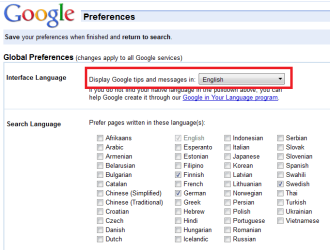
So, first change that. Go then to Google Search Settings, and check that English is really chosen, also choose additional languages to add to search results, in your case for instance French. Remember to change the settings and clear browser cache:
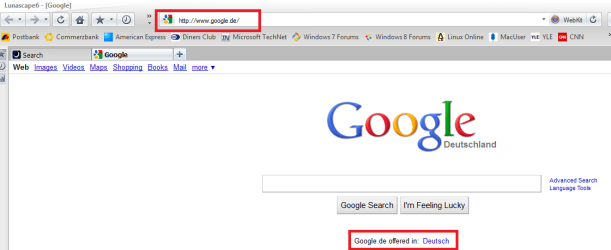
After that, typing google.com in your browser should still open google.fr, but show it in English:
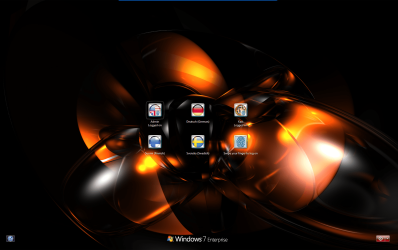
Of course, if you have Seven Ultimate or Enterprise, you can install English language pack and create a completely English user account. My logon screen gives you an idea what I mean; I can choose from four languages, regarding what I need at that moment:
Kari | My System Specs | | Computer type Laptop System Manufacturer/Model Number HP ENVY 17-1150eg OS Windows 7 x64 Ultimate CPU 1.6 GHz Intel Core i7-720QM Processor Memory 6 GB Graphics Card ATI Mobility Radeon HD 5850 Graphics Sound Card Beats sound system with integrated subwoofer Monitor(s) Displays 17" laptop display, 22" LCD and 32" Full HD TV through HDMI Screen Resolution 1600*900, 1680*1050 and 1920*1080 Keyboard Logitech diNovo Media Desktop Laser (bluetooth) Mouse Logitech MX1000 Laser (Bluetooth) Hard Drives Internal: 2 x 500 GB SATA Hard Disk Drive 7200 rpm
External: 2TB for backups, 3TB USB3 network drive for media Internet Speed 50/10 Mbps VDSL Antivirus MSE, Windows Defender Browser Maxthon 3.5.2. Other Info Windows 7 Ultimate Retail Full in English, additional Guest-user accounts in Finnish, German and Swedish (Working languages English & Swedish, Family language German, my own language, mother tongue, Finnish. I really need Ultimate to get to use Language Packs!) |
29 Nov 2010
|
#9 | | |
Thanks for you all. I have already changed the OS to english (language package) but google and other research engines still turn to French and reseults in French!!
I am really fed up with this!
No solution apparently except to change country !! | My System Specs | | |
29 Nov 2010
|
#10 | | Windows 7 x64 Ultimate A Finnish immigrant in Leipzig, Germany |
That is strange. I'm located in Germany, and as I mentioned using Windows in four different language. English accounts on my rigs show google.de in English, Finnish accounts google.de in Finnish, Swedish accounts google.de in Swedish and of course the German accounts show it in German.
I have non what so ever problems with this.
Kari | My System Specs | | Computer type Laptop System Manufacturer/Model Number HP ENVY 17-1150eg OS Windows 7 x64 Ultimate CPU 1.6 GHz Intel Core i7-720QM Processor Memory 6 GB Graphics Card ATI Mobility Radeon HD 5850 Graphics Sound Card Beats sound system with integrated subwoofer Monitor(s) Displays 17" laptop display, 22" LCD and 32" Full HD TV through HDMI Screen Resolution 1600*900, 1680*1050 and 1920*1080 Keyboard Logitech diNovo Media Desktop Laser (bluetooth) Mouse Logitech MX1000 Laser (Bluetooth) Hard Drives Internal: 2 x 500 GB SATA Hard Disk Drive 7200 rpm
External: 2TB for backups, 3TB USB3 network drive for media Internet Speed 50/10 Mbps VDSL Antivirus MSE, Windows Defender Browser Maxthon 3.5.2. Other Info Windows 7 Ultimate Retail Full in English, additional Guest-user accounts in Finnish, German and Swedish (Working languages English & Swedish, Family language German, my own language, mother tongue, Finnish. I really need Ultimate to get to use Language Packs!) Everything turns to French, I am fed up! problems? All times are GMT -5. The time now is 04:04 PM. | |