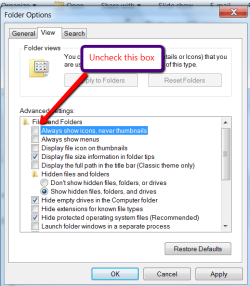
Sometimes things just get corrupted within a system -- and we're not aware of the reason. And just as often, sometimes you can repair the problem by going through the motions of doing some basic steps, like, for example, (building on what whs suggested above), starting with the "Always show icons, never thumbnails" box why don't you do this: Since it's currently UNchecked, why don't you go ahead and check it, then hit Apply, and close Explorer. Turn off your system and reboot. Then, reopen Windows Explorer and UNcheck the box. Hit Apply.
If that doesn't work why don't you try making a copy of your Desktop photo, saving it to a different folder, and then deleting that image from the folder where you have your Desktop photos saved. Again, shut down and re-boot. Try transferring the copied image to the Desktop folder, and hopefully this time it will show up.