Windows 7 Forums Search
Welcome to Windows 7 Forums. Our forum is dedicated to helping you find solutions with any problems, errors or issues you are experiencing with Windows 7. The Windows 7 forum also covers news and updates and has an extensive Windows 7 tutorial section that covers a wide range of tips and tricks.


Windows 7 - Win7 truncates filenames with "." in it..

 
11-30-2010   #1


Windows 7 Enterprise x32


Win7 truncates filenames with "." in it..

I've recently upgraded to Windows 7. My company uses files that have version numbering such as "Customer Filename v1.0.xlsx" In previous versions of Windows (Vista and XP), there's no problem with this. But with Windows 7, the filename keeps getting truncated to "Customer Filename v1", which means each time i need to go into Explorer to rename the file.

I've already turned off the "Hide extensions for known file types" but this still happens. Any idea how to get around this?

An example of when this happens is.. when printing a file to PDF, instead of saving a file named "Customer Filename v1.0.pdf", I get instead "Customer Filename v1.pdf"

Help??

My System SpecsSystem Spec
11-30-2010   #2


Windows 7 x64 pro/ Windows 7 x86 Pro/ XP SP3 x86


Are you sure the filenames are not too long? Windows usually limits file names to 260 characters. But the file name must actually be shorter than that, since the complete path (such as C:\Program Files\filename.txt) is included in this character count.

Just to test, create a file with a smaller name and all those version numbers and see if it is saved properly.
My System SpecsSystem Spec
11-30-2010   #3


Windows 7 Ultimate x64


Quote   Quote: Originally Posted by Struggling7User View Post
I've recently upgraded to Windows 7. My company uses files that have version numbering such as "Customer Filename v1.0.xlsx" In previous versions of Windows (Vista and XP), there's no problem with this. But with Windows 7, the filename keeps getting truncated to "Customer Filename v1", which means each time i need to go into Explorer to rename the file.

I've already turned off the "Hide extensions for known file types" but this still happens. Any idea how to get around this?

An example of when this happens is.. when printing a file to PDF, instead of saving a file named "Customer Filename v1.0.pdf", I get instead "Customer Filename v1.pdf"

Help??
This is not a problem with Windows, but rather the PDF printing software you are using. I use BullZip PDF Printer. And I just ran a test by printing a tutorial page from our sister site, VistaForums:

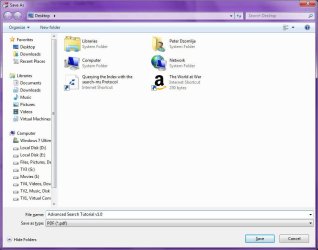
1) I issued the Print command, and selected the "Bullzip PDF Printer"
Win7 truncates filenames with "." in it..-image1.jpg

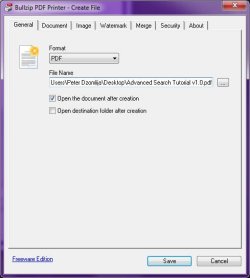
2) I clicked the icon to specify a filename, and typed "Advanced Search Tutorial v1.0" (without the quotes):
Win7 truncates filenames with "." in it..-image2.jpg

3) I then clicked Save:
Win7 truncates filenames with "." in it..-image3.jpg

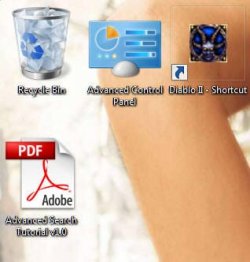
4) The file was created properly on the desktop, with the filename I specified:
Win7 truncates filenames with "." in it..-image4.jpg

So I'm thinking perhaps your PDF printing software needs to be updated?

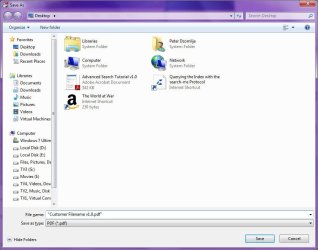
There is one workaround that you can try. When specifying the filename to save, enclose it in quotes before you click save. For example:
Win7 truncates filenames with "." in it..-image5.jpg

You can try excluding the ".pdf" from the filename "Customer Filename v1.0" in the Save As dialog, but if what I suspect is tru, the you may not be able to open it until you use explorer to re-attach the .pdf extension.
My System SpecsSystem Spec
.


11-30-2010   #4


Windows 7 Enterprise x32


Thanks for the replies..
@Bill2..
- its definitely not the filename length. There's no problem at all whatsoever if in Vista or XP. Its only since moving to Windows 7 that this problem is encountered.

@Domlija..
- not sure if its to do with the PDF writer (I user CutePDF) as there are other instances where this problem occurs.

More info..
My company uses a mix of machines, some have been upgraded, some not. There are still Windows XP and Windows Vista users whom i send and receive files from. I've noticed some of them have started to send me file attachments with the 'version numbering' minus the period ".".. ie.. "Customer Filename v1 0.whatever"

So far, we've been experiencing truncated filenames with all sorts of software including MS Office apps (versions 2003, 2007).

Wondering if there is any configuration somewhere that i'm missing probably in Windows Explorer or something?? As mentioned previously, have already disabled "Hide extensions for known file types".
My System SpecsSystem Spec
11-30-2010   #5


Windows 7 Home Premium 64bit


I can confirm that it is Cute PDF that truncates the file names, not Windows 7.
I use Cute PDF and this happens all the time.
My System SpecsSystem Spec
11-30-2010   #6


If this is a problem with the virtual PDF printer, may I suggest Primo PDF? It does convert extended ASCII characters to underscores if I'm not mistaken, but multiple periods in the filename should be fine.

PrimoPDF
My System SpecsSystem Spec
11-30-2010   #7


Windows 7 Home Premium x64 OEM --> RTM clean install


But did the OP not state in the first post that he had an Excel file truncated aswell?
My System SpecsSystem Spec
11-30-2010   #8


Windows 7 Ultimate x64


Quote   Quote: Originally Posted by allend66 View Post
But did the OP not state in the first post that he had an Excel file truncated aswell?
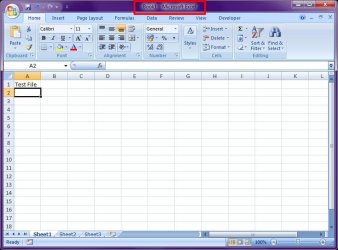
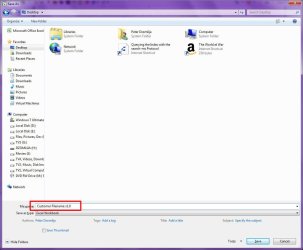
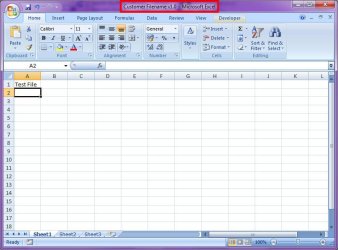
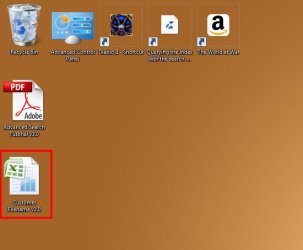
I've just tried it with Excel, and the problem does not happen. So I'm guessing there must be some sort of conflict going on here that we have not yet discovered...

Win7 truncates filenames with "." in it..-image1.jpg
Win7 truncates filenames with "." in it..-image2.jpg
Win7 truncates filenames with "." in it..-image3.jpg
Win7 truncates filenames with "." in it..-image4.jpg
My System SpecsSystem Spec
11-30-2010   #9


Windows 7 Home Premium 64bit


The OP stated:
Quote:
An example of when this happens is.. when printing a file to PDF, instead of saving a file named "Customer Filename v1.0.pdf", I get instead "Customer Filename v1.pdf"
I gathered the name changed when he printed to PDF using Cute PDF writer. This happens with Cute that's why another poster suggested Primo. So I assumed this was a Cute PDF problem not a Windows 7 or Excel Problem!
My System SpecsSystem Spec
11-30-2010   #10


Windows 7 Enterprise x32


@mitchell65.. thank you. CutePDF does consistently truncate the filename. Have installed on your recommendation, BullZIP PDF and it works fine now.

@ALL.. Thanks for all your responses. For the time being, have solved the PDF filenames being truncated. Will monitor some more to determine exact sequence of events that leads to filenames of other apps being truncated. Suspect it might be mix of O/S and MSOffice versions in company's environment, but will confirm and post some more when more details available.
My System SpecsSystem Spec
Reply

 Win7 truncates filenames with "." in it.. problems?


Thread Tools


Similar Threads for: Win7 truncates filenames with "." in it..
Thread Forum
Changing the "minimize" "maximize" and "close" buttons of a theme Customization
Solved Win7 pro startup error "Boot MGR missing"/"Operating System Not Found Installation & Setup
Disable "ESC" During Win7 boot "Only" System Security
Filenames like ".emacs" Software
Win7 "workstation" to WinXP "server" file copy FAIL Network & Sharing


All times are GMT -5. The time now is 11:08 PM.


Windows 7 Forums is an independent web site and has not been authorized,
sponsored, or otherwise approved by Microsoft Corporation.
"Windows 7" and related materials are trademarks of Microsoft Corp.
© Designer Media Ltd
  

1 2 3 4 5 6 7 8 9 10 11 12 13 14 15 16 17 18 19 20 21 22 23 24 25 26 27 28 29 30