Windows 7 Forums


Windows 7: Log on troubles

30 Nov 2010   #1

Windows 7 32bit home premium
 
 
Log on troubles

I have an unusual situation. I have a normal logon screen with four users, call them A, B, C and D. Once the computer enters sleep mode, when I rewake it, instead of going to the general login screen, it automatically logs on user C regardless of the fact that all users were loged off before it went into sleep mode. Any idea how I can fix this?

My System SpecsSystem Spec

30 Nov 2010   #2

Windows 7 Ultimate x64
Brisbane, Queensland, Australia


does user c have no password?
My System SpecsSystem Spec
30 Nov 2010   #3

Windows 7 Pro X64
Space Coast of Florida


Has user C been set to be automatically logged on? Does C get logged on when you boot the computer?
My System SpecsSystem Spec
.


01 Dec 2010   #4

Windows 7 32bit home premium


User c has no password and has not been set for automatic log on, as far as I know.
User c does no automatically log onwhen the computer is booted; instead, the computer boots into the log in screen with all users listed.
My System SpecsSystem Spec
01 Dec 2010   #5

Windows 7 Ultimate x64
Milton Keynes, United Kingdom


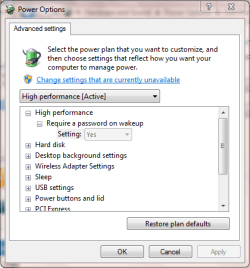
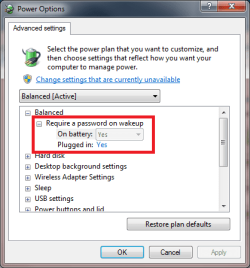
You may want to check User C's Power Settings.

Control Panel -> System and Security -> Power Options

Click 'Change plan settings' then 'Change advanced power settings' and check if Require a password on wakeup is set correctly.

Log on troubles-capture.png


OS
My System SpecsSystem Spec
01 Dec 2010   #6

Windows 7 32bit home premium


OK, thanks. Will try this evening.
My System SpecsSystem Spec
01 Dec 2010   #7

Windows 7 32bit home premium


OK... Require a password on wakeup was set to NO for user C. I changed it to Yes, logged off user C and went into sleep mode. When I awoke, the same problem...computer automatically logged user C on.
My System SpecsSystem Spec
01 Dec 2010   #8

64-bit Windows 7 Ultimate SP1 & Windows 8 Enterprise
Texas


Hello Plograsso, and welcome to Seven Forums.

Create a password for user C to see if it works properly afterwards.

Hope this helps,
Shawn
My System SpecsSystem Spec
02 Dec 2010   #9

Windows 7 32bit home premium


Created a password for user C. After sleep, screen comes up for user C requesting password to log in. This work around does prevent the computer automatically logging in user C, however, it doesn't seem to solve the underlying problem since user C doen't want to have a password.
My System SpecsSystem Spec
02 Dec 2010   #10

Windows 7 x64 Ultimate
A Finnish immigrant in Leipzig, Germany


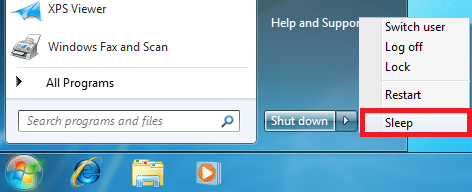
Important to notice is that requiring a password when waking up does not mean users must have passwords; it's a bit misleading named feature. It simply means that when waking up, Windows does not automatically log in the last user.

Log on troubles-sleep_0.png

To achieve what you want, you must enable that setting, regardless if your user C has a password or not.

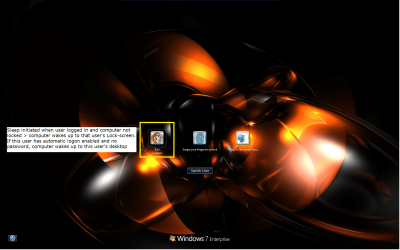
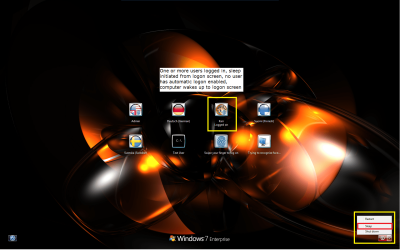
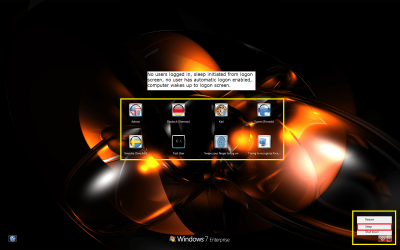
Here are the different wake up scenarios when the above mentioned setting is enabled and no user has automatic logon enabled:

1. Sleep initiated from a logged in user account > computer wakes up to that user's lock screen. (If the wake up password is not enabled and this user has no password or automatic logon is enabled > computer wakes up to this user's desktop):

Log on troubles-sleep_1.png
Log on troubles-sleep_2.png

2. Sleep initiated from logon screen when one or more users are logged in > computer wakes up to logon screen:

Log on troubles-sleep_3.png

3. Sleep initiated from logon screen, no users logged in > computer wakes up to logon screen:

Log on troubles-sleep_4.png

That's about it.

Kari
My System SpecsSystem Spec
Reply

 Log on troubles problems?


Thread Tools


Similar help and support threads for: Log on troubles
Thread Forum
Win 7 CAC troubles General Discussion
VPN troubles Network & Sharing
Solved RAM Troubles Hardware & Devices
Mic troubles? help? Sound & Audio
So W7 troubles... Installation & Setup


All times are GMT -5. The time now is 08:58 AM.


Seven Forums Android App Seven Forums IOS App Follow us on Facebook

Windows 7 Forums is an independent web site and has not been authorized,
sponsored, or otherwise approved by Microsoft Corporation.
"Windows 7" and related materials are trademarks of Microsoft Corp.
© Designer Media Ltd
  

1 2 3 4 5 6 7 8 9 10 11 12 13 14 15 16 17 18 19 20 21 22 23 24 25 26 27 28 29 30 31 32