Windows 7 Forums Search
Welcome to Windows 7 Forums. Our forum is dedicated to helping you find solutions with any problems, errors or issues you are experiencing with Windows 7. The Windows 7 forum also covers news and updates and has an extensive Windows 7 tutorial section that covers a wide range of tips and tricks.


Windows 7 - Windows Media Player Jumplist - no more recent items

 
12-01-2010   #1


Windows 7 Home Premium 32-bit (Just installed 64 bit as of January 10)


Windows Media Player Jumplist - no more recent items

Hi
Something must have happened to my Windows Media Player... its Jumplist doesn't display anything anymore except for "Resume Previous List", "Play all music", "Windows Media Player" and "Unpin from taskbar"

It used to display all my recently opened files but now they're not there.
Any solutions?

My System SpecsSystem Spec
12-01-2010   #2


Windows 7 Ultimate x64


Quote   Quote: Originally Posted by M4dn3ss View Post
Hi
Something must have happened to my Windows Media Player... its Jumplist doesn't display anything anymore except for "Resume Previous List", "Play all music", "Windows Media Player" and "Unpin from taskbar"

It used to display all my recently opened files but now they're not there.
Any solutions?
Try this:
  1. Open Windows Media Player
  2. Switch to Library view if it opens in Player Mode (the icon just beneath the close button in the top right corner)
  3. Click the "Tools" menu, then select "Options"
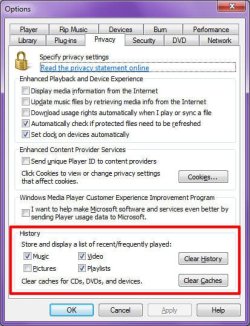
  4. Click the "Privacy" tab
  5. At the bottom of the "Privacy" tab is the History box. Which if those items are checked?
  6. Make the necessary changes to the History settings, then click OK
Windows Media Player Jumplist - no more recent items-image1.jpg
My System SpecsSystem Spec
12-01-2010   #3


Windows 7 Home Premium 32-bit (Just installed 64 bit as of January 10)


Hmm they're all ticked and it's still not working
I tried clearing it (using those two buttons) and played some files, they still don't show up...
My System SpecsSystem Spec
.


12-03-2010   #4


Windows 7 Home Premium 32-bit (Just installed 64 bit as of January 10)


Does anyone have any solutions? This problem is starting to get really annoying
My System SpecsSystem Spec
12-03-2010   #5


Windows 7 Ultimate x64


Quote   Quote: Originally Posted by M4dn3ss View Post
Hmm they're all ticked and it's still not working
I tried clearing it (using those two buttons) and played some files, they still don't show up...
Try unticking those options, then close WMP.
Open WMP again, tick those options, then close WMP.
Double-click a media file in Explorer, and let's see if it keep a history
My System SpecsSystem Spec
12-03-2010   #6


Windows 7 Home Premium 32-bit (Just installed 64 bit as of January 10)


Tried it, when I tried to play a file it crashed saying "Server execution failed" and then the second time it worked, however the history was still not saved
My System SpecsSystem Spec
12-03-2010   #7


Windows 7 Ultimate x64


Quote   Quote: Originally Posted by M4dn3ss View Post
Tried it, when I tried to play a file it crashed saying "Server execution failed" and then the second time it worked, however the history was still not saved
I get "Server execution failed" all the time!

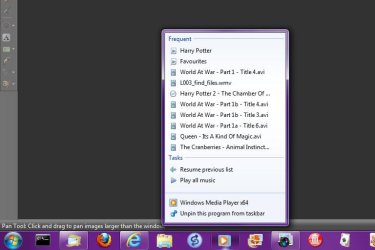
Does your jump list look similar to mine:
Windows Media Player Jumplist - no more recent items-image2.jpg
My System SpecsSystem Spec
12-03-2010   #8


Windows 7 Home Premium 32-bit (Just installed 64 bit as of January 10)


It used to... but now it's just Tasks
My System SpecsSystem Spec
12-03-2010   #9


Windows 7 Ultimate x64


Quote   Quote: Originally Posted by M4dn3ss View Post
It used to... but now it's just Tasks
Sorry for the long delays between replies.

Anyhow, I think I have the solution for you:
  1. Open Windows Media Player
  2. Switch to Library view if it opens in Player Mode (the icon just beneath the close button in the top right corner)
  3. Click the "Tools" menu, then select "Options"
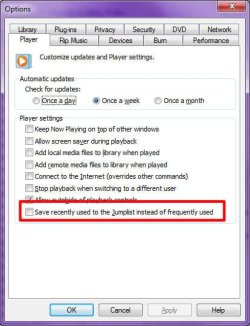
  4. Click the "Player" tab
  5. Add a checkmark to the "Save recently used to the Jumplist instead of frequently used"
  6. Click OK
Windows Media Player Jumplist - no more recent items-image3.jpg
My System SpecsSystem Spec
12-04-2010   #10


Windows 7 Home Premium 32-bit (Just installed 64 bit as of January 10)


Thanks for your help, unfortunately it still doesn't work
is there any way maybe to reinstall WMP?
My System SpecsSystem Spec
Reply

 Windows Media Player Jumplist - no more recent items problems?


Thread Tools


Similar Threads for: Windows Media Player Jumplist - no more recent items
Thread Forum
Frequent items missing, recent items are there (Windows Explorer) General Discussion
Solved Playlist Items problem in Windows 7 Media player Media Center
Force Windows Explorer Jumplist to show Recent, not Frequent Performance & Maintenance
Force Windows Explorer Jumplist to Show Recent, not Frequent Customization
Recent items aint working for windows explorer. General Discussion


All times are GMT -5. The time now is 11:09 PM.


Windows 7 Forums is an independent web site and has not been authorized,
sponsored, or otherwise approved by Microsoft Corporation.
"Windows 7" and related materials are trademarks of Microsoft Corp.
© Designer Media Ltd
  

1 2 3 4 5 6 7 8 9 10 11 12 13 14 15 16 17 18 19 20 21 22 23 24 25 26 27 28 29 30