
Windows 7 Forums Search
Welcome to Windows 7 Forums. Our forum is dedicated to helping you find solutions with any problems, errors or issues you are experiencing with Windows 7. The Windows 7 forum also covers news and updates and has an extensive Windows 7 tutorial section that covers a wide range of tips and tricks.


Windows 7 - A few issues I need some help with!

 
12-02-2010   #1


Windows 7 Home Premium 64bit


A few issues I need some help with!

Hi,

My first post so please go easy on me!

I'd really appreciate it if anyone could shed some light on some issues I have.

1) I keep getting Data Base Files appearing randomly on my system, why is that, and how can I stop them from appearing?

2) When I updated to MSN 2011 my 'Live Mail' keeps saying a program has caused it to stop working when I try and write/send an email. I assume it's my firewall? I am currently using the free version of AVG. Which has now revealed another issue, (3).

3) When I go into 'Control Panel\System and Security\Windows Firewall' and click the option "Allow a program or feature through Windows Firewall" to hopefully add Live Mail through the firewall, nothing happens, as if I had never clicked it?

I would really appreciate some advice.

Thanks!

My System SpecsSystem Spec
12-02-2010   #2


Welcome to the forums! While we wait for someone to post advice on how to detect malware, can you post a screenshot of these "data base files"? And when/how did you notice them appearing?
My System SpecsSystem Spec
12-02-2010   #3


Windows 7 Ultimate x86


Let's start at the end
[QUOTE][3) When I go into 'Control Panel\System and Security\Windows Firewall' and click the option "Allow a program or feature through Windows Firewall" to hopefully add Live Mail through the firewall, nothing happens, as if I had never clicked it? /QUOTE]

OK, the free Version of AVG has no Firewall as far as I know. so your firewall is the regular Windows Firewall that came pre installed, right? Or do you have any other firewall currently running?
Log into an account with admin rights and try again. You should get a (more or less) useful window with the programs that are already allowed.
If that still doesn't pop up, I recommend you run
SFC /SCANNOW Command - System File Checker
to make sure that there are no damaged system files interfering.
After that you should run
http://download.cnet.com/Malwarebyte...-10804572.html
just to stay on the safe site

I use the free version this program to monitor and set network rights for my programs that's just more useful to me. But that is something to keep in mind for later

Windows 7 Firewall Control : Sphinx Software

now we're waiting on the database files screen shot

Screenshots and Files - Upload and Post in Seven Forums

-DG
My System SpecsSystem Spec
.


12-02-2010   #4


Win 7 Ultimate 32bit


I would recommend the following....

We will start with this first,
Just incase, you might want to backup any data you don't want to lose if something is really going wrong....

AVG = Uninstall it and never go back. (if I could triple underline and double bold that I would)

Then as suggested run SFC \Scannow ,, could be a good idea to do this now.
however, I might not suggest this if it is infact malware or virus related.
The choice is yours.

Run the following on-line scanners....
Run both of these one at a time till complete.. Very important.

What's new - Windows Live OneCare safety scanner for Windows Vista and Windows 7

Free ESET Online Antivirus Scanner

Then yes, Install Malwarebytes as suggested and run that....

If anything is found,, clean it as needed (clean, quarantine, delete, whatever is needed)
Then run them again till nothing is found in each.
If something is found, but can't be cleaned, then there are other issues to worry about.
I would then install MSE and try scanning and cleaning with that.
Post anything that is found and can not be got rid of.

If everything comes back clean or is cleaned.

Then run SFC /Scannow

Install MSE

You may need to reinstall Live Mail,,, but I would do that later after doing what is listed above.
Then we can see what else might be going on.

Database files being created like that could be caused by malware or virus.
Or a corrupt application or OS.
My System SpecsSystem Spec
12-03-2010   #5


Windows 7 Home Premium 64bit


Quote   Quote: Originally Posted by Trucidation View Post
Welcome to the forums! While we wait for someone to post advice on how to detect malware, can you post a screenshot of these "data base files"? And when/how did you notice them appearing?
Thanks. I'm pretty sure I had these files randomly appearing when I first had this laptop, bought it around a year ago, so hopefully not a virus and something to do with the OS or something as suggested in one of the other posts. Okay, the first screenshot is within a folder I created on my desktop and the second is a data base file which appeared on my desktop when I saved the screenshot.

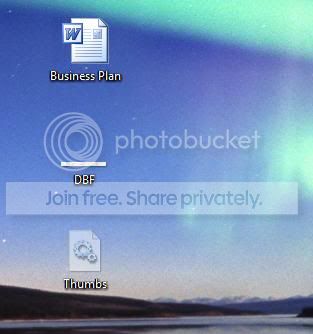

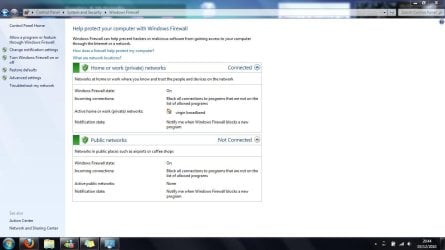


Hope this helps? Thanks.
My System SpecsSystem Spec
12-03-2010   #6


Windows 7 Home Premium 64bit


Quote   Quote: Originally Posted by SledgeDG View Post
OK, the free Version of AVG has no Firewall as far as I know. so your firewall is the regular Windows Firewall that came pre installed, right? Or do you have any other firewall currently running?
Log into an account with admin rights and try again. You should get a (more or less) useful window with the programs that are already allowed.

-DG
Thanks for the response, I did have a paid version of AVG on my laptop but when I used 'Glary Utilities' for the first time and restarted my laptop, AVG was saying that it couldn't find the license number, and as I can't find the license number anymore I've reverted back to AVG free. But other than that I haven't installed any other Firewall software, so yes my firewall is the regular Windows Firewall that came pre installed.

I only have one account on my laptop, which is set to admin rights, so I will make a restoration point, back up any data on my external HDD I really wouldn't want deleted and follow the steps you and the other poster (sorry I forgot to quote you, but I have read your response, thanks) have kindly given.

I will post up my plan of action and any issues. Thanks.
My System SpecsSystem Spec
12-03-2010   #7


Oh, "Thumbs" - fairly sure that's referring to "thumbs.db", which Windows itself creates. They shouldn't be a problem. I'll let the others help you on your other questions since I don't use MSN or Live Mail. Good luck.
My System SpecsSystem Spec
12-03-2010   #8


Windows 7 Home Premium 64bit


Quote   Quote: Originally Posted by Trucidation View Post
Oh, "Thumbs" - fairly sure that's referring to "thumbs.db", which Windows itself creates. They shouldn't be a problem. I'll let the others help you on your other questions since I don't use MSN or Live Mail. Good luck.

Phew...hopefully not any viruses then. Thanks for your input mate, appreciate it.
My System SpecsSystem Spec
12-03-2010   #9


Windows 7 Home Premium 64bit


Quote   Quote: Originally Posted by Tepid View Post

Run the following on-line scanners....
Run both of these one at a time till complete.. Very important.

What's new - Windows Live OneCare safety scanner for Windows Vista and Windows 7

After downloading IE I keep getting "We were unable to install the scanner
Please follow the instructions for each troubleshooting step below and then click Retry Installation to try to install the scanner again.
"

I accept the installation from a pop up but I keep getting the above message?
My System SpecsSystem Spec
12-03-2010   #10


Windows 7 Ultimate x86


That might be related to your problem that you can't allow stuff through your firewall.
I just tried Eset and it requested permission 3 times.
From your answer I suspect that there is still some "residue"/leftover from the AVG firewall that now interferes with windows FW. So if you can't run online scanners due to FW permissions you can't install resident scanners either (they also would need permission to update their database)
That's why I would say remove AVG completely for now, run the sfc /scannow and then try the online scanners again.
Don't forget...once we're through here you will need to install an AV solution again.
If you go with the free AVG again, free AVAST or free MSE that's up to you. I would recommend AVAST as it kept me safe for 3, 4 years now on 5 PCs...so I am partial now
-DG
My System SpecsSystem Spec
Reply

 A few issues I need some help with! problems?


Thread Tools


Similar Threads for: A few issues I need some help with!
Thread Forum
Windows 7 Ultimate 32bit issues with desktop freezing/ other issues General Discussion
Having Issues with multiple audio drivers getting audio sync issues. Sound & Audio
Low mem issues Hardware & Devices
Adobe CS4 Issues/Desktop Issues Software
Freezing issues and BSoD issues. Help please! Crashes and Debugging


All times are GMT -5. The time now is 11:09 PM.


Windows 7 Forums is an independent web site and has not been authorized,
sponsored, or otherwise approved by Microsoft Corporation.
"Windows 7" and related materials are trademarks of Microsoft Corp.
© Designer Media Ltd
  

1 2 3 4 5 6 7 8 9 10 11 12 13 14 15 16 17 18 19 20 21 22 23 24 25 26 27 28 29 30