| Windows 7: Locked folders |
03 Dec 2010
|
#1 | | |
Locked folders Hi
Can somebody tell me how do i get rid of that Lock in my folders. I got to open some folders but when i click to open that nagging message pops up telling me that i donīt have permission to open it. What do i have to do to open the folders?
madgirl | My System Specs |
| OS Windows Ultimate 32 CPU Intel Core2 Duo E7500 2.93GHz Motherboard ASUS p/ Intel P5G41-M LX 775 Memory 3 gb Graphics Card vga XFX 1024MB (1GB) GeForce 9500 GT DDR2 Monitor(s) Displays samsung syncmaster 931c Hard Drives 500 gb - SeaGate and Samsumg 500 gb |
03 Dec 2010
|
#2 | | Windows 7 Ultimate - 64-bit | Windows 8 Pro - 64-bit |
Hello,
Try this article Take Ownership Shortcut
- Captain | My System Specs | | System Manufacturer/Model Number Samsung NP550P5C-S02IN OS Windows 7 Ultimate - 64-bit | Windows 8 Pro - 64-bit CPU IntelŪ Core™ i7 Processor 3,610QM (2.30Hz, 6MB L3 Cach Memory 8 GB Graphics Card NVIDIAŪ GeForceŪ GT 650M 2GB Graphics, Optimus™ techno Sound Card SoundAlive™ JBL 3 Speakers (With sub-Woofer) Monitor(s) Displays 39.62cm (15.6) SuperBright 300nit HD+ LED Display Screen Resolution 1,600 x 900, Anti-Reflective Hard Drives 1TB S-ATA II Hard Drive (5,400RPM) |
03 Dec 2010
|
#3 | | Windows 7 x64 Ultimate San Diego |
Which folders?
For example, you should not try to fiddle with anything under "C:\DocumentsAndSettings" it's not a real folder. All your real files are found under C:\Users\<username>\<Various folders>
If the folders are from another user on another widows install then yes the take owership shortcut will work, but that won't work if you are looking inside certain windows protected folders. | My System Specs | | System Manufacturer/Model Number Scratch built OS Windows 7 x64 Ultimate CPU i7 960 Motherboard Asus P6X58D Memory 12 Gig Corsair Dominator Graphics Card Nvidia 480 Sound Card Maudio Delta 44 + breakout box Monitor(s) Displays Dell UltraSharp U2410 24in and Samsung 21 dual monitors Screen Resolution 1920x1200 and 1280x1024 Keyboard Logitech G15 + N52 game pad Mouse Logitech MX518 PSU Corasair TX850 Case Cooler Master HAF Cooling Corsair H50 Hard Drives Primary: Intel X-25M G2 160G SSD
Secondary: Segate baracuda 1.0 TB
HDs in AHCI mode. Internet Speed 15kbs down 4.5kbps up Other Info WEI 7.6
CPU & RAM 7.6
Graphics 7.9
Hard disk 7.7 |
03 Dec 2010
|
#4 | | |
Hi
Iīm back. Well, ihave downloaded and installed the register files But unfortunately "the targets remain..." i would say. Actually, the folders are mine, i mean i am the administrator and user. Just to narrow it down, i got to open, for example the cookie folders, local configurations, recent files.....
I think i managed to get rid of the lock in the Administratorīs folder using the downloaded program as instructed by the Captain. But it didinīt work with the others.
madgirl | My System Specs | | OS Windows Ultimate 32 CPU Intel Core2 Duo E7500 2.93GHz Motherboard ASUS p/ Intel P5G41-M LX 775 Memory 3 gb Graphics Card vga XFX 1024MB (1GB) GeForce 9500 GT DDR2 Monitor(s) Displays samsung syncmaster 931c Hard Drives 500 gb - SeaGate and Samsumg 500 gb |
03 Dec 2010
|
#5 | | |
Another user given tools again to mess with junctions...when will it ever end? Listen please, before pointing people to the "Take ownership..." stuff, you should ask if they are trying to mess with those compatibility junctions. Take ownership is not a cure all... | My System Specs | | System Manufacturer/Model Number Alienware Aurora ALX R4 OS Windows 7 x64 (SP1) CPU Intel Core i7-3930K (3.2GHz, Turbo 4GHz) Motherboard Alienware Aurora-R4 x79 Memory 4x Samsung 4GB PC3-12800 DDR3 (16GB 1600MHz) Graphics Card Nvidia Geforce GTX 690 (Stock) Sound Card RealTek Integrated Audio Monitor(s) Displays Dell UltraSharp U3011 Screen Resolution 2560x1600 Other Info Dell Inspiron Mini 10v (Intel Atom N270 1.6 GHz; 1GB; Windows 7 Ultimate) |
04 Dec 2010
|
#6 | | |

Quote: Originally Posted by logicearth Another user given tools again to mess with junctions...when will it ever end? Listen please, before pointing people to the "Take ownership..." stuff, you should ask if they are trying to mess with those compatibility junctions. Take ownership is not a cure all... 
Quote: Originally Posted by madgirl Hi
Iīm back. Well, ihave downloaded and installed the register files But unfortunately "the targets remain..." i would say. Actually, the folders are mine, i mean i am the administrator and user. Just to narrow it down, i got to open, for example the cookie folders, local configurations, recent files.....
I think i managed to get rid of the lock in the Administratorīs folder using the downloaded program as instructed by the Captain. But it didinīt work with the others.
madgirl As LogicEarth mentioned, the junctions are there for compatibility, and should not be removed or otherwise tampered with.
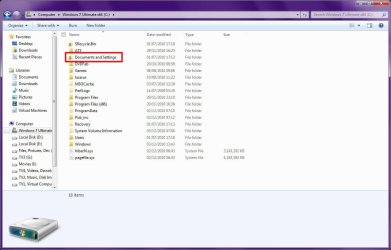
If you will recall, on Windows XP, all user-related settings and files was stored in "C:\Documents and Settings". Some programs incorrectly hard-coded the access paths to that folder, and although it worked on XP, it would be a big problem on Windows 7 because that folder no longer exists, and the program would no longer function correctly. So Windows creates the "Documents and Settings" junction to automatically and invisibly redirect such poorly written programs to the "Users" folder.
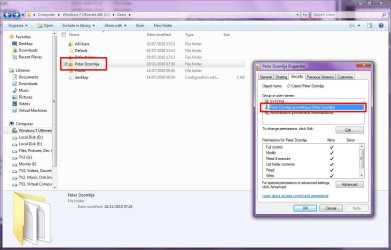
But if the folder does belong to you, then the lock is there also for security, as it prevents other users from accessing your files. The following screenshot show the lock icon on my user folder, "Peter Dzomlija", and the security settings for it shows only "SYSTEM", "Peter Dzomlija" and "Administrators". Should I be concerned? No, because if another user is created on my computer, then it means they they will not have access to that folder or anything inside it.
The same applies to a folder that I created myself for hold all my programming projects. I don't mind other users accessing stuff like my videos or music, but my programming is mine alone, so the securities have been edited to allow access to only myself and important system processes:
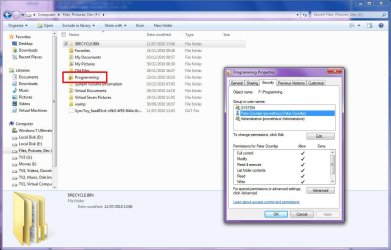
Essentially what the lock icon means is that the folder has limited access to only specific users... | My System Specs | | System Manufacturer/Model Number Custom Build OS Windows 7 Ultimate x64 CPU AMD Phenom 9600 Quad Core Motherboard ASUS MB-M3A32-MVP Deluxe/WiFi Memory 2 x A-Data 2GB DDR2-800 Graphics Card ASUS ATI Radeon HD 2400PRO Sound Card C-Media 7.1 Surround Monitor(s) Displays Sahara 19" Screen Resolution 1600x1200 Keyboard Mercury Mouse Logitech PSU 800W Case Thermaltake Tai-Chi Cooling Tai-Chi Water Cooler Hard Drives 1 x 80GB Seagate (IDE)

2 x 120GB Seagate (IDE/Sata)
2 x 200GB Seagate (IDE/Sata)
1 x 250GB Seagate (Sata)
1 x 320GB Seagate (Sata)
2 x 1TB Seagate (Sata)
1 x 1.5TB Seagate (Sata) Internet Speed 384kbps |
04 Dec 2010
|
#7 | | |
Oh my! I think i got it. In this case, whatīs happened to some folders like Local configurations, where a body could access the IE folders like cookies, temporary files, recently opened docs and so on. I mean, where are the stuff of those folders stored in?
Thanks for the help
madgirl | My System Specs | | OS Windows Ultimate 32 CPU Intel Core2 Duo E7500 2.93GHz Motherboard ASUS p/ Intel P5G41-M LX 775 Memory 3 gb Graphics Card vga XFX 1024MB (1GB) GeForce 9500 GT DDR2 Monitor(s) Displays samsung syncmaster 931c Hard Drives 500 gb - SeaGate and Samsumg 500 gb |
04 Dec 2010
|
#8 | | Windows 7 Ultimate RTM (Technet) Charlotte, NC |
The real issue here is why do you need to get to those folders directly? There are plenty of tools out there that will clear that information for you without having to go directly to the source.
Also, if you already changed permissions or "took ownership" of anything, I would recommend that you perform a System Restore and go back to the point before you did it. Chances are high that you have made changes that should not have been made due to reckless advice given here. | My System Specs | | System Manufacturer/Model Number Custom OS Windows 7 Ultimate RTM (Technet) CPU 3.00 gigahertz Intel Core2 Duo E8400 Motherboard ASUSTeK Computer INC. P5K/EPU Rev 1.xx Memory 4GB Graphics Card ATI Radeon X1950 Pro Sound Card Built in HD Audio Monitor(s) Displays 22" Gateway LCD Screen Resolution 1920 x 1200 Keyboard Logitech G11 Mouse Microsoft Wireless Laser Mouse 5000 Hard Drives ST3160023A [Hard drive] (160.04 GB) -- drive 0, rev 8.01, ST3500630AS [Hard drive] (500.11 GB) -- drive 2, rev 3.AAK
ST3500630AS [Hard drive] (500.11 GB) -- drive 1, rev 3.AAK Internet Speed 13.44 Mbps |
04 Dec 2010
|
#9 | | Win7U 64 RTM Ellesmere Island |

Quote: Originally Posted by madgirl Oh my! I think i got it. In this case, whatīs happened to some folders like Local configurations, where a body could access the IE folders like cookies, temporary files, recently opened docs and so on. I mean, where are the stuff of those folders stored in? * USER NAME means insertion of your user account name. Also,you can create a shortcut to the any of the following locations and keep it on your desktop or wherever suits you. Further, you can create keyboard shortcuts to these shortcuts for even more convenient access (in the vista group, but same in Win 7): http://www.vistax64.com/tutorials/74...-shortcut.html Access to some or all of these may require that you show hidden folders and/or unhide protected OS Files: Hidden Files and Folders - Show or Hide ------------------------------------------------- Access Temporary folder (real temp folder, not the system protected junction): C:\Users\USER NAME\AppData\Local\Temp or 1) Windows Key 2) Type %temp% 3) Press Enter Access Cookie folder: C:\Users\USER NAME\AppData\Roaming\Microsoft\Windows\Cookies\Low Access to SendTo folder: C:\Users\USER NAME\AppData\Roaming\Microsoft\Windows\SendTo
For this folder, you can create a shortcut, placing it in it's original folder (above):
1) Right Click on the folder and (still holding the right mouse button) drag it into itself (the right side pane with shortcuts).
2) Release mouse button and choose ' Create shortcut here' from the popup menu.
This will Place Send To in your Right Click context menu, allowing you to place items in your Send to menu simply by right clicking and choosing Send To\Send To. Access to Start Menu: C:\Users\USER NAME\AppData\Roaming\Microsoft\Windows\Start Menu\Programs or 1) Click on Start 2) Right click on All Programs 3) Choose Open Recently Opened Docs: C:\Users\USER NAME\AppData\Roaming\Microsoft\Windows\Recent or 1) Click on Start 2) Right click on Recent Items 3) Choose Open James
Last edited by James Colbert; 27 Dec 2010 at 10:26 PM..
Reason: Clarity
| My System Specs | | OS Win7U 64 RTM CPU Q9550 Motherboard GA-EP45-UD3R Memory 8GB Gskill Graphics Card ASUS|EAH4850/HTDI/1GD3/A Sound Card xfi Plat Monitor(s) Displays Dell 2405fpw Screen Resolution 1920x1200 Keyboard MS Natural Ergonomic 4000 Mouse Logitech MX610 USB Cordless PSU Antec Case Antec Hard Drives Seagate & WD sata Drives |
04 Dec 2010
|
#10 | | |
Hi guys!
I did it! Colbertīs help got me right to the point! This way, Iīd like to thank all of you for the help and ask a last question about this issue. It seemed to me that i shouldnīt have used the registry keys, am i right? If it is that way, do you think that i should restore my system?
madgirl | My System Specs | | OS Windows Ultimate 32 CPU Intel Core2 Duo E7500 2.93GHz Motherboard ASUS p/ Intel P5G41-M LX 775 Memory 3 gb Graphics Card vga XFX 1024MB (1GB) GeForce 9500 GT DDR2 Monitor(s) Displays samsung syncmaster 931c Hard Drives 500 gb - SeaGate and Samsumg 500 gb All times are GMT -5. The time now is 03:43 AM. | |