Windows 7 Forums


Windows 7: Search not showing all results

08 Dec 2010   #1

Windows 7 Home Premium x64 SP 1
Florida
 
 
Search not showing all results

The other day I was looking for a .dll file in the Firefox plugin folder. I entered the file name correctly in Start > Search programs and files, but the file and location did not appear. I navigated to the file manually in Windows Explorer anyway. I already had ticked Windows Explorer > Tools > Folder Options > View > Show hidden files, folders and drives, and I had unticked Hide Protected Operating System Files. So why didn't the file appear on my search? Thanks.

My System SpecsSystem Spec

08 Dec 2010   #2

Win7U 64 RTM
Ellesmere Island


A search of this forum will reveal that Win 7 search produces inconsistent results. This issue is a bit controversial, as there are those who believe that it's always user error and others who believe that Win search is defective, I believe the reality lies somewhere in the middle.

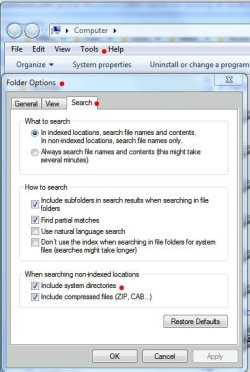
That said, Win 7 search is an AQS search engine, which, to obtain the best results, requires AQS syntax. Also, search, being integrated throughout windows, functions differently in different areas. For example, Start Menu searches include only indexed locations. By default, system files are not indexed. Viewing the screenshot, taking note of the red dots will point the way (via Folder Options\Tools|Search tab). Also, I've included some links that will give good info on win search.

Mastering Windows Search using Advanced Query Syntax

Windows Search Advanced Query Syntax

Advanced Query Syntax (Windows)

You can also do a google search on AQS. In the meantime, you can try your search from Windows Explorer, which will search non-indexed locations.

James
Attached Thumbnails
Search not showing all results-search-properties.jpg  
My System SpecsSystem Spec
08 Dec 2010   #3

Windows 7 Pro/32 Academic. Build 7600
Coral Springs, Florida


James Colbert is correct, it has been a controversial issue. There seems to be a great misunderstanding regarding search and a lack of knowledge from many new users of Windows 7. Simply, Windows would not locate your file because hidden/system files are not indexed. You will find that if you indexed the folder, your file would show up instantly in Windows/Search. Or, you could navigate to the folder where you know the file is and search from within the folder.
My System SpecsSystem Spec
.


08 Dec 2010   #4

Windows 7 Home Premium x64 SP 1
Florida


Thanks, James mborner. I think the issue is that the folder was not indexed. Thanks again.
My System SpecsSystem Spec
Reply

 Search not showing all results problems?


Thread Tools


Similar help and support threads for: Search not showing all results
Thread Forum
How to prevent showing of search results from drive/folder? General Discussion
"Search" not showing all results! General Discussion
Sorting search results causes search to rerun General Discussion
Disable folder content from showing in search results! General Discussion
Google Desktop Search Results from Start menu search Software


All times are GMT -5. The time now is 08:51 PM.


Seven Forums Android App Seven Forums IOS App Follow us on Facebook

Windows 7 Forums is an independent web site and has not been authorized,
sponsored, or otherwise approved by Microsoft Corporation.
"Windows 7" and related materials are trademarks of Microsoft Corp.
© Designer Media Ltd
  

1 2 3 4 5 6 7 8 9 10 11 12 13 14 15 16 17 18 19 20 21 22 23 24 25 26 27 28 29 30 31 32