Windows 7 Forums


Windows 7: Replace file? I have to click "Yes" Twice. Why?

11 Dec 2010   #1

Win 7 x64 Pro
N. GA
 
 
Replace file? I have to click "Yes" Twice. Why?

When I drag and drop a file from one folder to another and it tells me there is already a file there and do I want to replace it, I click "Yes" and it blinks and I have to click it again. Argh! Consistently across several drives this is the case.

Help!

My System SpecsSystem Spec

11 Dec 2010   #2

Windows 7 x64 Ultimate
A Finnish immigrant in Leipzig, Germany


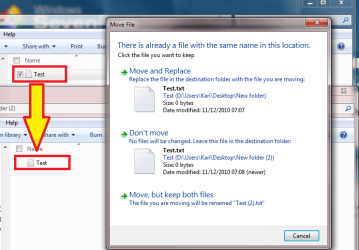
I tried to reproduce this issue, but could not. When dragging a single file with left mouse button, one click is always enough:

Replace file? I have to click "Yes" Twice. Why?-drag_-_drop_2.png

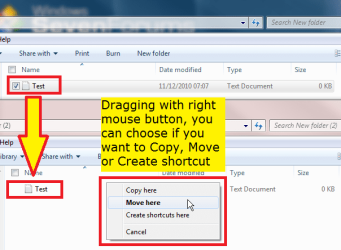
There are two ways to drag and drop that do in fact need two (or more) clicks. First, if you drag a file with right mouse button, Windows asks first you to confirm with one click if you want to copy, move or create shortcut, after what you get a dialog as in screenshot above, with second click to confirm if you want to replace the old one or keep both.

Replace file? I have to click "Yes" Twice. Why?-drag_-_drop.png

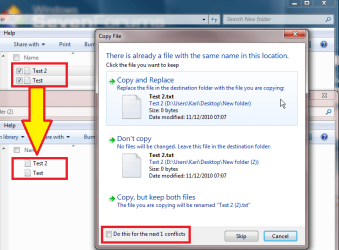
Also, dragging several files at once, you have to choose the action for every file, if the option Do this for the next X conflicts is not chosen:

Replace file? I have to click "Yes" Twice. Why?-drag_-_drop_3.png

Kari
My System SpecsSystem Spec
11 Dec 2010   #3

Win 7 x64 Pro
N. GA


Thank you. It must be permissions or something on my end. I am trying to give the three PC's on a wired network full access and I'm having trouble there too. I am in a home group and want full sharing but keep hitting snags. Any help there would be good. I want access to be wide open across the network
My System SpecsSystem Spec
.


11 Dec 2010   #4

Windows 7 x64 Ultimate
A Finnish immigrant in Leipzig, Germany


I'm sure you'll get valid advice by posting your sharing issue to Network & Sharing section. Don't forget to tell what OS's you comuters have, and how they are connected to network, which router and so on.

Network & Sharing - Windows 7 Forums

Kari
My System SpecsSystem Spec
Reply

 Replace file? I have to click "Yes" Twice. Why? problems?


Thread Tools


Similar help and support threads for: Replace file? I have to click "Yes" Twice. Why?
Thread Forum
Solved How do I add file types to "Right-Click->New->" in Windows Explorer General Discussion
Solved Replace file? Have to click "Yes" Twice. Why? General Discussion
When I click "install now", it's saying "No device drivers were found" Installation & Setup
Replace default "Windows can't open this file" dialog Customization
Solved Missing One-Click "Red X" File Delete General Discussion


All times are GMT -5. The time now is 12:20 AM.


Windows 7 Forums is an independent web site and has not been authorized,
sponsored, or otherwise approved by Microsoft Corporation.
"Windows 7" and related materials are trademarks of Microsoft Corp.
© Designer Media Ltd