Windows 7 Forums Search
Welcome to Windows 7 Forums. Our forum is dedicated to helping you find solutions with any problems, errors or issues you are experiencing with Windows 7. The Windows 7 forum also covers news and updates and has an extensive Windows 7 tutorial section that covers a wide range of tips and tricks.


Windows 7 - 2 Windows, both showing C drive??

 
12-14-2010   #1


Windows 7 x64


2 Windows, both showing C drive??

I've installed Windows 7 on two different partitions, both are on the same drive. When I boot into each version of windows they both show C:\ as the partition. Each one has a different login password, so I know that I'm logging into two different windows on two different partitions.

When on Windows(1) another installation of windows is shown on D:\
When on Windows(2) another second installation of windows is also shown on D:\

But I've installed each Windows on two different partitions.

Why are they both displaying that they're installed on C:\ on both windows 1 and windows 2? Crazy.

My System SpecsSystem Spec
12-14-2010   #2


Windows 7 Ultimate x64 SP1


I believe Windows 7 will show the system volume as C for each OS, even if that partition/drive is different.

I have to ask, because there is always a better way...but why on Earth would you burn an extra license installing the same OS on the same computer twice?
My System SpecsSystem Spec
12-14-2010   #3
whs


Vista and Windows7, sometimes Ubuntu and Fedora


I think that is normal. I have Windows 7 and Vista on 2 different harddrives on the same PC. And there it is the same. When I am in Windows 7, it occupies C and Vista is E. When I am in Vista, it is the other way around.
My System SpecsSystem Spec
.


12-14-2010   #4


Windows 7 x64


Are you sure?

Before I posted this I was getting ready for war with bootable CD's, bootkit detection utility's, security analyzers, vulnerability patchers, scripts, firewalls...

lol...sure it's normal?
My System SpecsSystem Spec
12-14-2010   #5


Windows 7 x64


Doesn't sound normal.

What if I WANT it to display as D:\....why would a partition display as C when the name of the partition is D.

You guys must be in on it.
My System SpecsSystem Spec
12-14-2010   #6


Windows 7 Home Premium 64 bit


Because the os alway takes C: when your logged on
My System SpecsSystem Spec
12-14-2010   #7
whs


Vista and Windows7, sometimes Ubuntu and Fedora


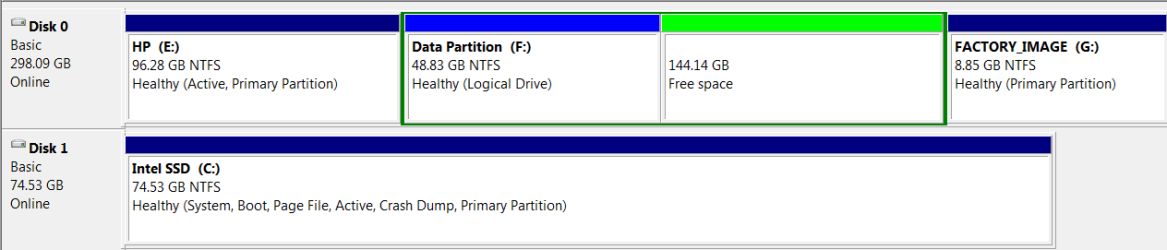
Have a look at my Disk Management. E is Vista, C is Windows 7 where I currently am.
Attached Thumbnails
2 Windows, both showing C drive??-2010-12-14_162434.png  
My System SpecsSystem Spec
12-14-2010   #8


Windows 7 Ultimate RTM (Technet)


Drive letters are dependent on the OS itself, so yes, what you are seeing is normal. Just to clarify, the OS drive does not HAVE to be C:, but it will be in most cases.
My System SpecsSystem Spec
12-14-2010   #9


Windows 7 Ultimate X64 SP1


Windows will always see itself as C:\ regardless. The Drive letters are OS dependant not Drive dependant. In reality the letters don't really exist they are just friendly names so we can identify them easily.

To answer your question, if you want it to be D then you can change it using Disk Management (Start>Right click Computer>Manage>Storage>Disk management) but there is no real reason to do this, and in fact quite a good reason not to.

When you install a program, by default, it will try and install itself to C:\ (in 99% of cases) unless you want to go through changing the default path every time, then every program will end up dumping itself on the "C" drive regardless of which OS it's installed on. Organisational nightmare. not to mention the fact that if you have the same program installed on both OS's then you will get a file conflict because it will just overwrite the program that was there before (or fail to install, varies by program)

In short: If it aint broke, don't fix it.
My System SpecsSystem Spec
12-14-2010   #10


Do not attempt to change your drive letter using any method unless it loses it during reimaging or repair (then use Paragon Rescue CD). It will brick your OS.

The only way to install Windows 7 so that it doesn't conveniently always see itself as C is if you install it from another runnning OS which is lettered C.

Booting the installer to install will always result in Windows 7 being C when you are in it.
My System SpecsSystem Spec
Reply

 2 Windows, both showing C drive?? problems?


Thread Tools


Similar Threads for: 2 Windows, both showing C drive??
Thread Forum
dvd drive not showing after windows 7 installed Drivers
Solved External hard drive not showing up in Windows Explorer Hardware & Devices
Solved Windows is showing Drive C: as nearly full, but this is not possible ? General Discussion
Windows not showing files moved to external drive. General Discussion
New Windows 7 Pro system not showing SD card drives & Networked Drive Network & Sharing


All times are GMT -5. The time now is 11:18 PM.


Windows 7 Forums is an independent web site and has not been authorized,
sponsored, or otherwise approved by Microsoft Corporation.
"Windows 7" and related materials are trademarks of Microsoft Corp.
© Designer Media Ltd
  

1 2 3 4 5 6 7 8 9 10 11 12 13 14 15 16 17 18 19 20 21 22 23 24 25 26 27 28 29 30