| Windows 7: How much diskspace for windows partition??? |
14 Dec 2010
|
#1 | | desktop: win7 professional x86, laptop: win7 prof. x64 |
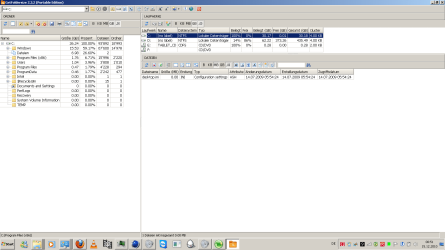
How much diskspace for windows partition??? I felt confident about giving my windows partition 30Gb of diskspace. Now, and suddenly i have only about 200mb's left. Why the hell does windows use so much space? And why is its need for space growing and not constant?
Are there any backup/update/something-files i can dump? Here a screenshot of my diskspace-usage | My System Specs |
| OS desktop: win7 professional x86, laptop: win7 prof. x64 CPU desktop: intel e6400 dual @ 2.13ghz, laptop: intel i7 quad Internet Speed 20Mbit/s dwn, 2Mbit/s up |
14 Dec 2010
|
#2 | | Win 8 Release candidate 8400 |

Quote: Originally Posted by blackdot I felt confident about giving my windows partition 30Gb of diskspace. Now, and suddenly i have only about 200mb's left. Why the hell does windows use so much space? And why is its need for space growing and not constant?
Are there any backup/update/something-files i can dump? Here a screenshot of my diskspace-usage As you add programs and updates the size does grow. 30 Gigs is on the small end for a win 7 OS partition.
Doubtful that there is any backups in that partition because it is too small.
Ken J | My System Specs | | System Manufacturer/Model Number HP Pavillion dv-7 1005 Tx OS Win 8 Release candidate 8400 CPU 2@2.4 Memory 4 gigs Graphics Card Nvidia 9600M Sound Card HD built-in Monitor(s) Displays 17" Wxga Screen Resolution 1440x900 Cooling none Internet Speed 45Mb down 5Mb up |
14 Dec 2010
|
#3 | | W 7 64-bit Ultimate The Lowcountry |
Hello blackdot, welcome to Seven Forums!
Have a look at this tutorial at the link below to see if it will get you some space back; 30GB is not nearly enough space for the OS and installed programs/apps. How to Free Up and Recover Hard Drive Space | My System Specs | | System Manufacturer/Model Number * BFK Customs * OS W 7 64-bit Ultimate CPU Intel Q9550 Yorkfield Motherboard ASUS P5Q Pro Memory 8GB Dominator 8500C5D Graphics Card ATI : XFX 5870 Sound Card Realtek HD Audio 7-1 Monitor(s) Displays 1x 47" LCD HDMI & 3x 26" LCD HDMI Screen Resolution 1920x1080P & 1920x1200 Keyboard Microsoft 500 Mouse Razer Diamondback 3G PSU Corsair 620HX Case Cooler Master RC-690 Cooling Tuniq Tower 120, 2x 140mm and 3x 120mm case fans Hard Drives 1x 80GB Intel X25-M G2 SSD : 1x 500GB & 1x 640GB WD Caviar Black(s) Internet Speed 14 Mb/s Other Info 1x Koutech 3Gb/s SATA HDD Hot Swap Rack |
14 Dec 2010
|
#4 | | Windows 7 Home Premium 64 bit Illinois |
I use 50Gb for OS, but that's because I have a large drive.
You could get away with 25Gb, 35Gb or 40Gb.
It all depend upon what you're installing.
If you have more than one partition, you may want to use partitioning software to increase the size of the OS partition. | My System Specs | | System Manufacturer/Model Number Self-built OS Windows 7 Home Premium 64 bit CPU Intel Core i7-3770 Motherboard MSI Z77A-G45 Memory G.SKILL 8GB (2 x 4GB) DDR3 F3-10666CL9D-8GBNT Graphics Card Sapphire ATI Radeon HD 6670 Sound Card On-Board Realtek Monitor(s) Displays Samsung SyncMaster P2370HD, Dell 1703FPT Screen Resolution 1920 x 1080, 1280 x 1024 Keyboard Logitech K270 Mouse Logitech M705 PSU SeaSonic M12II SS-500GM Case Lian Li PC-9F Cooling Zalman CNPS9900ALED Hard Drives Samsung HD103SJ Internet Speed 16 Mbps Other Info Bose Companion 2 Multimedia Speakers |
14 Dec 2010
|
#5 | | desktop: win7 professional x86, laptop: win7 prof. x64 |

Quote: Originally Posted by Bare Foot Kid Hello blackdot, welcome to Seven Forums!
Have a look at this tutorial at the link below to see if it will get you some space back; 30GB is not nearly enough space for the OS and installed programs/apps. How to Free Up and Recover Hard Drive Space thanks, there were some tricks i didnt know. i guess with the sync-files i can save some Gb's. Or is it possible to tell him, that he shall not put synced files on C: ? 
Quote: Originally Posted by zigzag3143 As you add programs and updates the size does grow. Well i recognised that. Isnt there a way, that every file a program brings is installed where i order it to insteady of messing up my windows partition? 
Quote: Originally Posted by p5bdkw I use 50Gb for OS, but that's because I have a large drive.
You could get away with 25Gb, 35Gb or 40Gb.
It all depend upon what you're installing.
If you have more than one partition, you may want to use partitioning software to increase the size of the OS partition. If i use such a software i dont need to reinstall windows? that would be great, because it sucks to install all programs and drivers all over again. | My System Specs | | OS desktop: win7 professional x86, laptop: win7 prof. x64 CPU desktop: intel e6400 dual @ 2.13ghz, laptop: intel i7 quad Internet Speed 20Mbit/s dwn, 2Mbit/s up |
14 Dec 2010
|
#6 | | W 7 64-bit Ultimate The Lowcountry |
Have a look at this tutorial at the link below for some ideas and be sure to post back with any further questions you may have and to keep us informed. Partition Wizard : Use the Bootable CD | My System Specs | | System Manufacturer/Model Number * BFK Customs * OS W 7 64-bit Ultimate CPU Intel Q9550 Yorkfield Motherboard ASUS P5Q Pro Memory 8GB Dominator 8500C5D Graphics Card ATI : XFX 5870 Sound Card Realtek HD Audio 7-1 Monitor(s) Displays 1x 47" LCD HDMI & 3x 26" LCD HDMI Screen Resolution 1920x1080P & 1920x1200 Keyboard Microsoft 500 Mouse Razer Diamondback 3G PSU Corsair 620HX Case Cooler Master RC-690 Cooling Tuniq Tower 120, 2x 140mm and 3x 120mm case fans Hard Drives 1x 80GB Intel X25-M G2 SSD : 1x 500GB & 1x 640GB WD Caviar Black(s) Internet Speed 14 Mb/s Other Info 1x Koutech 3Gb/s SATA HDD Hot Swap Rack |
14 Dec 2010
|
#7 | | desktop: win7 professional x86, laptop: win7 prof. x64 |
thank you, i will look into that.
Btw, thank you all for those ultra-fast replies  . | My System Specs | | OS desktop: win7 professional x86, laptop: win7 prof. x64 CPU desktop: intel e6400 dual @ 2.13ghz, laptop: intel i7 quad Internet Speed 20Mbit/s dwn, 2Mbit/s up |
14 Dec 2010
|
#8 | | W 7 64-bit Ultimate The Lowcountry |
| My System Specs | | System Manufacturer/Model Number * BFK Customs * OS W 7 64-bit Ultimate CPU Intel Q9550 Yorkfield Motherboard ASUS P5Q Pro Memory 8GB Dominator 8500C5D Graphics Card ATI : XFX 5870 Sound Card Realtek HD Audio 7-1 Monitor(s) Displays 1x 47" LCD HDMI & 3x 26" LCD HDMI Screen Resolution 1920x1080P & 1920x1200 Keyboard Microsoft 500 Mouse Razer Diamondback 3G PSU Corsair 620HX Case Cooler Master RC-690 Cooling Tuniq Tower 120, 2x 140mm and 3x 120mm case fans Hard Drives 1x 80GB Intel X25-M G2 SSD : 1x 500GB & 1x 640GB WD Caviar Black(s) Internet Speed 14 Mb/s Other Info 1x Koutech 3Gb/s SATA HDD Hot Swap Rack |
14 Dec 2010
|
#9 | | Windows 7 Ultimate x64, Mint 9 In the Crust |
When you install software, it defaults to the C: drive (where the OS is).
In my case, I have a 60GB SSD and am limited on space, so I install to my E: drive, which is a much larger HDD. You can change this (filepath) when you install anything.
~Lordbob | My System Specs | | System Manufacturer/Model Number Hera OS Windows 7 Ultimate x64, Mint 9 CPU Intel i5-2500k Motherboard ASUS P8P67 Pro Memory 2x 4Gb Corsair VENGEANCE DDR3-1600 Graphics Card NVidia GeForce N260GTX Twin Frozr Sound Card Realtek HD OnBoard Audio Monitor(s) Displays ASUS 24" Monitor Screen Resolution 1920x1080 Keyboard Razer Tarantula Mouse Razer Lachesis PSU Cooler Master Real Power Pro 750W Case Cooler Master Haf 932 Cooling Fans Hard Drives G.SKILL Phoenix Series 60GB SATA II MLC Internal Solid State Drive (SSD)
SAMSUNG Spinpoint F3R 1TB 7200 RPM 32MB Cache SATA II Internet Speed not fast enough |
14 Dec 2010
|
#10 | | desktop: win7 professional x86, laptop: win7 prof. x64 |

Quote: Originally Posted by Lordbob75 When you install software, it defaults to the C: drive (where the OS is).
In my case, I have a 60GB SSD and am limited on space, so I install to my E: drive, which is a much larger HDD. You can change this (filepath) when you install anything.
~Lordbob I do this. I even changed the default-install-path in the registry, as sometimes programs dont ask where they are wanted to be installed. | My System Specs | | OS desktop: win7 professional x86, laptop: win7 prof. x64 CPU desktop: intel e6400 dual @ 2.13ghz, laptop: intel i7 quad Internet Speed 20Mbit/s dwn, 2Mbit/s up How much diskspace for windows partition??? problems? All times are GMT -5. The time now is 05:13 PM. | |