Windows 7 Forums Search
Welcome to Windows 7 Forums. Our forum is dedicated to helping you find solutions with any problems, errors or issues you are experiencing with Windows 7. The Windows 7 forum also covers news and updates and has an extensive Windows 7 tutorial section that covers a wide range of tips and tricks.


Windows 7 - windows 7 quick launch like XP / VISTA ?

 
06-13-2009   #11


Windows 7 x64


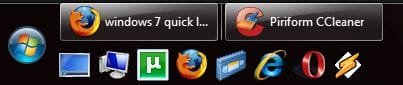
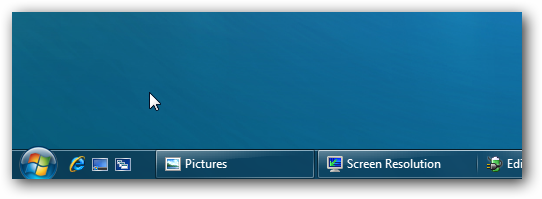
Lmao did you see the last picture? It looks EXACTLY like XP and Vista..


My System SpecsSystem Spec
08-13-2009   #12


xp


Quote   Quote: Originally Posted by tehelite View Post
Lmao did you see the last picture? It looks EXACTLY like XP and Vista..

And how did you fix it ? I tried everything possible,but i can't have it like yours.
My System SpecsSystem Spec
08-18-2009   #13


xp


Quote   Quote: Originally Posted by melex View Post
And how did you fix it ? I tried everything possible,but i can't have it like yours.
Please help me ,someone.
I wanna have it same like in the post above.
Thanks.
My System SpecsSystem Spec
.


08-18-2009   #14


My Quick Launch works just as it worked in XP and Vista. I want to open something I just click the button on QL and that's it. See the image, QL on top under the orb (my taskbar is on the left).

windows 7 quick launch like XP / VISTA ?-ql.png
My System SpecsSystem Spec
08-18-2009   #15


Windows 7 Ultimate x64 SP1


This will show you how to have Quick Launch in Windows 7 like it was in Vista.

Quick Launch - Enable or Disable

Hope this helps,
Shawn
My System SpecsSystem Spec
05-14-2010   #16


Windows 7 x64 Professional


Quick Launch was just a name for the default/prefabricated/predfined toolbar. This could be pulled out of the default location in the task bar and put wherever.

'Quick Launch' for the toolbar is analogous to the default/prefabricated/predifined 'Links' folder in the old Internet Explorer Bookmarks.

What is missing is toolbar from XP which could be put on any side of the monitor.

THEN

You could create a new toolbar and name it Quicker Launch, and then put THAT on another side of the monitor.

THEN

You could do this 2 more times and have 4 totally different toolbars (only one of which was the 'quick launch', each defined by unique system folders) on each side of your monitor. (These toolbars could also be 'copies' of each other instead as they really just pointed to a system folder; you could have multiple copies of the quick launch at need.)

THAT is no longer possible in windows 7. Its a loss especially for people who use multiple monitors. I mean come on -- motherboards nowdays can easily give you PCIe space for 3 sli/cf graphics cards allowing you to setup an array of six monitors (and that's just with normal GPUs not using DVI links) -- you do NOT want just one toolbar for that, you want toolbars accessible on those other monitors or you have a mouse traversal nightmare.

This aspect of the windows xp toolbar is gone entirely.

---

A lot of people don't seem to realize the "Quick Launch" was just a folder name on the Hard Disk where the default Tool Bar contents was defined. Most people didn't realize apparently that you could have multiple totally different 'quick launch' bars defined and put all over the desktop.

Last edited by flirno; 05-15-2010 at 04:34 AM..
My System SpecsSystem Spec
Reply

 windows 7 quick launch like XP / VISTA ? problems?


Thread Tools


Similar Threads for: windows 7 quick launch like XP / VISTA ?
Thread Forum
Launch Manager (Quick Launch Buttons) Hardware & Devices
HP Quick Launch Buttons and Windows 7 Drivers
Windows 7 task bar vs. Vista's Quick launch General Discussion
Getting Back Vista Quick Launch General Discussion


All times are GMT -5. The time now is 11:18 PM.


Windows 7 Forums is an independent web site and has not been authorized,
sponsored, or otherwise approved by Microsoft Corporation.
"Windows 7" and related materials are trademarks of Microsoft Corp.
© Designer Media Ltd
  

1 2 3 4 5 6 7 8 9 10 11 12 13 14 15 16 17 18 19 20 21 22 23 24 25 26 27 28 29 30