| Windows 7: Messing around with ownership brings general problem |
16 Dec 2010
|
#1 | | Windows 7 Ultimate x64 zagreb,croatia |
Messing around with ownership brings general problems Hello everybody,I need a little help
I was playing around with ownerships on C partition(and D,and E as well,but those two are data partitions only and have managed to solve a problem with those two) for I don't remember what reason exactly,and I have a general problem now.
There are problems involved I never dreamed about like access to program files folder,writing in it,installing anything and many many other,but with following a common sense(which account needs to do what),I have maaged to resolve a most of my problems,but there are still few to work on(for example Event Viewer ad Log Viewer etc)If it is not a problem,if aybody could write here who ows and which rights what folder in his PC has.
I need this properties:
-owner(system,admiistrator or user),
-full permision(everybody with full permission-admin,system,trusted installer,etc),
-and who has only basic rights(user xy)
of following folders:
-Program Files
-Program Data
-User Documents
-Public Documets
-Windows
And it would be also great to know who is the owner of the whole partition,and who has which rights.
I hope there is someoe out there,who wont find this too complicated to find.
And I am sorry on my English,it is not my native language and because of that,sometimes it is not so easy to find a word you would want to use,but I still thinnk that it is better this way then push it through the Google Translator.
Cheers | My System Specs |
| System Manufacturer/Model Number "MYSELF MANUFACTURE" OS Windows 7 Ultimate x64 CPU AMD Athlon 5600+ x2 Motherboard GA-MA69-S3H Memory 4GB DDR2@800 dual channel Graphics Card Gigabyte 4670 Sound Card Realtek ALC889A/on board Monitor(s) Displays LG 1718S Screen Resolution 1280x1024/75 Keyboard logitech cordles PSU Antec 550w Case noname Hard Drives 2x250GB SATA II Seagate ST3250310AS Internet Speed 4096/320kbps |
16 Dec 2010
|
#2 | | 64-bit Windows 7 Ultimate SP1 & Windows 8 Enterprise Texas |
Hello Drazenn,
You could do a system restore at boot using a restore point dated before you did this to undo and hopefully fix it.
Hope this helps,
Shawn | My System Specs | | Computer type PC/Desktop System Manufacturer/Model Number Self built custom OS 64-bit Windows 7 Ultimate SP1 & Windows 8 Enterprise CPU Intel i7-3930K 3.2 Ghz (O/C 4 Ghz) Motherboard ASRock X79 Extreme11 Memory 32 GB (8GBx4) G.SKILL DDR3 Quad PC3-19200 2400MHz Graphics Card Sapphire HD5870 Eyefinity 6 2GB Sound Card SB Recon 3Di Integrated Chip Monitor(s) Displays 3x 27" Asus VE278Q Screen Resolution 1920x1080 Keyboard Logitech Cordless Desktop MX 5500 Revolution Mouse Logitech Cordless Desktop MX 5500 Revolution PSU OCZ Series Gold OCZZ1000M 1000W Case Thermaltake Level 10 GT Snow Edition Cooling Corsair Hydro H100 Hard Drives 256GB OCZ Vector
160GB OCZ RevoDrive X2
2 x 1TB Samsung HDD HD154UI SATA Internet Speed 50 Mb/s Download and 2 Mb/s Upload Other Info Microsoft LifeCam Cinema
Lite-On iHBS212 12x BD Writer
Samsung CLX-3175FW Printer
Netgear WNDR3800 Router
Motorola SBG6580 Cable Modem
2x APC Back-UPS XS 1500 |
16 Dec 2010
|
#3 | | |
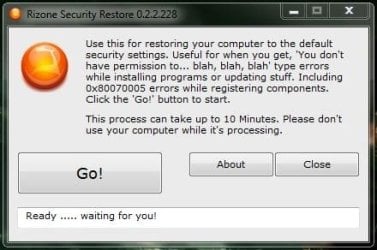
See if this utility can help: (I have not used it and don't know if it really works!) | My System Specs | | System Manufacturer/Model Number Acer Notebook OS Win 8 RP, Win 7, XP CPU Intel |
17 Dec 2010
|
#4 | | Windows 7 Ultimate x64 zagreb,croatia |
yes Brink,you are right,it would probably solve that,but the problem is I have done all that mess log time ago,and since then,I have managed everything to run so flawless,that I have even forgot on that,made an image,and bump,that was it.
Those few unresolved (and unneeded at that time)remained things I solved in the walk,but then,i that time,I had all that stuff in my head since I was agonized with that for days.
And now,ohohoho months later(or year and something),after I made a really big mess on a hard disk,and there was really no option to repair(I was happy that I saved eve some of data on other 2 partitions),I had to pull that famous image made backthen(I was always thinking that I don't need to make another image,because I will make fresh install some day,and I'll make an image of that,but due to delay of that,that day never came).
Briefly said,image that I installed few days ago has no healthy restore points,and I have no clue where to start anymore.
Thanks to Boyans,I hope there will be no need for another repair or fresh install(still haven't tried but looks promising)
Cheers | My System Specs | | System Manufacturer/Model Number "MYSELF MANUFACTURE" OS Windows 7 Ultimate x64 CPU AMD Athlon 5600+ x2 Motherboard GA-MA69-S3H Memory 4GB DDR2@800 dual channel Graphics Card Gigabyte 4670 Sound Card Realtek ALC889A/on board Monitor(s) Displays LG 1718S Screen Resolution 1280x1024/75 Keyboard logitech cordles PSU Antec 550w Case noname Hard Drives 2x250GB SATA II Seagate ST3250310AS Internet Speed 4096/320kbps |
18 Dec 2010
|
#5 | | Windows 7 Ultimate x64 zagreb,croatia |
Sadly,it didn't worked.
I ran security restore few times,but nothing changed.
I ran it normal and as admin,but neither one of admin rights changed.
Seems I will need to find normal,usual,default properties somewhere,and change them maually through each folder.
But still,thanks on a try | My System Specs | | System Manufacturer/Model Number "MYSELF MANUFACTURE" OS Windows 7 Ultimate x64 CPU AMD Athlon 5600+ x2 Motherboard GA-MA69-S3H Memory 4GB DDR2@800 dual channel Graphics Card Gigabyte 4670 Sound Card Realtek ALC889A/on board Monitor(s) Displays LG 1718S Screen Resolution 1280x1024/75 Keyboard logitech cordles PSU Antec 550w Case noname Hard Drives 2x250GB SATA II Seagate ST3250310AS Internet Speed 4096/320kbps |
18 Dec 2010
|
#6 | | 64-bit Windows 7 Ultimate SP1 & Windows 8 Enterprise Texas |
Doing a repair install will restore the default permissions on the C: drive. | My System Specs | | Computer type PC/Desktop System Manufacturer/Model Number Self built custom OS 64-bit Windows 7 Ultimate SP1 & Windows 8 Enterprise CPU Intel i7-3930K 3.2 Ghz (O/C 4 Ghz) Motherboard ASRock X79 Extreme11 Memory 32 GB (8GBx4) G.SKILL DDR3 Quad PC3-19200 2400MHz Graphics Card Sapphire HD5870 Eyefinity 6 2GB Sound Card SB Recon 3Di Integrated Chip Monitor(s) Displays 3x 27" Asus VE278Q Screen Resolution 1920x1080 Keyboard Logitech Cordless Desktop MX 5500 Revolution Mouse Logitech Cordless Desktop MX 5500 Revolution PSU OCZ Series Gold OCZZ1000M 1000W Case Thermaltake Level 10 GT Snow Edition Cooling Corsair Hydro H100 Hard Drives 256GB OCZ Vector
160GB OCZ RevoDrive X2
2 x 1TB Samsung HDD HD154UI SATA Internet Speed 50 Mb/s Download and 2 Mb/s Upload Other Info Microsoft LifeCam Cinema
Lite-On iHBS212 12x BD Writer
Samsung CLX-3175FW Printer
Netgear WNDR3800 Router
Motorola SBG6580 Cable Modem
2x APC Back-UPS XS 1500 |
18 Dec 2010
|
#7 | | Windows 7 Ultimate RTM (Technet) Charlotte, NC |
Back up your files and do a clean install. It's the only way to be sure. | My System Specs | | System Manufacturer/Model Number Custom OS Windows 7 Ultimate RTM (Technet) CPU 3.00 gigahertz Intel Core2 Duo E8400 Motherboard ASUSTeK Computer INC. P5K/EPU Rev 1.xx Memory 4GB Graphics Card ATI Radeon X1950 Pro Sound Card Built in HD Audio Monitor(s) Displays 22" Gateway LCD Screen Resolution 1920 x 1200 Keyboard Logitech G11 Mouse Microsoft Wireless Laser Mouse 5000 Hard Drives ST3160023A [Hard drive] (160.04 GB) -- drive 0, rev 8.01, ST3500630AS [Hard drive] (500.11 GB) -- drive 2, rev 3.AAK
ST3500630AS [Hard drive] (500.11 GB) -- drive 1, rev 3.AAK Internet Speed 13.44 Mbps |
20 Dec 2010
|
#8 | | Windows 7 Ultimate x64 zagreb,croatia |

Quote: Originally Posted by MacGyvr Back up your files and do a clean install. It's the only way to be sure. Erh,MacGvyr,that is exactly what I want to avoid,I have really many many programs installled,and have maximally adjusted instalation to my needs and preferences,so problem is not a windows instalation itself,but few weeks of adjusting PC again after fresh install.
Brink,repair install will definitely be a way to go(I have done it few times before,but have completely forgot on it)but I am in mess with time this days,so I have't done it already.
I have one more question for you since you look like one of the most advanced users here(since pre-beta,if I remember well).
I have a problem with Media Center too(it can't access tuner so I believe it is also a permissions problem,and can't remember how I solved that problem backthen because I started to use it-Media Center-only few months ago,and now I am completely tied to it),and since I read I can loose Media Center after repair install,do you think after reinstalling it,it will work like before? | My System Specs | | System Manufacturer/Model Number "MYSELF MANUFACTURE" OS Windows 7 Ultimate x64 CPU AMD Athlon 5600+ x2 Motherboard GA-MA69-S3H Memory 4GB DDR2@800 dual channel Graphics Card Gigabyte 4670 Sound Card Realtek ALC889A/on board Monitor(s) Displays LG 1718S Screen Resolution 1280x1024/75 Keyboard logitech cordles PSU Antec 550w Case noname Hard Drives 2x250GB SATA II Seagate ST3250310AS Internet Speed 4096/320kbps |
20 Dec 2010
|
#9 | | Windows 7 Ultimate RTM (Technet) Charlotte, NC |
Bear in mind...every minute you spend trying to "fix" it is time you could have spent rebuilding. It's likely that you would have already been done. Also, I recommend next time you have all the "adjustments" done, that you make a full system image that you can roll back to at any time. | My System Specs | | System Manufacturer/Model Number Custom OS Windows 7 Ultimate RTM (Technet) CPU 3.00 gigahertz Intel Core2 Duo E8400 Motherboard ASUSTeK Computer INC. P5K/EPU Rev 1.xx Memory 4GB Graphics Card ATI Radeon X1950 Pro Sound Card Built in HD Audio Monitor(s) Displays 22" Gateway LCD Screen Resolution 1920 x 1200 Keyboard Logitech G11 Mouse Microsoft Wireless Laser Mouse 5000 Hard Drives ST3160023A [Hard drive] (160.04 GB) -- drive 0, rev 8.01, ST3500630AS [Hard drive] (500.11 GB) -- drive 2, rev 3.AAK
ST3500630AS [Hard drive] (500.11 GB) -- drive 1, rev 3.AAK Internet Speed 13.44 Mbps |
20 Dec 2010
|
#10 | | Windows 7 Ultimate x64 zagreb,croatia |
Yes,MacGvyr,like I wrote above,I do reinstall system from an image usually,but this particular image has permissions messed up,and I have forgot to make a newer one when I solved all the problems.In fact,I haven't forgot,but have always delayed thinking I'll make an image when update one program,uninstall another,istall the other of the same kind but different developer,and so on.
But this time,I hope,repair install will do the job.I know it will take quiite time because of so much programs and files already in,but it's worth waiting.
Still,since like I said,I didn't use Media Center at that time,I can't remember when I did repait install,did I have to download Media Center separetely,or I haven't loose it at all. | My System Specs | | System Manufacturer/Model Number "MYSELF MANUFACTURE" OS Windows 7 Ultimate x64 CPU AMD Athlon 5600+ x2 Motherboard GA-MA69-S3H Memory 4GB DDR2@800 dual channel Graphics Card Gigabyte 4670 Sound Card Realtek ALC889A/on board Monitor(s) Displays LG 1718S Screen Resolution 1280x1024/75 Keyboard logitech cordles PSU Antec 550w Case noname Hard Drives 2x250GB SATA II Seagate ST3250310AS Internet Speed 4096/320kbps Messing around with ownership brings general problem problems? All times are GMT -5. The time now is 01:47 AM. | |