Quote: Originally Posted by
Omlet
The thing is I have a a separate hard-drive just for games and nothing else. If I were to do a clean install, I would think the games would still work considering no files were altered (the config and save files are usually located in the documents folder, but I can just back that up). The only thing I can see going wrong is a missing registry entry.
That may work, but at the end of the day, a game is nothing more than just another program on the system, and these are never easy to back, if at all possible. There are always registry entries that need replacing, and what about other files that may be required and are located in folders other than the primary install folder? These are all factors that need to be taken into account.
In the rare cases where the registry is easy to find, and all required files are in the same place, like Diablo 2, then your idea of exporting the registry may help, but then only if you restrict yourself to the relevant keys.
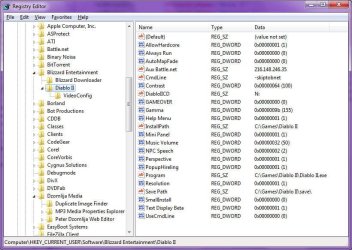
For example, if I want to backup the entire Diablo 2 game folder, I need to export the registry key shown in the following screenshot:
Diablo 2 Registry Keys
From there, I only need to backup the main install folder and all it's contents. I can actually away with this, because several months ago, Blizzard Entertainment release the 1.13 patch for Diablo 2, which allow the game to be played without requiring the CD to be present. Their motivation was that most people will want to protect their game discs from damage, and with Diablo 2 being a 10 year old game, will be hard to replace. So they allow the game to be played without the disc. This has the advantage of also making the game easy to backup.
Perhaps if you go to the manufacturers website for any of your games, you can find a similar facility. Possibly even more information on how to properly backup each game?