

ten
New member
- Local time
- 6:51 AM
- Messages
- 266
Anyone seen this before or know what causes it? My mom is suffering from it. I did move her default desktop location to her data drive.
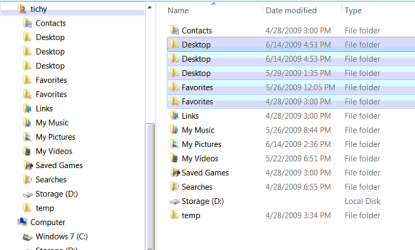
Here you can see the properties. The one on the left is the default location one which appears in explorer but shouldn't. The one on the right is the real desktop that I moved to her data drive. 2 copies appear for the one on her data drive.
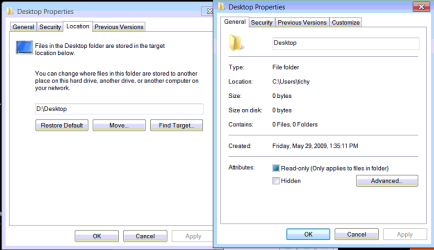
Here you can see the properties. The one on the left is the default location one which appears in explorer but shouldn't. The one on the right is the real desktop that I moved to her data drive. 2 copies appear for the one on her data drive.
Last edited:
My Computer
At a glance
XP / Windows 7 Pro RTM
- Computer Manufacturer/Model Number
- Haha! You peeked. Why so nosey?
- OS
- XP / Windows 7 Pro RTM


