
Can you tell me what I need to make this batch file run?
I run a batch file to do image backups. It will only run if I am in the built- in-admin account. When I saw the command line option I thought I had it made. Because the batch file runs in C:\windows\system32\cmd I figured I was already at an elevated commandprompt so I merely added 'net user administrator /active:yes' as the first line in the batch file. I also got a error 5 when the net user line was used. Can you tell me what I need to make this batch file run? I have it on the scheduler to run while I am sleeping.
Last edited by Brink; 22 Dec 2010 at 06:20 PM..
Reason: moved
Computer type Laptop System Manufacturer/Model Number Asus OS W7 Ultimate CPU 2.2 bh Intel Core i3-2330M Motherboard Asustek Computer Inc. P53E 1.0 Memory 4MB Graphics Card On Board Sound Card On Board Monitor(s) Displays On Board Screen Resolution 1366 X 768
Hard Drives ST9500423AS
ST2000DM USB Backup Drive External
blockie;Error 5 = Access denied
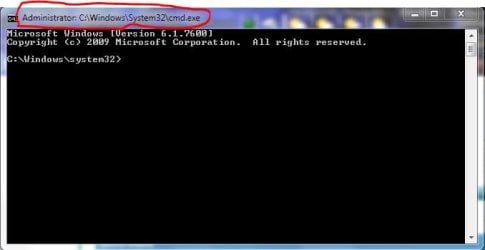
The command prompt is not automatically elevated just because it runs in \system32\
You'd have to call CMD in the search bar, right click and run as Administrator.
ONLY if it looks like this, it's an elevated command prompt
System Manufacturer/Model Number HP m8000n OS Windows 7 Ultimate x86 CPU DualCore AMD Athlon 64 X2, 2600 MHz 5200+ Motherboard Asus M2N68-LA (Narra) Memory Samsung 2GB DDR2 Graphics Card Onboard NVIDIA GeForce 6150SE nForce 430 Sound Card Onboard nVIDIA nForce 6100-430 (MCP61P) Monitor(s) Displays Westinghouse 19" LED Screen Resolution 1280x1024
Keyboard Logitech Classic KB 200 Mouse Standard HP opticle USB mouse PSU Stock (HP) Case Stock (HP) Cooling Stock Hard Drives SATA II Seagate Barracuda 500GB
USB II WD Elements 500GB
USB II WD My Book 1TB
USB II WD My Book 2TB
Create a link on the Desktop to the batch file.
Right click on the link and select Properties.
Click on the Compatibility tab.
Check Run this program as administrator under Privilege Level.
If Run this program as administrator is greyed out, that means you have UAC disabled. Try enabling UAC then check the box, then disable UAC again.
You also don't want net user administrator /active:yes as the first line of the batch file. That's a one time command to enable the built in Administrator account and does not need to be run more than once.
System Manufacturer/Model Number Dell Precision 370 OS Windows 7 Pro X64 CPU Intel Pentium 4 Dual LP 3.4Ghz Memory 4GB DDR PC2-5200 ECC Graphics Card NVIDIA Quadro FX 3400/4400 Sound Card SoundMAX Integrated Digital Audio Monitor(s) Displays HP 22" w2207 LCD Screen Resolution 1680 x 1050
Hard Drives 300GB Maxtor 6L300RD PATA
128GB Kingston SV200S3128G SSD (boot)
1.5TB Seagate ST3150041AS SATA Internet Speed Cable via Road Runner 2MB Upload, 20MB Download
System Manufacturer/Model Number HP m8000n OS Windows 7 Ultimate x86 CPU DualCore AMD Athlon 64 X2, 2600 MHz 5200+ Motherboard Asus M2N68-LA (Narra) Memory Samsung 2GB DDR2 Graphics Card Onboard NVIDIA GeForce 6150SE nForce 430 Sound Card Onboard nVIDIA nForce 6100-430 (MCP61P) Monitor(s) Displays Westinghouse 19" LED Screen Resolution 1280x1024
Keyboard Logitech Classic KB 200 Mouse Standard HP opticle USB mouse PSU Stock (HP) Case Stock (HP) Cooling Stock Hard Drives SATA II Seagate Barracuda 500GB
USB II WD Elements 500GB
USB II WD My Book 1TB
USB II WD My Book 2TB
DG:
Remember I am running this batch file in the scheduler so it is automatic. Is there a way to add the proper words in the batch file to insure an elevated prompt?
Computer type Laptop System Manufacturer/Model Number Asus OS W7 Ultimate CPU 2.2 bh Intel Core i3-2330M Motherboard Asustek Computer Inc. P53E 1.0 Memory 4MB Graphics Card On Board Sound Card On Board Monitor(s) Displays On Board Screen Resolution 1366 X 768
Hard Drives ST9500423AS
ST2000DM USB Backup Drive External
Don't let yourself get confused. that method of course works also if it's not called at startup. So just take the info from the pic at #7 and modify your task accordingly.
-DG
System Manufacturer/Model Number HP m8000n OS Windows 7 Ultimate x86 CPU DualCore AMD Athlon 64 X2, 2600 MHz 5200+ Motherboard Asus M2N68-LA (Narra) Memory Samsung 2GB DDR2 Graphics Card Onboard NVIDIA GeForce 6150SE nForce 430 Sound Card Onboard nVIDIA nForce 6100-430 (MCP61P) Monitor(s) Displays Westinghouse 19" LED Screen Resolution 1280x1024
Keyboard Logitech Classic KB 200 Mouse Standard HP opticle USB mouse PSU Stock (HP) Case Stock (HP) Cooling Stock Hard Drives SATA II Seagate Barracuda 500GB
USB II WD Elements 500GB
USB II WD My Book 1TB
USB II WD My Book 2TB
Computer type Laptop System Manufacturer/Model Number Asus OS W7 Ultimate CPU 2.2 bh Intel Core i3-2330M Motherboard Asustek Computer Inc. P53E 1.0 Memory 4MB Graphics Card On Board Sound Card On Board Monitor(s) Displays On Board Screen Resolution 1366 X 768
Hard Drives ST9500423AS
ST2000DM USB Backup Drive External
System Manufacturer/Model Number HP m8000n OS Windows 7 Ultimate x86 CPU DualCore AMD Athlon 64 X2, 2600 MHz 5200+ Motherboard Asus M2N68-LA (Narra) Memory Samsung 2GB DDR2 Graphics Card Onboard NVIDIA GeForce 6150SE nForce 430 Sound Card Onboard nVIDIA nForce 6100-430 (MCP61P) Monitor(s) Displays Westinghouse 19" LED Screen Resolution 1280x1024
Keyboard Logitech Classic KB 200 Mouse Standard HP opticle USB mouse PSU Stock (HP) Case Stock (HP) Cooling Stock Hard Drives SATA II Seagate Barracuda 500GB
USB II WD Elements 500GB
USB II WD My Book 1TB
USB II WD My Book 2TB
Can you tell me what I need to make this batch file run? problems?