Open programs disappear

BSeanD

New member
Member
VIP
Local time
9:39 PM
Messages
136
Hi guys,

Just recently a staff member has been having issues whereby their open programs will disappear from the screen. I scrolled over the Show Desktop icon on the taskbar and the staff member said that the result is the same as what happens randomly. They assure me that when the programs disappear the mouse is not over Show Desktop icon but can be anywhere on the screen.
The desktop and all the icons can be seen.
If the mouse is moved around the programs come back to life.
Any ideas on what the issue might be?

Regards,

Sean
 

My Computer My Computer

At a glance

Windows 7
OS
Windows 7
Happy Holidays
I have helped many with this problem and it always begins with the mouse was not on the show desktop icon and later it is found that it is
May I suggest that you turn the icon off
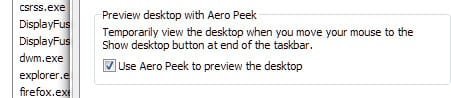
Just right click on it and untick peek at desktop
After this is done if you still have the problem, may I suggest
Go to search
type
device manager and make sure that the graphics driver is up to date and not showing yellow warning markers
Then go to event viewer when this happens (from search) and go to adminstrative section and look for errors
 

My Computer My Computer

At a glance

Windows 10, Home Clean InstallIntel Core2 processsor Q8200(2.33Ghz 1333FSB)...6 gbATI Radeon 256MB HD3650
Computer type
PC/Desktop
Computer Manufacturer/Model Number
Dell XPS 420
OS
Windows 10, Home Clean Install
CPU
Intel Core2 processsor Q8200(2.33Ghz 1333FSB) Quad Core Tech
Motherboard
Dell
Memory
6 gb
Graphics Card(s)
ATI Radeon 256MB HD3650
Sound Card
Intergrated 7.1 Channel Audio
Monitor(s) Displays
Dell SP2009W 20"
Hard Drives
640 GB Serial ATA Hard drive
Cooling
Fan
Keyboard
Dell USB Keyboard
Mouse
Dell Premium Optical USB
Internet Speed
DSL 2.85
Thanks richc46 for the quick reply. I'll give that a go. :-)
 

My Computer My Computer

At a glance

Windows 7
OS
Windows 7
Just an idea and certainly a longshot
Defective Keyboard....the Keyboard command WIN (key) +D minimizes everything so if those two keys get stuck
all you see is the Desktop.
Or let's say it's a wireless keyboard and one key on the tv remote just happens to send a similar signal...
Like I said...it's a long shot

-DG
 

My Computer My Computer

At a glance

Windows 7 Ultimate x86DualCore AMD Athlon 64 X2, 2600 MHz 5200+Samsung 2GB DDR2Onboard NVIDIA GeForce 6150SE nForce 430
Computer Manufacturer/Model Number
HP m8000n
OS
Windows 7 Ultimate x86
CPU
DualCore AMD Athlon 64 X2, 2600 MHz 5200+
Motherboard
Asus M2N68-LA (Narra)
Memory
Samsung 2GB DDR2
Graphics Card(s)
Onboard NVIDIA GeForce 6150SE nForce 430
Sound Card
Onboard nVIDIA nForce 6100-430 (MCP61P)
Monitor(s) Displays
Westinghouse 19" LED
Screen Resolution
1280x1024
Hard Drives
SATA II Seagate Barracuda 500GB
USB II WD Elements 500GB
USB II WD My Book 1TB
USB II WD My Book 2TB
PSU
Stock (HP)
Case
Stock (HP)
Cooling
Stock
Keyboard
Logitech Classic KB 200
Mouse
Standard HP opticle USB mouse
Long shots are always fun! :-P
 

My Computer My Computer

At a glance

Windows 7
OS
Windows 7
Hey there,

Found that the Peek at Desktop is greyed out, guessing this is a permissions issue?
 

My Computer My Computer

At a glance

Windows 7
OS
Windows 7
Check in taskmanager if dwm.exe (Desktop Windows Manager) under the Processes-Tab is running
 

My Computer My Computer

At a glance

Windows 7 Ultimate x86DualCore AMD Athlon 64 X2, 2600 MHz 5200+Samsung 2GB DDR2Onboard NVIDIA GeForce 6150SE nForce 430
Computer Manufacturer/Model Number
HP m8000n
OS
Windows 7 Ultimate x86
CPU
DualCore AMD Athlon 64 X2, 2600 MHz 5200+
Motherboard
Asus M2N68-LA (Narra)
Memory
Samsung 2GB DDR2
Graphics Card(s)
Onboard NVIDIA GeForce 6150SE nForce 430
Sound Card
Onboard nVIDIA nForce 6100-430 (MCP61P)
Monitor(s) Displays
Westinghouse 19" LED
Screen Resolution
1280x1024
Hard Drives
SATA II Seagate Barracuda 500GB
USB II WD Elements 500GB
USB II WD My Book 1TB
USB II WD My Book 2TB
PSU
Stock (HP)
Case
Stock (HP)
Cooling
Stock
Keyboard
Logitech Classic KB 200
Mouse
Standard HP opticle USB mouse
Must be a permissions issue set in the Local Policy Editor because I have dwm.exe running and can select the option with no problem:

ScreenShot00329.jpg

Seeing as how you demonstrated the feature, you most likely have dwm running.
 

My Computer My Computer

At a glance

Windows 7 Ultimate x64 SP1Core2 Duo4 GBGM965 on-board
Computer Manufacturer/Model Number
Toshiba L355D
OS
Windows 7 Ultimate x64 SP1
CPU
Core2 Duo
Motherboard
Intel
Memory
4 GB
Graphics Card(s)
GM965 on-board
Sound Card
RealTek on-board
Monitor(s) Displays
19"+17"(laptop)
Screen Resolution
1440x900 (x 2)
Hard Drives
500GB Ext. 200GB Internal
PSU
N/A
Case
N/A
Cooling
N/A
Back
Top