Windows 7 Forums


Windows 7: Question about: running in administrator mode

02 Jan 2011   #1

Windows 7 64 ultimate
 
 
Question about: running in administrator mode

Hello and Happy new Year to you all.

I am having some issue running my compute as an "administrator".
I know that because when I run CMD in administrator mode, I stay in the user part not on system32 as explained on a post in the forum and I cannot delete some files or folder.

Could someone direct me how I can be the "master controller" of this computer i.e. change the setting of adminstrator?

Kind Regards

Jack

My System SpecsSystem Spec

02 Jan 2011   #2

Windows 7 Home Premium SP1, clean install, upgrade disc
CT


Welcome
Jack
You are only the owner, here is the true master
Built-in Administrator Account - Enable or Disable[2]=User Accounts
Wish you luck
This hidden adminitrator is not to be used for everyday affairs, but merely to resolve problems
My System SpecsSystem Spec
02 Jan 2011   #3

Windows 7 Ultimate x64 Service Pack 1
Doncaster, UK


Hi Jack and welcome to Windows 7 Forums

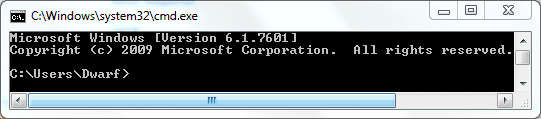
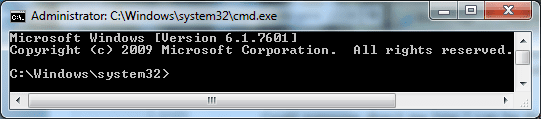
This is what I get with CMD, firstly as a standard user and secondly as an Elevated Command Prompt with administrative privileges.

Question about: running in administrator mode-capture.png Question about: running in administrator mode-capture1.png

Do you have UAC enabled? User Account Control - UAC - Change Notification Settings
My System SpecsSystem Spec
.


02 Jan 2011   #4

Windows 7 64 ultimate


Thank you for your answer gentlemen.

Rich, my main issue is that virtual pc would not install on my computer.
the message says something like this update is not valid on your computer. I have dowloaded Windows XP Mode and installed it.

Dwarf, when i run under adminstrator I get c:\user\adiministrator . Any idea why?

Thanks again

JAck
My System SpecsSystem Spec
02 Jan 2011   #5

Windows 7 64 ultimate


Sorted the c:\user\adiministrator issue not sure how...

Howevere when I try to run sfc /scannow there is align saying "Windows Resource Protection could not perform the requested operation"

SO it seems I'm not yet the true "master" of my machine.

Any ideas on how to get round this Windows Resource Protection issue?

Cheers

Jack
My System SpecsSystem Spec
02 Jan 2011   #6

Windows 7 Home Premium SP1, clean install, upgrade disc
CT


Yes
Look at dwarf and use the elevated command prompt.
My System SpecsSystem Spec
02 Jan 2011   #7

Windows 7 Ultimate x64 Service Pack 1
Doncaster, UK


Follow my instructions and open an elevated command prompt. What does it say in the title bar? It should be identical to my second image above. For the SFC command to work, you need to be at the prompt shown in that image.
My System SpecsSystem Spec
Reply

 Question about: running in administrator mode problems?


Thread Tools


Similar help and support threads for: Question about: running in administrator mode
Thread Forum
Explorer running slow in normal mode, fine in safe mode.? Performance & Maintenance
How To Trick App Into Thinking You're NOT Running As Administrator? General Discussion
Running in User Mode vs Administrator Mode General Discussion
How to tell if a user is running as Administrator? General Discussion
Running everything as administrator...why? Software


All times are GMT -5. The time now is 09:01 PM.


Windows 7 Forums is an independent web site and has not been authorized,
sponsored, or otherwise approved by Microsoft Corporation.
"Windows 7" and related materials are trademarks of Microsoft Corp.
© Designer Media Ltd