Deleted Explorer.exe, can't get it back, HELP, please!

imbrium16

New member
Local time
11:53 PM
Messages
7
Ok, so I was using Avira Antivirus and it found a virus.

It asked me to restart my computer in order to get rid of the virus in explorer.exe. It restarted and completely got rid of explorer.exe.

It deleted explorer.exe, not like it is in the recycling bin, like it is gone.

I have been told there are many of these "explorer.exe" files in the computer. At first, I couldn't even see a desktop.

The whole screen was black.

I did a System Restore and now I can see my desktop and everything works fine including the Internet, but files won't open, neither will my computer or control panel or recycling bin. I just get this message "Windows cannot access the specified device, path, or file. You may not have the appropriate permissions to access the item."

My audio doesn't work at all either.

I have googled the problem, but I only find solutions for windows xp and I have windows 7.

Does anyone know how to restore explorer.exe for windows 7?

I saw a similar thread but it said to go to command prompt and type in cd/cdWindowsdri. I tried that and all it said was that it couldn't find whatever it needed to. I also tried scf scannow (I think that was the name) and it didn't help either. HELP PLEASE?
 

My Computer My Computer

At a glance

Windows 7 32 bit
OS
Windows 7 32 bit

My Computer My Computer

At a glance

Windows 10 Pro (x64)Intel Core i7-3930K (3.2GHz - 4.5GHz)4x Samsung 4GB PC3-12800 DDR3 (16GB 1600MHz)Nvidia Geforce GTX 690
Computer type
PC/Desktop
Computer Manufacturer/Model Number
Alienware Aurora ALX R4
OS
Windows 10 Pro (x64)
CPU
Intel Core i7-3930K (3.2GHz - 4.5GHz)
Motherboard
Alienware Aurora-R4 x79
Memory
4x Samsung 4GB PC3-12800 DDR3 (16GB 1600MHz)
Graphics Card(s)
Nvidia Geforce GTX 690
Sound Card
SteelSeries Siberia Elite
Monitor(s) Displays
Dell UltraSharp U3011
Screen Resolution
2560x1600
Hard Drives
Samsung 850 Pro 256 GB, Seagate 1TB Desktop Hybrid HDD, 2x Western Digital 4TB Green HDD
PSU
875W Some Dell PSU <.<
Case
Alienware Aurora ALX
Cooling
Custom Liquid Cooling (EK CPU & GPU blocks) dual EK 480RAD
Keyboard
Logitech G710+ Mechanical
Mouse
Logitech G700s
Internet Speed
Verizon Fios (50 mbps average)
Other Info
Server: Intel NUC D54250WYK: i5-4250U, 16GB, 256 GB mSATA, Windows Server 2012 R2
@Logicearth: I just tried what you suggested, and it gave me the message "Windows Resource Protection could not start the repair service." Nothing has changed. Is there anything else to do?
 

My Computer My Computer

At a glance

Windows 7 32 bit
OS
Windows 7 32 bit

My Computer My Computer

At a glance

Vista, Windows7, Mint Mate, Zorin, Windows 8from 1.6GHz Duo to i7
Computer Manufacturer/Model Number
HP, Dell, Gateway, Toshiba - 4 laptops and 2 desktops
OS
Vista, Windows7, Mint Mate, Zorin, Windows 8
CPU
from 1.6GHz Duo to i7
Monitor(s) Displays
2x HP w2207
Hard Drives
5x HDD, 7x SSD, 12x Externals
Keyboard
with trackball - no mices
Mouse
Trackball mice
Internet Speed
DSL 6000
@whs, there was nothing to repair in startup repair. I'm having the computer do "Windows Memory Diagnostics Tool" test.
 

My Computer My Computer

At a glance

Windows 7 32 bit
OS
Windows 7 32 bit
If you can download this. Install. When you open click the update tab and update then run a full scan- not a quick.
Free version is blue button at top left of page.
Malwarebytes

Lets make sure the bug is gone. You need to make sure. If it is still there that may be the entire problem.
The bug may still be there or it may have damaged something.

Mike

Also when Malwarebytes gets done scanning it will make a log file. Save it to desktop or somewhere you can find it and upload the log with your post.
Posting instructions if you need them.
http://www.sevenforums.com/tutorials/9733-screenshots-files-upload-post-seven-forums.html
 

My Computer My Computer

At a glance

Windows7 Pro 64bit SP-1; Windows XP Pro 32bitIntel Core i7-870 Lynnfield 2.93GHz LGA 1156 ...8GB@1400MHz Crucial Ballistix DDR3-1600 4x2GBASUS ENGTX460 DirectCU/2DI/1GD5 1GB 256-bit G...
Computer Manufacturer/Model Number
Hopalong/ Godzilla
OS
Windows7 Pro 64bit SP-1; Windows XP Pro 32bit
CPU
Intel Core i7-870 Lynnfield 2.93GHz LGA 1156 95W Quad-Core
Motherboard
ASUS P7P55D-E PRO
Memory
8GB@1400MHz Crucial Ballistix DDR3-1600 4x2GB
Graphics Card(s)
ASUS ENGTX460 DirectCU/2DI/1GD5 1GB 256-bit GDDR5
Sound Card
VIA Onboard
Monitor(s) Displays
Asus VS248H-P 24"; Samsung SyncMaster 941BW 19"ws
Screen Resolution
1920x1080; 1440x900
Hard Drives
Samsung 830 120GB SSD
Intel 320 120GB SSD
Western Digital Caviar Black WD7501AALS 750GB 7200 RPM SATA 3.0Gb/s
Western Digital Caviar Black WD6401AALS 640GB 7200 RPM SATA 3.0Gb/s
PSU
COOLER MASTER Silent Pro RS850-AMBAJ3-US 850W Modular
Case
COOLER MASTER HAF 932 RC-932-KKN5-GP Black
Cooling
Scythe "Mugen-2 Rev.B" (2 ScytheKaze-Jyuni PWM fans)
Keyboard
Logitech K-320
Mouse
Kensington
Antivirus
Avast Inernet Suite
Browser
IE 9 ; Chrome
You may have to download recuva file recovery, just google for it, it is freeware. If you deleted it it can be recovered, are you sure it was a virus? It could have been a false positive. Another way I guess you could get it is that someone could maybe email you a clean copy of it of your operating system and put it right back where you deleted it from that will work to. I had to do that when I had a corrupted chkdsk.exe at one time..So give those options a try..:geek:

On my computer the file is located in 13 locations the winxs folders I will just exclude: The primary locations are:

C:\Windows\
C:\Windows\System32\
C:\Windows\SysWOW64\ (if you are running 64bit)

Now the windows locations and the 32 and 64 bit locations are different sizes the window being the different size and 32 and 64 being the same...
 

My Computer My Computer

At a glance

Windows 7 Ultimate x64Amd dual-core 4400 Socket 979Kingston 3gb ddr 3200Radeon Sapphire HD5670 1gb GDDR5 Artic cooling
Computer Manufacturer/Model Number
Custom built be me
OS
Windows 7 Ultimate x64
CPU
Amd dual-core 4400 Socket 979
Motherboard
Asus A8N-SLI
Memory
Kingston 3gb ddr 3200
Graphics Card(s)
Radeon Sapphire HD5670 1gb GDDR5 Artic cooling
Sound Card
Standard Motherboards Realtec
Monitor(s) Displays
IC Power
Screen Resolution
1280 x 1024
Hard Drives
Seagate Barracuda 500gb Sata 16mb Cache 7200 rpm Primary Drive
300gb Maxtor IDE
Seagate 500gb usb freeagent backup drive
PSU
600 watt power star
Case
Lian-Li Aluminum
Cooling
MassCool Socket 979
Keyboard
Microsoft Comfort Curve
Mouse
Microsoft Basic Optical Mouse 2.0
Internet Speed
5mb
Other Info
The system as of now is about a year old and the OS was installed on 11/30/2010..

My Computer My Computer

At a glance

Vista, Windows7, Mint Mate, Zorin, Windows 8from 1.6GHz Duo to i7
Computer Manufacturer/Model Number
HP, Dell, Gateway, Toshiba - 4 laptops and 2 desktops
OS
Vista, Windows7, Mint Mate, Zorin, Windows 8
CPU
from 1.6GHz Duo to i7
Monitor(s) Displays
2x HP w2207
Hard Drives
5x HDD, 7x SSD, 12x Externals
Keyboard
with trackball - no mices
Mouse
Trackball mice
Internet Speed
DSL 6000
Ok, so I was using Avira Antivirus and it found a virus.

It asked me to restart my computer in order to get rid of the virus in explorer.exe. It restarted and completely got rid of explorer.exe.

It deleted explorer.exe, not like it is in the recycling bin, like it is gone.

I have been told there are many of these "explorer.exe" files in the computer. At first, I couldn't even see a desktop.

The whole screen was black.

I did a System Restore and now I can see my desktop and everything works fine including the Internet, but files won't open, neither will my computer or control panel or recycling bin. I just get this message "Windows cannot access the specified device, path, or file. You may not have the appropriate permissions to access the item."

My audio doesn't work at all either.

I have googled the problem, but I only find solutions for windows xp and I have windows 7.

Does anyone know how to restore explorer.exe for windows 7?

I saw a similar thread but it said to go to command prompt and type in cd/cdWindowsdri. I tried that and all it said was that it couldn't find whatever it needed to. I also tried scf scannow (I think that was the name) and it didn't help either. HELP PLEASE?

I just had something similar happen to me and it turned out that files hadn't been deleted, they had just had their permissions changed so I couldn't see them. Actually, no one could except for TrustedInstaller.
I had to start at drive C and change ownership and permissions on everything.
You can probably boot to Repair Computer and then go to the command prompt.
Change to c:\windows and try start explorer.exe.
If this works you can go from there changing ownership and permissions as needed.
If that's not possible, try control-alt-delete and choose task manager. Then look at processes where you should see explorer running. If you highlight that file, then right click and choose properties, then security, you can see who owns it and what permissions they have.
At least this will let you know it the problem is changed permissions or something else.
It took me 3 days to get this far in fixing my mess so I wouldn't swear by this solution, but I hope it helps.
 

My Computer My Computer

At a glance

Windows 7 Home Premium 64 bitIntel Core2 Duo
Computer Manufacturer/Model Number
Toshiba Qosmio X305-Q701
OS
Windows 7 Home Premium 64 bit
CPU
Intel Core2 Duo
Malware Log, if this works

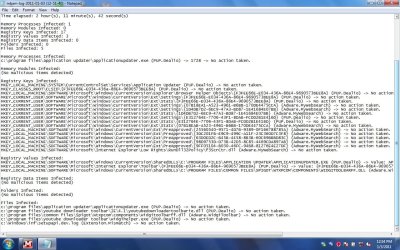
Ok, I did the Malware thing, Sorry it took so long. My computer doesn't like to let things scan for a long time. I had to let it cool down first. Here is the log, if I do this right, I'm not sure if anyone can read this. When I previewed it, it was tiny and hard to understand. Hope this works. Actually, I just checked: If you click on the picture, it still isn't perfect, but you can see it better :

Malware Log.jpg
 

My Computer My Computer

At a glance

Windows 7 32 bit
OS
Windows 7 32 bit

I just had something similar happen to me and it turned out that files hadn't been deleted, they had just had their permissions changed so I couldn't see them. Actually, no one could except for TrustedInstaller.
I had to start at drive C and change ownership and permissions on everything.
You can probably boot to Repair Computer and then go to the command prompt.
Change to c:\windows and try start explorer.exe.
If this works you can go from there changing ownership and permissions as needed.
If that's not possible, try control-alt-delete and choose task manager. Then look at processes where you should see explorer running. If you highlight that file, then right click and choose properties, then security, you can see who owns it and what permissions they have.
At least this will let you know it the problem is changed permissions or something else.
It took me 3 days to get this far in fixing my mess so I wouldn't swear by this solution, but I hope it helps.

Ok, I will try to do this, but I'm not sure I entirely understand. I have to go to Repair Computer and then command prompt and entering what you said, that will change my permissions? and as needed? I'm not sure what you mean. Will I need to change the permissions for everything, and how do I do that? How do I specify? and I can't do this on my regular account? Sorry about all the questions. I'm just not very technologically savvy and I'm trying to figure this out.
 

My Computer My Computer

At a glance

Windows 7 32 bit
OS
Windows 7 32 bit
I'm going to find one of the security aces. Looks like you have a mess there.

Mike

Jacee is going to look at the Malwarebytes log and get back to you soon.
 
Last edited:

My Computer My Computer

At a glance

Windows7 Pro 64bit SP-1; Windows XP Pro 32bitIntel Core i7-870 Lynnfield 2.93GHz LGA 1156 ...8GB@1400MHz Crucial Ballistix DDR3-1600 4x2GBASUS ENGTX460 DirectCU/2DI/1GD5 1GB 256-bit G...
Computer Manufacturer/Model Number
Hopalong/ Godzilla
OS
Windows7 Pro 64bit SP-1; Windows XP Pro 32bit
CPU
Intel Core i7-870 Lynnfield 2.93GHz LGA 1156 95W Quad-Core
Motherboard
ASUS P7P55D-E PRO
Memory
8GB@1400MHz Crucial Ballistix DDR3-1600 4x2GB
Graphics Card(s)
ASUS ENGTX460 DirectCU/2DI/1GD5 1GB 256-bit GDDR5
Sound Card
VIA Onboard
Monitor(s) Displays
Asus VS248H-P 24"; Samsung SyncMaster 941BW 19"ws
Screen Resolution
1920x1080; 1440x900
Hard Drives
Samsung 830 120GB SSD
Intel 320 120GB SSD
Western Digital Caviar Black WD7501AALS 750GB 7200 RPM SATA 3.0Gb/s
Western Digital Caviar Black WD6401AALS 640GB 7200 RPM SATA 3.0Gb/s
PSU
COOLER MASTER Silent Pro RS850-AMBAJ3-US 850W Modular
Case
COOLER MASTER HAF 932 RC-932-KKN5-GP Black
Cooling
Scythe "Mugen-2 Rev.B" (2 ScytheKaze-Jyuni PWM fans)
Keyboard
Logitech K-320
Mouse
Kensington
Antivirus
Avast Inernet Suite
Browser
IE 9 ; Chrome
Hi imbrium16, rescan with MBam ......
* When the scan is complete, click OK, then Show Results to view the results.
* Be sure that everything is checked, and click Remove Selected.

* When completed, a log will open in Notepad. Please save it to a convenient location. Copy and Paste that log into your next reply.
 

My Computer My Computer

At a glance

Windows 7 Ultimate 32bit SP1Intel(R) Core(TM)2 Quad CPU @ 2.40GHz, 2400 MHz4 GBATI Radeon HD 2600 Pro
Computer type
PC/Desktop
Computer Manufacturer/Model Number
Bruce ... somewhere in his 40's
OS
Windows 7 Ultimate 32bit SP1
CPU
Intel(R) Core(TM)2 Quad CPU @ 2.40GHz, 2400 MHz
Motherboard
INTEL/D975XBX2
Memory
4 GB
Graphics Card(s)
ATI Radeon HD 2600 Pro
Monitor(s) Displays
Samsung SyncMaster 914v
Screen Resolution
1280 x 1024
Hard Drives
2/500GB each ... ST3500630AS ATA Device.
One is not connected
PSU
Rocketfish 700 W
Case
G.Skill Gigabyte Chassis
Keyboard
Standard PS/2 Keyboard
Mouse
Microsoft PS/2 Mouse
Internet Speed
DSL
Antivirus
Avira Internet Security
Browser
IE 11
Other Info
ATI HDMI Audio
@Jacee, won't that delete pivotal things in my computer, parts of my registry? And are you sure I can do that with a free version of Malwarebytes?
 

My Computer My Computer

At a glance

Windows 7 32 bit
OS
Windows 7 32 bit
By the by, I tried going to Avira and getting it to let the explorer.exe back from the quarantine. There were 4 explorer.exe files. I told it to restore them and it said that the objects were already on the computer and asked if I should replace them. I did, and nothing has changed.
 

My Computer My Computer

At a glance

Windows 7 32 bit
OS
Windows 7 32 bit
Malwarebytes will remove all the viruses and malware you have on your system that is all.

You have about 3-5 infections going at once. At least three are listed in your last log posting.
That is why nothing works right they have hijacked your system.

That is why I went and got Jacee who is the Ace on security and bugs.

So please run and select delete for what is found and post the notepad log after Malwarebytes is done.

Mike
 

My Computer My Computer

At a glance

Windows7 Pro 64bit SP-1; Windows XP Pro 32bitIntel Core i7-870 Lynnfield 2.93GHz LGA 1156 ...8GB@1400MHz Crucial Ballistix DDR3-1600 4x2GBASUS ENGTX460 DirectCU/2DI/1GD5 1GB 256-bit G...
Computer Manufacturer/Model Number
Hopalong/ Godzilla
OS
Windows7 Pro 64bit SP-1; Windows XP Pro 32bit
CPU
Intel Core i7-870 Lynnfield 2.93GHz LGA 1156 95W Quad-Core
Motherboard
ASUS P7P55D-E PRO
Memory
8GB@1400MHz Crucial Ballistix DDR3-1600 4x2GB
Graphics Card(s)
ASUS ENGTX460 DirectCU/2DI/1GD5 1GB 256-bit GDDR5
Sound Card
VIA Onboard
Monitor(s) Displays
Asus VS248H-P 24"; Samsung SyncMaster 941BW 19"ws
Screen Resolution
1920x1080; 1440x900
Hard Drives
Samsung 830 120GB SSD
Intel 320 120GB SSD
Western Digital Caviar Black WD7501AALS 750GB 7200 RPM SATA 3.0Gb/s
Western Digital Caviar Black WD6401AALS 640GB 7200 RPM SATA 3.0Gb/s
PSU
COOLER MASTER Silent Pro RS850-AMBAJ3-US 850W Modular
Case
COOLER MASTER HAF 932 RC-932-KKN5-GP Black
Cooling
Scythe "Mugen-2 Rev.B" (2 ScytheKaze-Jyuni PWM fans)
Keyboard
Logitech K-320
Mouse
Kensington
Antivirus
Avast Inernet Suite
Browser
IE 9 ; Chrome
By the by, I tried going to Avira and getting it to let the explorer.exe back from the quarantine. There were 4 explorer.exe files. I told it to restore them and it said that the objects were already on the computer and asked if I should replace them. I did, and nothing has changed.

There are instances when explorer.exe is infected. Please follow Jacee's instructions.
 

My Computer My Computer

At a glance

Windows 7 & Windows Vista Ultimate
OS
Windows 7 & Windows Vista Ultimate
You are going to be better off backing up your data if you have anything you need to save, and simply reinstalling the OS. It will take less time and headache than fumbling through possible fixes.
 

My Computer My Computer

At a glance

Windows 7 Ultimate RTM (Technet)3.00 gigahertz Intel Core2 Duo E84004GBATI Radeon X1950 Pro
Computer Manufacturer/Model Number
Custom
OS
Windows 7 Ultimate RTM (Technet)
CPU
3.00 gigahertz Intel Core2 Duo E8400
Motherboard
ASUSTeK Computer INC. P5K/EPU Rev 1.xx
Memory
4GB
Graphics Card(s)
ATI Radeon X1950 Pro
Sound Card
Built in HD Audio
Monitor(s) Displays
22" Gateway LCD
Screen Resolution
1920 x 1200
Hard Drives
ST3160023A [Hard drive] (160.04 GB) -- drive 0, rev 8.01, ST3500630AS [Hard drive] (500.11 GB) -- drive 2, rev 3.AAK
ST3500630AS [Hard drive] (500.11 GB) -- drive 1, rev 3.AAK
Keyboard
Logitech G11
Mouse
Microsoft Wireless Laser Mouse 5000
Internet Speed
13.44 Mbps

My Computer My Computer

At a glance

Vista, Windows7, Mint Mate, Zorin, Windows 8from 1.6GHz Duo to i7
Computer Manufacturer/Model Number
HP, Dell, Gateway, Toshiba - 4 laptops and 2 desktops
OS
Vista, Windows7, Mint Mate, Zorin, Windows 8
CPU
from 1.6GHz Duo to i7
Monitor(s) Displays
2x HP w2207
Hard Drives
5x HDD, 7x SSD, 12x Externals
Keyboard
with trackball - no mices
Mouse
Trackball mice
Internet Speed
DSL 6000
Back
Top