Windows 7 Forums


Windows 7: need help regarding hdd partition

10 Jan 2011   #1

Windows 7 Ultimate 32bit
 
 
need help regarding hdd partition

hello people..
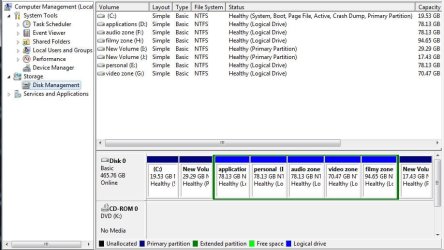
i want to merge two partitions, "new volume I" (which is beside C ) and last drive "new volume J."
which are primary partitions (not logical drives).
i tried partition magic 8.0v to merge but i didn't worked.
so, if anyone knows how to merge 2 primary partitions plzz help..

hope you'll find a solution for me.
and i really appreciate your work here..

Attached Thumbnails
need help regarding hdd partition-capture.jpg  

Last edited by lucasleo; 10 Jan 2011 at 10:16 AM.. Reason: didn't inserted pic
My System SpecsSystem Spec

10 Jan 2011   #2

Windows 7 Ultimate x86
Massachusetts


Hi lucasleo...your problem is, that between the partitions you want to merge sit all your logical partitions
so you need to move the primary partitions next to each other only then can you merge them.
PLUS Partition Magic v8 is at least 5 years old...so it's not really safe on windows 7
You could try your task with a more recent manager like

Paragon Partition Manager Free Edition - partition software, resize partition

or (more for experts) with the Linux based tool gparted

Using GParted to Resize Your Windows 7 or Vista Partition - How-To Geek

-DG
My System SpecsSystem Spec
10 Jan 2011   #3

Win7 x 6 PC's
California, Florida, Boston


Looking at the screenshot, your Windows 7 partition is way too small.

I would immediately move the data off of I, delete it in Disk Mgmt, then extend C into that space: Partition or Volume - Extend

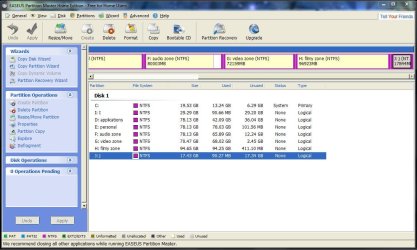
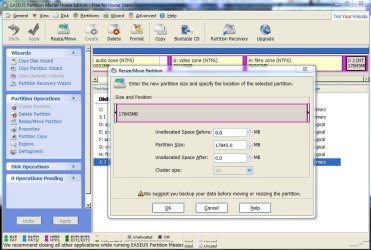
Even that may be too small, so if you need more space for C then I'd move data off of J, delete it using free Partition Wizard bootable CD, then rightclick to Resize the extended Logical partition, left click and hold to slide the whole partition to the right to move the deleted J space next to C, then extend C into it.

http://www.partitionwizard.com/download.html
My System SpecsSystem Spec
.


10 Jan 2011   #4

ultimate 64 sp1


i don't think either of those programs that SledgeDG mentioned will do merging.

i am unaware of any free modern apps that offer the merge function.

if i find one, i'll post.

*edit* found this - can't vouch for its quality though...
My System SpecsSystem Spec
10 Jan 2011   #5

Windows 7 Home Premium x64
Osceola, WI


My System SpecsSystem Spec
10 Jan 2011   #6

ultimate 64 sp1


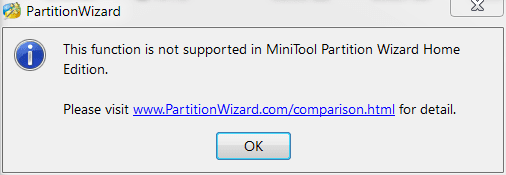
the free version of partition wizard won't merge i'm afraid.

need help regarding hdd partition-pwiz.png

product comparison table
My System SpecsSystem Spec
10 Jan 2011   #7

Windows 7 Ultimate x86
Massachusetts


Mickey is right!
The free version of Paragon Partition Manager and Partition Wizard don't explicitly support merges.
But both do support move and resize
So move I: next to J: (or vice versa), copy the content of one of the two elsewhere (temporarily)
delete the emptied partition and resize the other one (if you not rather follow gregrocker's advice, that is)

Theoretically you even could still use Partition Magic 8 for the task if you'd use it from a bootable disk.
I just advise against it

-DG
My System SpecsSystem Spec
10 Jan 2011   #8

Win7U 64 RTM
Ellesmere Island


Bootit NG will slide, merge, etc. I believe the 30 day trial is fully functional. Of course, slide operations must be done with the DOS disk.

Here is the manual (copy between underscores and paste in browser or click for a direct download):

_http://www.terabyteunlimited.com/downloads/bootitng.pdf_

Here's the download page for the trial:

TeraByte Unlimited :: Downloads :: BootIt Next Generation

They've been around for quite some time.

James
My System SpecsSystem Spec
10 Jan 2011   #9
mjf

Windows 7x64 Home Premium SP1 x 2
Australia


A slight variant on the gregrocker advice. Use Partition wizard.
Backup data on I & J whatever way you want.
  1. Delete (making unallocated) I & J.
  2. Move the extended partition containing the logicals all the way to the right as per the gregrocker advice.
  3. That leaves one unallocated region to the right of C:
  4. Resize C: by moving it all the way into the unallocated space (which came fro I&J)
C: is at a reasonable size (not too big!).
You now have 1 primary and may want to reconfigure your logicals. You have 2 other spare primaries to play with.
Replace your backed up data where you want it.
My System SpecsSystem Spec
11 Jan 2011   #10

Windows 7 Ultimate 32bit


well thnx 4 stopping by and replying my query.

i want a few things to tell about,
#1 : there is no data in the partitions i want to merge (i.e I & J)
#2 : it seems choice of extending is not available (option is in grey color)
#3 : i want those 2 partitions to be one.

now can u tell me is it possible to merge.
My System SpecsSystem Spec
Reply

 need help regarding hdd partition problems?


Thread Tools


Similar help and support threads for: need help regarding hdd partition
Thread Forum
Can OS partition access a dual boot partition if encrypted w/Bitlocker General Discussion
Solved How to change active partition without removing data from partition? General Discussion
Solved Windows lost partition letter and don't recognize format partition BSOD Help and Support
Setup unable to create a new partition or locate an existing partition Installation & Setup
partition table issue - win7 hidden partition formatted Installation & Setup


All times are GMT -5. The time now is 10:08 AM.


Seven Forums Android App Seven Forums IOS App Follow us on Facebook

Windows 7 Forums is an independent web site and has not been authorized,
sponsored, or otherwise approved by Microsoft Corporation.
"Windows 7" and related materials are trademarks of Microsoft Corp.
© Designer Media Ltd
  

1 2 3 4 5 6 7 8 9 10 11 12 13 14 15 16 17 18 19 20 21 22 23 24 25 26 27 28 29 30 31 32