|
Welcome to Windows 7 Forums. Our forum is dedicated to helping you find solutions with any problems, errors or issues you are experiencing with Windows 7. The Windows 7 forum also covers news and updates and has an extensive Windows 7 tutorial section that covers a wide range of tips and tricks.
Windows 7 - need keyboard shortcut |
01-10-2011
|
#1 | | |
need keyboard shortcut I am using a HP Mini 210-1076NR. does any one know of a keyboard shortcut to get to top of page???
| My System Specs | | System Manufacturer/Model Number HP mini 210-1076NR OS windows 7 starter CPU ? Motherboard ? Memory ? Graphics Card ? Sound Card ? Monitor(s) Displays ? PSU ? Case ? Cooling ? Hard Drives ? |
01-10-2011
|
#2 | | |
hi robertof1964, and welcome to sevenforums,
has your machine got a 'Home' key?
it might be fn-left arrow - at least it is on my mini 311 | My System Specs | | System Manufacturer/Model Number mickey megabyte 1234 OS ultimate 64 sp1 CPU i5 2500K 3.3@4.2GHz Motherboard MSI P67A-GD53 Memory 8 gigs GSkill Ripjaws 1600 Graphics Card amd hd6950 Sound Card creative x-fi gamer Monitor(s) Displays samsung 24" Screen Resolution 1920x1080 Keyboard saitek eclipse ii Mouse logitech g3 PSU antec 550 Case antec three hundred Cooling i'm a cooling fan Hard Drives ocz vertex 2e 60 gig, samsung f3 1tb, buffalo 2tb ext Internet Speed about 4 Mbps Other Info i love win7 |
01-10-2011
|
#3 | | Vista and Windows7, sometimes Ubuntu and Fedora |
| My System Specs | | System Manufacturer/Model Number HP, Dell, Gateway - 2 laptops and 2 desktops OS Vista and Windows7, sometimes Ubuntu and Fedora CPU from 1.6GHz Duo to 2.5GHz Quad Monitor(s) Displays 2x HP w2207 Keyboard with trackball - no mices Mouse terrible devices, who wants them Hard Drives 5x HDD, 2x SSD, 6x Externals Internet Speed DSL 6000 |
01-10-2011
|
#4 | | |
need keyboard shortcut to top of page I do not have a home key and ctrl-alt and other combos with direction keys wont do it. NOTE TO OTHERS...IF YOU PRESS CTRL/ALT and down key, your screen will turn up-side-down. To fix, just press CRTL/ALT and up key....I just learned this by trial and error. | My System Specs | | System Manufacturer/Model Number HP mini 210-1076NR OS windows 7 starter CPU ? Motherboard ? Memory ? Graphics Card ? Sound Card ? Monitor(s) Displays ? PSU ? Case ? Cooling ? Hard Drives ? |
01-10-2011
|
#5 | | Vista and Windows7, sometimes Ubuntu and Fedora |
Quote: I do not have a home key If you have a numeric pad, it may be hidden there. | My System Specs | | System Manufacturer/Model Number HP, Dell, Gateway - 2 laptops and 2 desktops OS Vista and Windows7, sometimes Ubuntu and Fedora CPU from 1.6GHz Duo to 2.5GHz Quad Monitor(s) Displays 2x HP w2207 Keyboard with trackball - no mices Mouse terrible devices, who wants them Hard Drives 5x HDD, 2x SSD, 6x Externals Internet Speed DSL 6000 |
01-10-2011
|
#6 | | Windows 7 Ultimate x86 build 7600 (XP, 98SE, 95, 3.11, DOS 7.10 on VM) + Ubuntu 10.04 LTS Lucid Lynx |

Quote: Originally Posted by whs Quote: I do not have a home key If you have a numeric pad, it may be hidden there. Its a netbook. It doesn't have a numeric pad or page up/down keys.
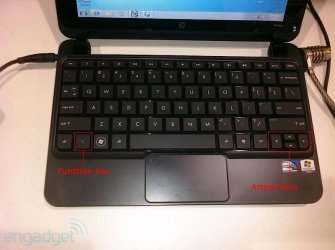
My guess is that the FN+arrow keys will do the trick.
The FN key is in the bottom left corner next to the CTRL key.
On my HP (EliteBook 8530w, which also has these keys), the
FN + Up = Page Up
FN + Down = Page Down
FN + Left = Home
FN + Right = End | My System Specs | | System Manufacturer/Model Number HP EliteBook 8530w Mobile Workstation OS Windows 7 Ultimate x86 build 7600 (XP, 98SE, 95, 3.11, DOS 7.10 on VM) + Ubuntu 10.04 LTS Lucid Lynx CPU Intel Core 2 Duo Processor P8600 (2.40 GHz, 3 MB L2 cache) Motherboard Mobile Intel PM45 Express Chipset ICH9M-Enhanced Memory 2GB 800 MHz DDR2 SDRAM Graphics Card ATI Mobility FireGL V5700 with 256 MB Sound Card SoundMAX Integrated Digital HD Audio Monitor(s) Displays 15.4-inch WXGA anti-glare (1280 x 800 resolution) Screen Resolution 1280 x 800 Mouse Synaptics PS/2 Port Touchpad, USB Mouse Hard Drives 250GB Fujitsu MJA2250BH G2 ATA Device (IDE),
120GB in External Casing Other Info Authentec AES2810 Fingerprint Reader,
Optiarc DVD RW AD-7561S LightScribe |
01-11-2011
|
#7 | | |
yeah, it's the same on my hp mini 311.
however, i've been looking at images of the OP's machine, and there doesn't seem to be anything extra on the arrow keys. | My System Specs | | System Manufacturer/Model Number mickey megabyte 1234 OS ultimate 64 sp1 CPU i5 2500K 3.3@4.2GHz Motherboard MSI P67A-GD53 Memory 8 gigs GSkill Ripjaws 1600 Graphics Card amd hd6950 Sound Card creative x-fi gamer Monitor(s) Displays samsung 24" Screen Resolution 1920x1080 Keyboard saitek eclipse ii Mouse logitech g3 PSU antec 550 Case antec three hundred Cooling i'm a cooling fan Hard Drives ocz vertex 2e 60 gig, samsung f3 1tb, buffalo 2tb ext Internet Speed about 4 Mbps Other Info i love win7 |
01-12-2011
|
#8 | | Windows 7 Ultimate x86 build 7600 (XP, 98SE, 95, 3.11, DOS 7.10 on VM) + Ubuntu 10.04 LTS Lucid Lynx |

Quote: Originally Posted by mickey megabyte yeah, it's the same on my hp mini 311.
however, i've been looking at images of the OP's machine, and there doesn't seem to be anything extra on the arrow keys.  Its a keyboard shortcut combo. "Function Key" + "Arrow Keys" | My System Specs | | System Manufacturer/Model Number HP EliteBook 8530w Mobile Workstation OS Windows 7 Ultimate x86 build 7600 (XP, 98SE, 95, 3.11, DOS 7.10 on VM) + Ubuntu 10.04 LTS Lucid Lynx CPU Intel Core 2 Duo Processor P8600 (2.40 GHz, 3 MB L2 cache) Motherboard Mobile Intel PM45 Express Chipset ICH9M-Enhanced Memory 2GB 800 MHz DDR2 SDRAM Graphics Card ATI Mobility FireGL V5700 with 256 MB Sound Card SoundMAX Integrated Digital HD Audio Monitor(s) Displays 15.4-inch WXGA anti-glare (1280 x 800 resolution) Screen Resolution 1280 x 800 Mouse Synaptics PS/2 Port Touchpad, USB Mouse Hard Drives 250GB Fujitsu MJA2250BH G2 ATA Device (IDE),
120GB in External Casing Other Info Authentec AES2810 Fingerprint Reader,
Optiarc DVD RW AD-7561S LightScribe need keyboard shortcut problems? All times are GMT -5. The time now is 11:31 PM. |  |